
Select language

Form 8879‑F – Fillable IRS E‑File Signature Authorization

  1. Country USA
  2. Language English
  3. Activity Taxes
  4. Department Internal Revenue Service
Fill out this form
Form 8879‑F – Fillable IRS E‑File Signature Authorization

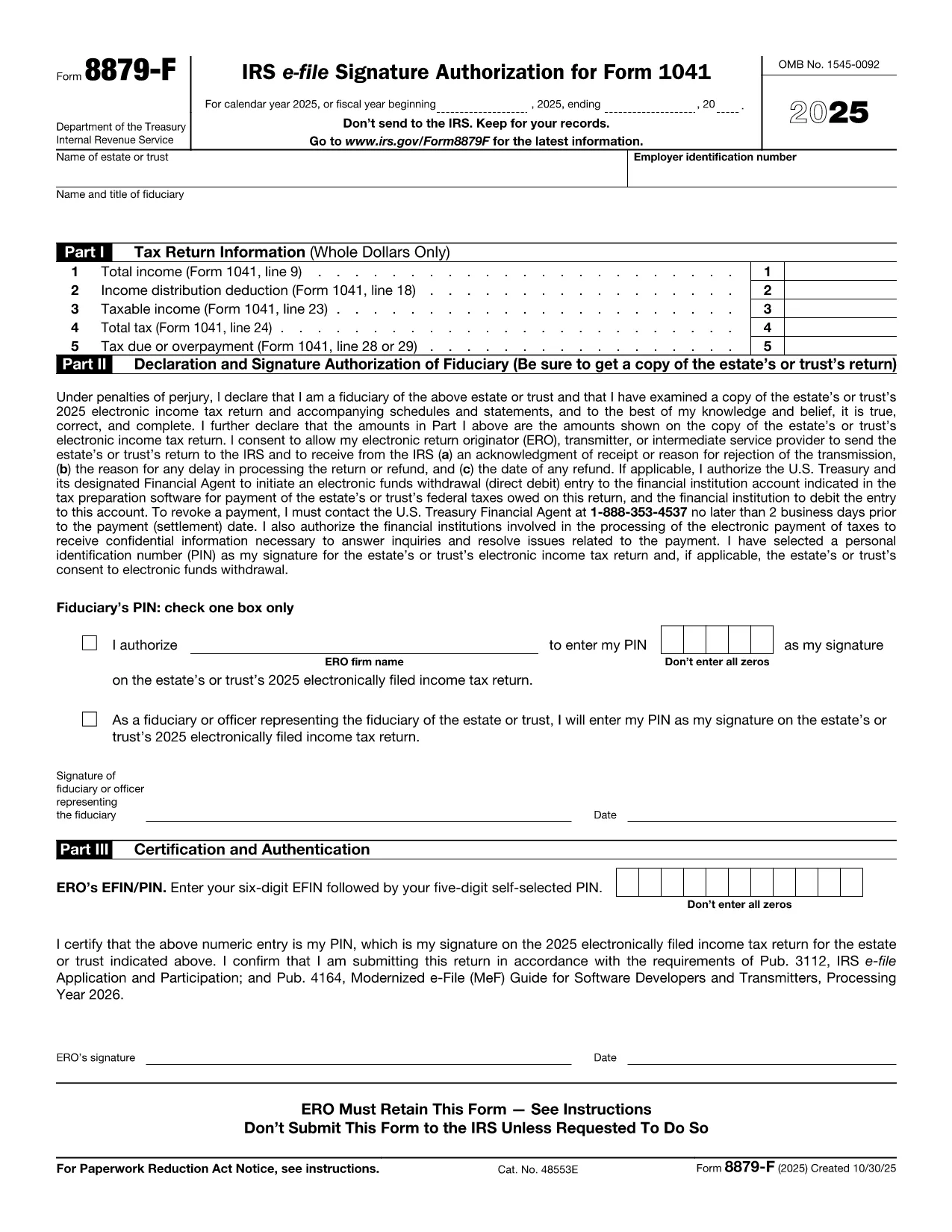
Form 8879‑F, IRS E‑File Signature Authorization for Form 1041, is used by fiduciaries of estates and trusts to give their tax professional permission to electronically sign and file the income‑tax return (Form 1041). This one‑page, fillable PDF lets you securely provide the required information without printing or scanning.

What Is Form 8879‑F?

The form consists of three parts:

  • Part I – Tax Return Information: Copies key figures from the 1041 (total income, taxable income, tax due, etc.).
  • Part II – Declaration and Signature Authorization: The fiduciary declares under penalty of perjury that the return is true and authorizes the electronic return originator (ERO) to sign.
  • Part III – Certification and Authorization: The tax professional certifies that the return was reviewed and that the fiduciary’s PIN is correct.

How to Complete the Fillable PDF with Formize

Instead of downloading the PDF and editing it in a separate editor, you can fill it out directly on our site using the Formize PDF Filler app. Follow the steps below.

Common Mistakes & Tips for Fiduciaries

Being a fiduciary carries legal responsibility. Avoid these pitfalls:

  • Enter the exact Fiscal Year dates – a mismatch will cause the IRS to reject the filing.
  • Double‑check the EIN and trust name; typos trigger processing delays.
  • Use a five‑digit PIN that you can remember but is not easily guessable.
  • Sign the form only after you have reviewed the entire Form 1041 for accuracy.

Where to Submit the Completed Form

After you finish the fillable form, you can:

  • Save a PDF copy for your records.
  • Send the signed PDF to your tax preparer – they will upload it with the electronic return.
  • Retain the form for at least three years in case the IRS requests it.

Remember, the IRS only requires the form when the ERO specifically asks for it. Otherwise, keep it on file.

FAQ
  • Do I need to print Form 8879‑F after filling it online?

    No. The fillable PDF can be saved and sent electronically. Printing is only required if the IRS explicitly asks for a hard copy.

  • Can I use the same PIN for multiple tax years?

    Yes, but it’s recommended to change the PIN each year for added security.

  • What if my estate uses a fiscal year that isn’t January 1 – December 31?

    Enter the exact beginning and ending dates of the fiscal year in the top section of Part I. The IRS will reject the form if the dates don’t match the return.

  • Who is allowed to act as the Electronic Return Originator (ERO)?

    A licensed tax professional, an authorized e‑file service provider, or an intermediate service provider that the fiduciary has hired.

  • Is Form 8879‑F required for every Form 1041 filing?

    It is required only when the fiduciary authorizes an ERO to sign the return electronically. If you file a paper return, the form isn’t needed.

  • What happens if I make a mistake on the form?

    Correct the error in the Formize filler, re‑sign, and resend the updated PDF to your preparer. The IRS will not accept a form with incorrect data.

  • Can I submit Form 8879‑F directly to the IRS?

    No. The form is sent to the tax professional who includes it with the electronic filing. The IRS receives it as part of the e‑file package.

HOW TO

How to fill out Form 8879-F for free, online in 5 easy steps:

  1. 1
    Open the Fillable Form
    Click the **"Fill out this form"** button on the page. The Formize PDF Filler app loads in your browser.
  2. 2
    Enter Required Information
    Fill in Part I with the figures from your Form 1041, then complete Part II and Part III. Use the drop‑down menus and date pickers for accurate entry.
  3. 3
    Set Your PIN
    Choose a five‑digit Personal Identification Number (PIN). You can let the ERO enter it for you or type it yourself.
  4. 4
    Review and Sign
    Review all fields for accuracy. Click the **"Sign"** button to apply an electronic signature that complies with IRS regulations.
  5. 5
    Save or Send
    After signing, download the completed PDF for your records or email it directly to your tax professional using the **"Send to preparer"** option.
Formize PDF Filler app
ABOUT

Tax forms

Form 8879-F is one of Tax forms that are documents used to report information related to taxes to the relevant tax authority. There are various types of tax forms, including federal, state, and local tax forms, which can vary depending on the taxpayer's circumstances and location.

FEATURES

PDF Filler

The easiest way to fill Form 8879-F online

  • Quickly fill out Form 8879-F
    Looking for a way to quickly fill Form 8879-F online? With our online free PDF form filler, you’ll know how to how to edit and fill this pdf document in less than a minute.
  • Easy to use online PDF editor
    Fed up with printing out PDF files so you can edit them, before rescanning and sending them back? Edit PDF documents for free online. Use our online pdf editor to save time and paper.
  • Great tools, all platforms
    Wondering how to fill in Form 8879-F on a Mac, or maybe how to use a PDF filler free? Our online PDF tools work on all platforms.
  • Secure file storage
    Completed "Form 8879-F" files are stored in a secured database managed by Amazon Cloud hosting. You can delete your files from our system anytime. In any case, these files are automatically deleted after 24 hours.
  • Chat with Form 8879-F
    Chat with "Form 8879-F" on Chatize that is a free PDF reader assistant. Ask questions and get answers from "Form 8879-F". Just click on Chat With Document button above.

Delete filling session

Delete the selected filling session? In this case, your progress in completing the form will be lost.

Delete editing session

Delete the selected editing session? In this case, your progress in creating and editing the form will be lost.