Select language

Download & Fill IRS Form 8892 (Gift Tax Extension)

  1. Country USA
  2. Language English
  3. Activity Taxes
  4. Department Internal Revenue Service
Download & Fill IRS Form 8892 (Gift Tax Extension)

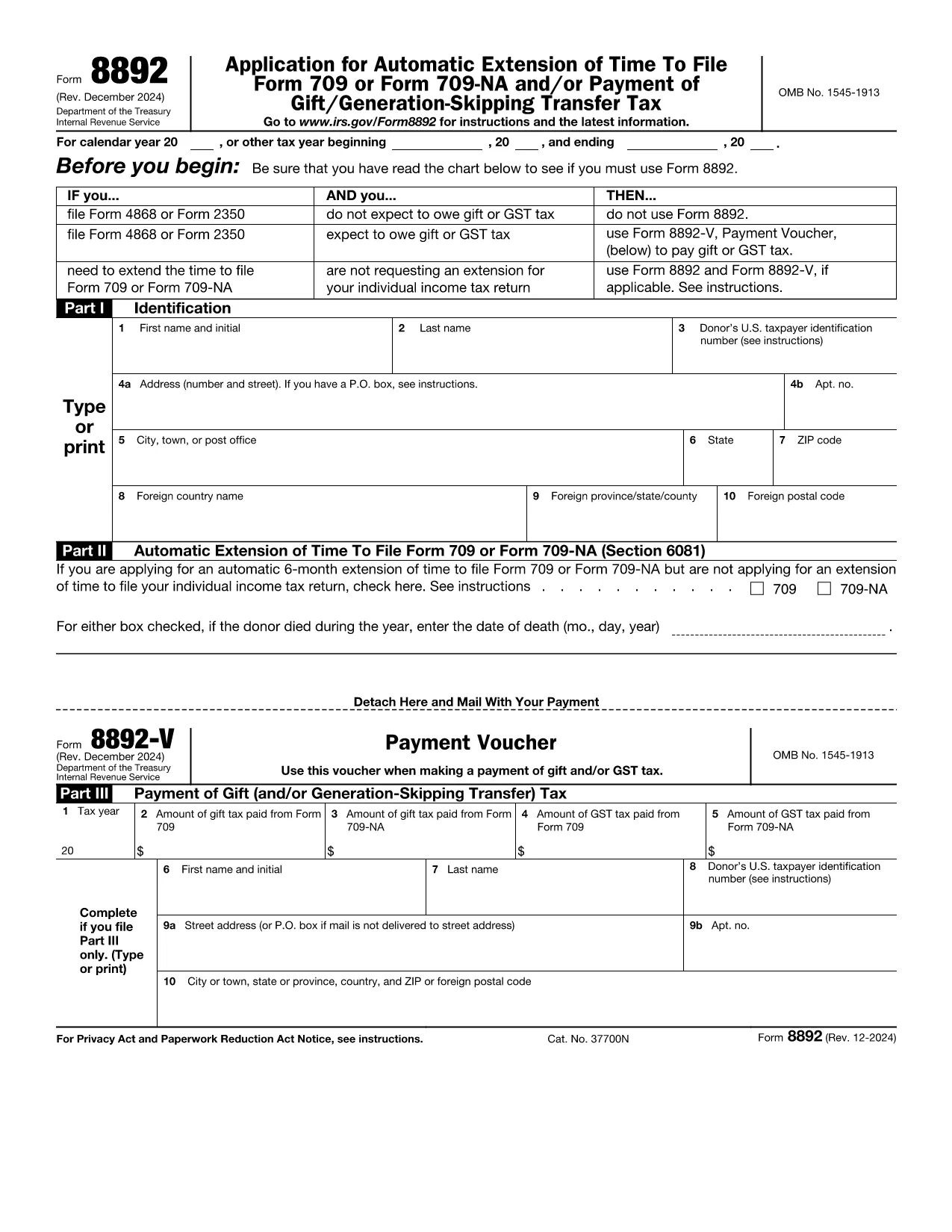
If you made a taxable gift that exceeds the annual exclusion, you may need to file IRS Form 709. When you need more time to file that return, Form 8892 lets you request an automatic six‑month extension.

When to Use Form 8892

Use Form 8892 only if you are filing an individual gift‑tax return (Form 709) and you are not already filing a general income‑tax extension (Form 4868 or Form 2350). The form is also required when you expect to owe gift or generation‑skipping transfer (GST) tax and need to make a payment with your extension request.

How to Complete Each Part of Form 8892

Part I – Identification
Enter your name, Social Security number, and mailing address exactly as they appear on your income‑tax return.

Part II – Automatic Extension (Section 6081)
Check the box to request a six‑month extension for Form 709. If the donor died during the tax year, provide the date of death in the format MM/DD/YYYY.

Part III – Payment of Gift (and/or GST) Tax
If you are making a payment with your extension, fill in the amount owed and attach Form 8892‑V (payment voucher). If no payment is required, you may leave this section blank.

Common Mistakes to Avoid

  • Leaving Part II unchecked – without this box checked the IRS will not grant an extension.
  • Using the wrong tax year on the form – double‑check the calendar year or fiscal year you are extending.
  • Failing to attach Form 8892‑V when a payment is due.
  • Submitting the form after the original due date – the request must be mailed or e‑filed by the original filing deadline.

How to Submit Your Extension Request

After completing the form, you can:

  • Print, sign, and mail it to the address listed in the instructions.
  • Upload the completed PDF to the IRS e‑file system if you have an authorized e‑file provider.
  • Use Formize’s online PDF filler – simply click the "Fill out this form" button below, wait for the Formize PDF Filler app to load, and submit directly from your browser.

Fill out this form

FAQs About Form 8892

Find quick answers to the most common questions below (full list also appears in the FAQ section).

FAQ
  • Do I need Form 8892 if I already filed Form 4868?

    No. If you are already requesting an automatic extension for your individual income‑tax return (Form 4868) and you do not expect to owe gift tax, you do not need to file Form 8892.

  • Can I file Form 8892 electronically?

    Yes. You can complete the fillable PDF in the Formize app and then upload the signed PDF to an IRS‑approved e‑file provider.

  • How long is the extension granted by Form 8892?

    The IRS grants an automatic six‑month extension. If the original due date is April 15, the new deadline is October 15 (or the next business day if the 15th falls on a weekend or holiday).

  • What is Form 8892‑V?

    Form 8892‑V is the payment voucher you must attach when you are making a payment of gift tax or GST tax with your extension request.

  • What happens if I miss the original filing deadline?

    If you file Form 8892 after the original due date, the extension request is not valid and you may be subject to late‑filing penalties and interest on any unpaid tax.

  • Do joint filers need separate Form 8892s?

    Yes. Form 8892 cannot be filed jointly. Each individual taxpayer who needs an extension must submit a separate Form 8892.

HOW TO

How to fill out IRS Form 8892 for free, online in 5 easy steps:

  1. 1
    Open the Fillable Form
    Click the "Fill out this form" button on this page. The Formize PDF Filler app will load in your browser.
  2. 2
    Enter Your Information
    Complete Part I with your name, SSN, and mailing address. The fields are editable directly in the browser.
  3. 3
    Request the Extension
    In Part II, check the box for an automatic six‑month extension and, if applicable, enter the donor’s date of death.
  4. 4
    Add Payment (if needed)
    If you owe gift or GST tax, fill out Part III and attach Form 8892‑V. The filler lets you type the amount and print a payment voucher.
  5. 5
    Save, Sign, and Submit
    When all fields are filled, click "Save" to download the completed PDF, sign it, and either mail it to the IRS or upload it through an authorized e‑file provider.
Formize PDF Filler app
ABOUT

Internal Revenue Service (IRS) Forms

IRS Form 8892 is one of the official tax forms used in the United States to report income, claim deductions and credits, calculate tax liability, and fulfill other tax-related obligations. The IRS is the federal agency responsible for administering and enforcing the internal revenue laws in the United States.

Here are some examples of Internal Revenue Service forms:

Form 1040: This is the primary individual income tax return form used by most taxpayers. It is used to report various types of income, claim deductions and credits, calculate tax liability, and determine whether a taxpayer owes additional tax or is entitled to a refund.

Form 1099: There are different variations of Form 1099, such as 1099-MISC, 1099-INT, 1099-DIV, etc. These forms are used to report income received by individuals or businesses from various sources other than employment, such as self-employment income, interest income, dividend income, and rental income.

Form W-2: This form is used by employers to report wages paid to employees and the taxes withheld from their pay. Employees use the information on Form W-2 to complete their individual tax returns.

Form 941: Employers use this form to report employment taxes, including federal income tax withheld, Social Security tax, and Medicare tax, for their employees.

Form 1065: This form is used by partnerships to report their income, deductions, and tax liability. Partnerships themselves do not pay income tax; instead, the partners report their share of partnership income on their individual tax returns.

Form 1120: This is the corporate income tax return form used by C corporations to report their income, deductions, and tax liability.

Form 990: This form is used by tax-exempt organizations, such as nonprofits and charities, to report their financial information, activities, and compliance with tax laws.

Form 8862: This form is used by taxpayers who previously claimed the Earned Income Tax Credit (EITC) but had it disallowed, and now want to claim it again.

These are just a few examples of the numerous IRS forms that exist to fulfill various tax-related obligations. The specific forms required for an individual or business depend on their unique circumstances, income sources, and deductions. It's advisable to consult the official website of the Internal Revenue Service (www.irs.gov) or seek professional tax advice to obtain accurate and up-to-date information regarding the specific IRS forms relevant to your tax situation.

FEATURES

PDF Filler

The easiest way to fill IRS Form 8892 online

  • Quickly fill out IRS Form 8892
    Looking for a way to quickly fill IRS Form 8892 online? With our online free PDF form filler, you’ll know how to how to edit and fill this pdf document in less than a minute.
  • Easy to use online PDF editor
    Fed up with printing out PDF files so you can edit them, before rescanning and sending them back? Edit PDF documents for free online. Use our online pdf editor to save time and paper.
  • Great tools, all platforms
    Wondering how to fill in IRS Form 8892 on a Mac, or maybe how to use a PDF filler free? Our online PDF tools work on all platforms.
  • Secure file storage
    Completed "IRS Form 8892" files are stored in a secured database managed by Amazon Cloud hosting. You can delete your files from our system anytime. In any case, these files are automatically deleted after 24 hours.
  • Chat with IRS Form 8892
    Chat with "IRS Form 8892" on Chatize that is a free PDF reader assistant. Ask questions and get answers from "IRS Form 8892". Just click on Chat With Document button above.

Delete filling session

Delete the selected filling session? In this case, your progress in completing the form will be lost.

Delete editing session

Delete the selected editing session? In this case, your progress in creating and editing the form will be lost.