
Select language

Form 943 (Puerto Rican Version)

  1. Country USA
  2. Language Spanish
  3. Activity Taxes
  4. Department Internal Revenue Service
Fill out this form
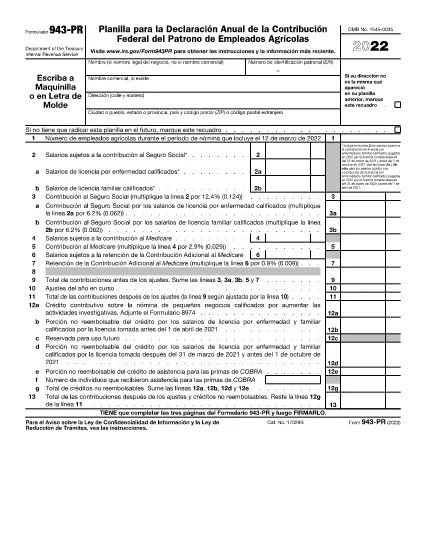
Form 943 (Puerto Rican Version)

Employer's Annual Federal Tax Return for Agricultural Employees (Puerto Rican Version)

Rev 2022

This text provides instructions on how to complete and file the Form 943-PR, including information on what the form is used for, who should file it, and how to make payments with the form. It also includes specific instructions on filling out the form, such as providing the employer identification number (EIN), payment amount, and name and address of the business.

Instructions

FAQ
  • What percentage should be multiplied to the employer's contribution for Medicare in order to calculate the credit for premium assistance under COBRA?

    50% (0.50)

  • Which periods of COBRA coverage are included in calculating the credit for premium assistance under COBRA?

    The coverage periods that begin on or after April 1, 2021, and end on or before September 30, 2021.

  • What is the first step for calculating the credit for premium assistance under COBRA?

    The first step is to annotate the Medicare contribution made by the employer on line 1a or line 1c of Paso 1, depending on whether the employer reported this information or not.

  • What information should be annotated in line 2b of Paso 2 for the credit for premium assistance under COBRA?

    Any amount of the employer's contribution to Medicare that was not reimbursed for qualified sick leave or family leave taken between March 31, 2021 and September 30, 2021.

  • Which lines of the Formulario 943-PR should be used to annotate the portion of the credit for premium assistance that is not reimbursed by the employer and the portion reimbursed by the employer, respectively?

    Line 12e is used to annotate the portion of the credit for premium assistance that is not reimbursed by the employer. Line 14g is used to annotate the portion reimbursed by the employer.

HOW TO

How to fill out Form 943 (PR) for free, online in 3 easy steps:

  1. 1
    Open form template in editor
    Click on the “Get this template” button.
  2. 2
    Fill out Form 943 (PR)
    Wait a moment and you will be redirected to our online PDF Filler app.
  3. 3
    Download file
    Download your completed Form 943 (PR) for free. You can also save it to a cloud storage.
Formize PDF Filler app
ABOUT

Internal Revenue Service (IRS) Forms

Form 943 (PR) is one of the official tax forms used in the United States to report income, claim deductions and credits, calculate tax liability, and fulfill other tax-related obligations. The IRS is the federal agency responsible for administering and enforcing the internal revenue laws in the United States.

Here are some examples of Internal Revenue Service forms:

Form 1040: This is the primary individual income tax return form used by most taxpayers. It is used to report various types of income, claim deductions and credits, calculate tax liability, and determine whether a taxpayer owes additional tax or is entitled to a refund.

Form 1099: There are different variations of Form 1099, such as 1099-MISC, 1099-INT, 1099-DIV, etc. These forms are used to report income received by individuals or businesses from various sources other than employment, such as self-employment income, interest income, dividend income, and rental income.

Form W-2: This form is used by employers to report wages paid to employees and the taxes withheld from their pay. Employees use the information on Form W-2 to complete their individual tax returns.

Form 941: Employers use this form to report employment taxes, including federal income tax withheld, Social Security tax, and Medicare tax, for their employees.

Form 1065: This form is used by partnerships to report their income, deductions, and tax liability. Partnerships themselves do not pay income tax; instead, the partners report their share of partnership income on their individual tax returns.

Form 1120: This is the corporate income tax return form used by C corporations to report their income, deductions, and tax liability.

Form 990: This form is used by tax-exempt organizations, such as nonprofits and charities, to report their financial information, activities, and compliance with tax laws.

Form 8862: This form is used by taxpayers who previously claimed the Earned Income Tax Credit (EITC) but had it disallowed, and now want to claim it again.

These are just a few examples of the numerous IRS forms that exist to fulfill various tax-related obligations. The specific forms required for an individual or business depend on their unique circumstances, income sources, and deductions. It's advisable to consult the official website of the Internal Revenue Service (www.irs.gov) or seek professional tax advice to obtain accurate and up-to-date information regarding the specific IRS forms relevant to your tax situation.

FEATURES

PDF Filler

The easiest way to fill Form 943 (PR) online

  • Quickly fill out Form 943 (PR)
    Looking for a way to quickly fill Form 943 (PR) online? With our online free PDF form filler, you’ll know how to how to edit and fill this pdf document in less than a minute.
  • Easy to use online PDF editor
    Fed up with printing out PDF files so you can edit them, before rescanning and sending them back? Edit PDF documents for free online. Use our online pdf editor to save time and paper.
  • Great tools, all platforms
    Wondering how to fill in Form 943 (PR) on a Mac, or maybe how to use a PDF filler free? Our online PDF tools work on all platforms.
  • Secure file storage
    Completed "Form 943 (PR)" files are stored in a secured database managed by Amazon Cloud hosting. You can delete your files from our system anytime. In any case, these files are automatically deleted after 24 hours.
  • Chat with Form 943 (PR)
    Chat with "Form 943 (PR)" on Chatize that is a free PDF reader assistant. Ask questions and get answers from "Form 943 (PR)". Just click on Chat With Document button above.

Delete filling session

Delete the selected filling session? In this case, your progress in completing the form will be lost.

Delete editing session

Delete the selected editing session? In this case, your progress in creating and editing the form will be lost.