
Select language

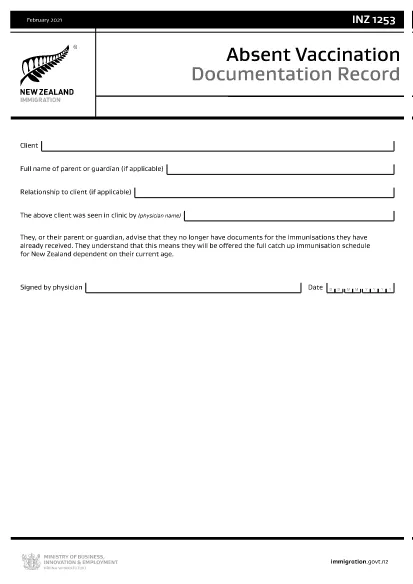
INZ1253 – Absent Vaccination Documentation Record (Fillable PDF)

  1. Language English
  2. Country New Zealand
  3. Activity Health
Fill out this form
INZ1253 – Absent Vaccination Documentation Record (Fillable PDF)

The INZ1253 is the official Absent Vaccination Documentation Record used by Immigration New Zealand when an applicant cannot produce proof of previously received immunisations. This form allows the applicant (or a parent/guardian) to declare the missing records and request the appropriate catch‑up vaccination schedule.

What is the INZ1253 Form?

The form is required for anyone applying for a New Zealand visa or residency who does not have the original vaccination certificates. By completing INZ1253 you acknowledge that you will follow the full catch‑up immunisation schedule based on your age.

How to Complete the INZ1253 Online

Instead of downloading, printing, and scanning, you can fill out the form directly on our site:

  • Click the “Fill out this form” button below.
  • Wait a few seconds while the Formize PDF Filler app loads.
  • Enter the required information in the fillable fields (personal details, reason for missing records, etc.).
  • Save the completed PDF to your device or submit it directly to Immigration New Zealand.

Common Mistakes to Avoid

  • Leaving mandatory fields blank – the system will highlight any missing information before you can save.
  • Using an outdated version – always use the latest INZ1253 PDF provided below.
  • Incorrect date formats – follow the DD/MM/YYYY format as shown in the example.
  • Not signing the form – the electronic signature field must be completed before submission.

Where to Submit the Completed Form

After you have saved the filled PDF, attach it to your visa or residency application through the Immigration New Zealand online portal. If you are applying by paper, include the printed form with your supporting documents.

Need help? Review the FAQs below or contact Immigration New Zealand directly.

FAQ
  • Do I need to print the INZ1253 form after filling it online?

    No. The Formize filler creates a fully signed PDF that can be uploaded directly to the Immigration New Zealand portal.

  • Can I edit the form after I have saved it?

    Yes. Open the saved PDF again with the Formize filler to make any changes, then re‑save.

  • What if I don’t have any vaccination records at all?

    Select “No records available” in the form and provide a brief explanation. You will be scheduled for the full catch‑up immunisation program.

  • Is the electronic signature legally accepted?

    Immigration New Zealand accepts electronic signatures on the INZ1253 when the form is completed using a certified PDF filler like Formize.

  • How long does it take for Immigration New Zealand to process the form?

    Processing times vary, but most applicants receive a response within 5‑10 business days after submission.

HOW TO

How to fill out INZ1253 for free, online in 4 easy steps:

  1. 1
    Open the Fillable Form
    Click the “Fill out this form” button on the page. The Formize PDF Filler will launch in your browser.
  2. 2
    Enter Your Details
    Complete each highlighted field – personal information, reason for missing vaccination records, and any additional notes.
  3. 3
    Save or Submit
    When all required fields are filled, click “Save PDF” to download the completed form or use the built‑in “Submit” button to send it directly to Immigration New Zealand.
  4. 4
    Confirm Receipt
    Check your email or the immigration portal for a confirmation that the form has been received.
Formize PDF Filler app
ABOUT

Medicare Application Forms

INZ1253 is one of Medicare forms that are documents used in various processes related to the Medicare program, which is a federally administered health insurance program in the United States. Medicare provides coverage for eligible individuals who are aged 65 and older, as well as certain individuals with disabilities or specific medical conditions.

Some common Medicare forms include:

Medicare Enrollment Application: This form is used to apply for Medicare benefits. It includes information about the applicant's personal details, such as name, address, Social Security number, and details about current health insurance coverage.

Medicare Claim Forms: These forms are used to request reimbursement for medical services or supplies covered by Medicare. Different claim forms are used for different types of services, such as hospital stays (UB-04 form), physician services (CMS-1500 form), or durable medical equipment (DMERC form).

Medicare Prescription Drug Plan Forms: These forms are used to enroll in Medicare Part D, which provides prescription drug coverage. They typically require information about the medications currently being taken and may include a list of covered drugs for the specific plan.

Medicare Appeals Forms: If a Medicare claim is denied or if there is a disagreement with a coverage decision, individuals can file an appeal. The forms used for the appeals process vary depending on the specific situation and the type of Medicare coverage involved.

Medicare Authorization Forms: These forms are used to authorize the release of protected health information to individuals or organizations that need access to the medical records for purposes such as claims processing or coordination of care.

Medicare Change Forms: These forms are used to make changes to existing Medicare coverage, such as updating personal information, changing the primary care physician, or switching to a different Medicare Advantage or Part D prescription drug plan.

It is important to note that Medicare forms and processes can be complex, and individuals are encouraged to seek assistance from the Medicare program or a trusted healthcare professional to ensure they complete the appropriate forms accurately and in a timely manner.

FEATURES

PDF Filler

The easiest way to fill INZ1253 online

  • Quickly fill out INZ1253
    Looking for a way to quickly fill INZ1253 online? With our online free PDF form filler, you’ll know how to how to edit and fill this pdf document in less than a minute.
  • Easy to use online PDF editor
    Fed up with printing out PDF files so you can edit them, before rescanning and sending them back? Edit PDF documents for free online. Use our online pdf editor to save time and paper.
  • Great tools, all platforms
    Wondering how to fill in INZ1253 on a Mac, or maybe how to use a PDF filler free? Our online PDF tools work on all platforms.
  • Secure file storage
    Completed "INZ1253" files are stored in a secured database managed by Amazon Cloud hosting. You can delete your files from our system anytime. In any case, these files are automatically deleted after 24 hours.
  • Chat with INZ1253
    Chat with "INZ1253" on Chatize that is a free PDF reader assistant. Ask questions and get answers from "INZ1253". Just click on Chat With Document button above.

Delete filling session

Delete the selected filling session? In this case, your progress in completing the form will be lost.

Delete editing session

Delete the selected editing session? In this case, your progress in creating and editing the form will be lost.