
Select language

INZ 1220 Supplementary Form – Fillable PDF

  1. Country New Zealand
  2. Language English
  3. Activity Visit and tourism Work Immigration Study
Fill out this form
INZ 1220 Supplementary Form – Fillable PDF

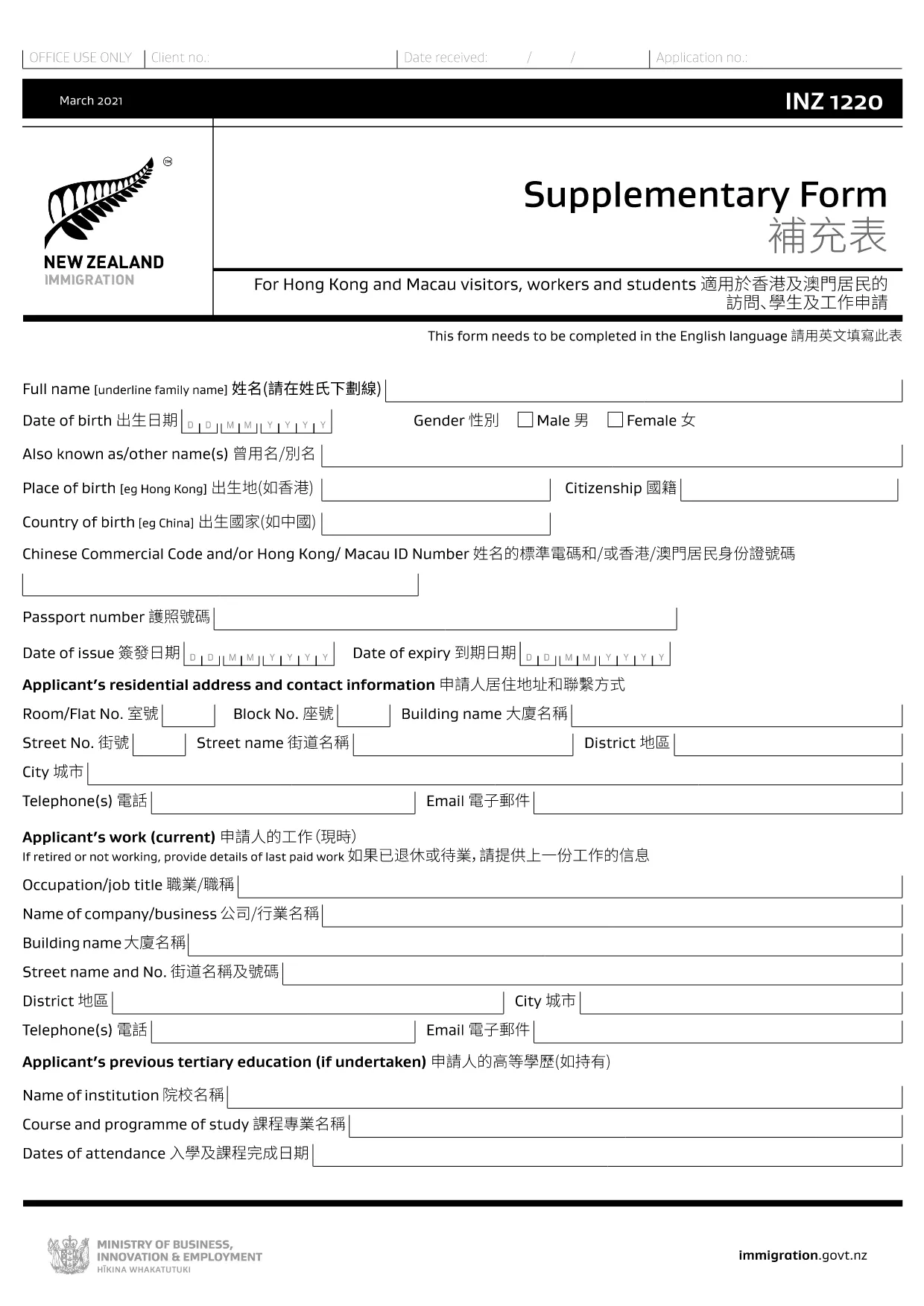
The INZ 1220 Supplementary Form is required by Immigration New Zealand for visitors, workers and students from Hong Kong and Macau who need to provide additional contact details. This fillable PDF lets you complete the form quickly, securely, and without printing.

Our page integrates the Formize PDF Filler app, so you can edit the document directly in your browser. No extra software, no downloads – just click, fill, and submit.

What Is the INZ 1220 Form?

INZ 1220 is a supplementary information sheet that collects the name, address, telephone, and email of a New Zealand contact (friend, family member, or sponsor). It is often requested alongside visa applications to verify local support.

How to Complete the INZ 1220 Online

Follow the simple steps below to fill out the form using Formize:

  • Click the **Fill out this form** button on this page.
  • Wait a few seconds while the Formize PDF Filler loads.
  • Enter the required details in each field – the interface highlights mandatory sections.
  • Review the information for accuracy.
  • Save the completed PDF to your device or download a copy for your records.

Common Mistakes to Avoid

  • Leaving the contact’s phone number incomplete – include country code.
  • Using an outdated email address – Immigration may send important updates.
  • Submitting the form with blank mandatory fields – the filler will flag these before you can save.

Where to Submit the Completed Form

After saving the PDF, attach it to your visa application through the Immigration New Zealand online portal, or email it to the address specified in your application instructions.

FAQs About INZ 1220

Find quick answers to the most common questions below (full FAQ list further down).

FAQ
  • Do I need to print the INZ 1220 form?

    No. Using the Formize PDF Filler you can complete the form entirely online and download the finished PDF.

  • What language is the INZ 1220 form in?

    The official form is in English. If you need a translation, you must provide a certified translation alongside the original.

  • Can I save my progress and finish later?

    Yes. While the Formize app is open, you can click **Save** to download a partially‑filled PDF, then reload it later to continue.

  • Is the contact’s New Zealand address mandatory?

    Yes. Immigration requires a full local address (street, city, postal code) to verify your support network.

  • What if I make a mistake after saving?

    Simply reopen the saved PDF in the Formize filler, correct the error, and save a new version.

  • How many pages is the INZ 1220 form?

    The supplementary form is a single‑page PDF, making it quick to fill and attach.

  • Do I need a digital signature?

    A handwritten signature is required. Print the completed PDF, sign it, then scan or take a clear photo to upload.

  • Where can I find help if I’m stuck?

    The Formize filler includes tooltip help for each field. For further assistance, consult the Immigration New Zealand website.

HOW TO

How to fill out INZ 1220 for free, online in 5 easy steps:

  1. 1
    Open the Fillable Form
    Click the **Fill out this form** button on the page. The Formize PDF Filler app will open in a new tab.
  2. 2
    Load the Form
    Wait a few seconds while the INZ 1220 PDF loads. All fields become editable directly in the browser.
  3. 3
    Enter Your Information
    Type the required details (contact name, address, phone, email). Required fields are marked with an asterisk.
  4. 4
    Review and Save
    Check the entered data for errors, then click **Save** to download the completed PDF to your device.
  5. 5
    Submit with Your Visa Application
    Attach the saved INZ 1220 PDF to your Immigration New Zealand online application or email it as instructed.
Formize PDF Filler app
ABOUT

Work Forms

INZ 1220 is one of application forms that are used by individuals who intend to work in a foreign country. These forms are typically required by the immigration authorities of the destination country to gather information about the individual's employment background, skills, and qualifications. The specific work forms and requirements can vary depending on the country and its immigration policies. Here are some examples of work forms in terms of immigration:

Work Visa Application Form: This is the main form used by individuals seeking to work in a foreign country. It collects personal information, details about the intended employment, the sponsoring employer or organization, and other relevant information required for the work visa application.

Employment Contract: In some cases, individuals may need to submit a copy of their employment contract as part of the work permit application. The employment contract outlines the terms and conditions of the job, including the position, salary, working hours, and other employment-related details.

Labor Market Impact Assessment (LMIA) Form: In certain countries, employers must obtain a Labor Market Impact Assessment (LMIA) to demonstrate that there is a genuine need for foreign workers to fill specific job positions. The LMIA form is completed by the employer and includes information about the job vacancy, efforts to hire local workers, and the impact on the local labor market.

Skills Assessment or Qualification Recognition Forms: Depending on the country, individuals may be required to have their skills or qualifications assessed or recognized to ensure they meet the standards required for the job. Skills assessment or qualification recognition forms collect information about the individual's educational background, work experience, and skills in relation to the specific occupation.

Proof of Employment or Job Offer Letter: Individuals applying for work visas may need to provide proof of employment or a job offer letter from the sponsoring employer. These documents typically include details about the job title, responsibilities, start date, and salary.

Work Permit Application Form: Once the work visa is approved, individuals may need to complete a separate work permit application form to obtain the official authorization to work in the country. This form may require information such as the work visa number, personal details, employment details, and any applicable fees.

Medical Examination Forms: Depending on the country and the nature of the work, individuals may be required to undergo a medical examination to ensure they meet the health requirements for working in that country. Medical examination forms collect the necessary health information and test results.

It's important to note that the specific work forms and requirements can vary significantly depending on the country, the type of work being pursued, and the immigration policies in place. It is advisable to consult the official website of the immigration authorities or seek legal advice to obtain accurate and up-to-date information regarding the necessary work forms for immigration purposes.

FEATURES

PDF Filler

The easiest way to fill INZ 1220 online

  • Quickly fill out INZ 1220
    Looking for a way to quickly fill INZ 1220 online? With our online free PDF form filler, you’ll know how to how to edit and fill this pdf document in less than a minute.
  • Easy to use online PDF editor
    Fed up with printing out PDF files so you can edit them, before rescanning and sending them back? Edit PDF documents for free online. Use our online pdf editor to save time and paper.
  • Great tools, all platforms
    Wondering how to fill in INZ 1220 on a Mac, or maybe how to use a PDF filler free? Our online PDF tools work on all platforms.
  • Secure file storage
    Completed "INZ 1220" files are stored in a secured database managed by Amazon Cloud hosting. You can delete your files from our system anytime. In any case, these files are automatically deleted after 24 hours.
  • Chat with INZ 1220
    Chat with "INZ 1220" on Chatize that is a free PDF reader assistant. Ask questions and get answers from "INZ 1220". Just click on Chat With Document button above.

Delete filling session

Delete the selected filling session? In this case, your progress in completing the form will be lost.

Delete editing session

Delete the selected editing session? In this case, your progress in creating and editing the form will be lost.