
Select language

UK HMRC Form P55 – Fillable PDF for Pension Tax Refund

  1. Language English
  2. Country United Kingdom
  3. Department HMRC
  4. Activity Taxes
Fill out this form
UK HMRC Form P55 – Fillable PDF for Pension Tax Refund

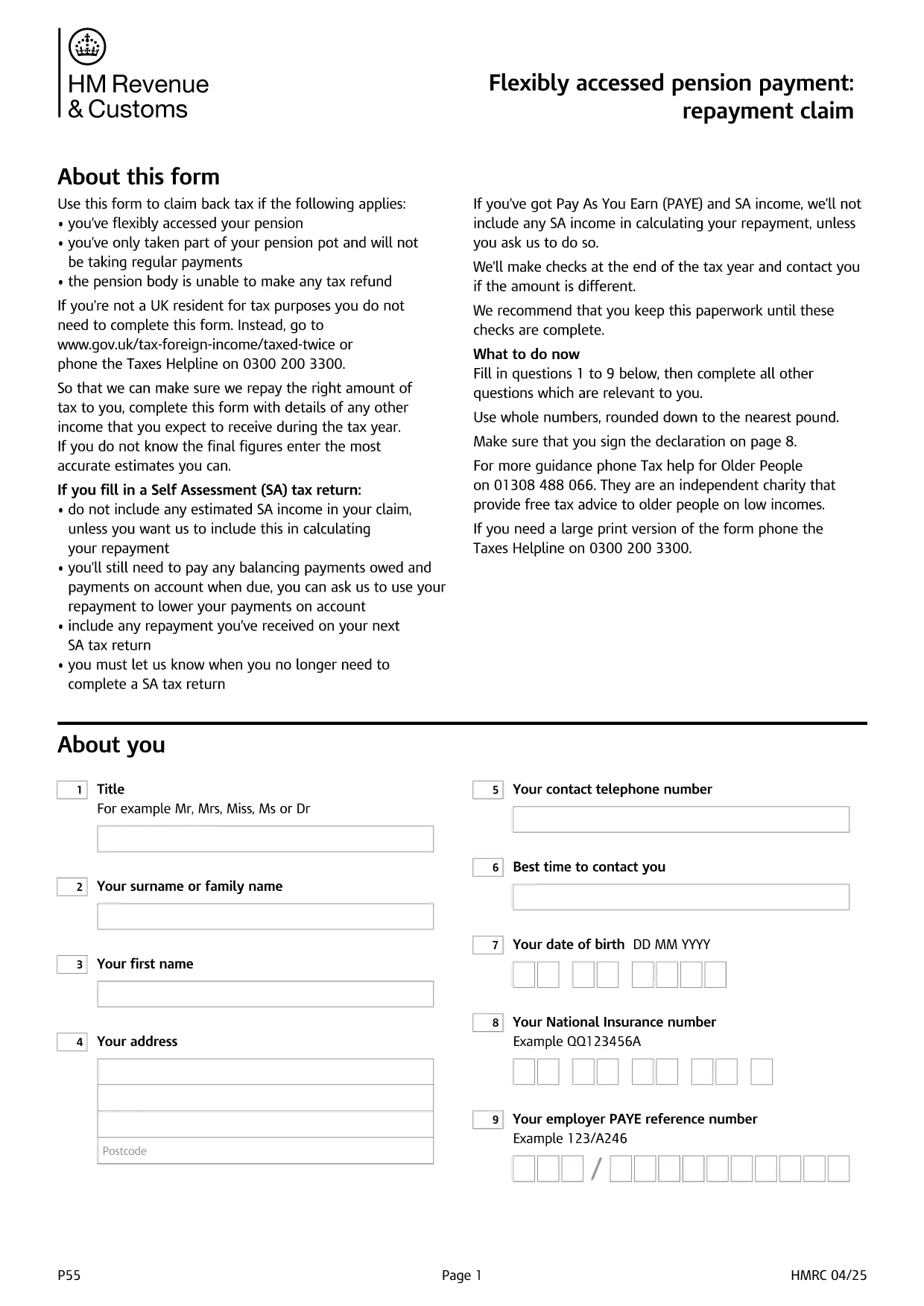
Form P55 is the HMRC claim form used to recover tax that was over‑deducted when you accessed a portion of your pension flexibly. With the fillable PDF hosted by Formize, you can complete the form directly in your browser—no extra software required.

What Is HMRC Form P55?

The P55 is issued by HM Revenue & Customs (HMRC) to correct the "month‑1" emergency tax code that pension providers often apply to a one‑off withdrawal. It allows you to claim back the excess tax within the same tax year.

When and Why to Use Form P55

  • You have taken a partial pension withdrawal (not the whole pot).
  • The withdrawal was a single lump‑sum or occasional payment.
  • Your provider could not issue the refund themselves.
  • You want the refund sooner than the end‑of‑year reconciliation.

How to Complete Form P55 Online

Instead of downloading the PDF and editing it with a separate editor, simply click the "Fill out this form" button on this page. The Formize PDF Filler app will load, and you can:

  1. Enter your personal details, NI number, and bank account.
  2. Provide the pension payment information (gross amount, tax deducted, provider details).
  3. Add any other income you earned during the tax year.
  4. Sign electronically with a typed, drawn, or uploaded signature.
  5. Submit the completed form directly to HMRC or download it for postal submission.

Common Mistakes to Avoid

  • Leaving fields blank – HMRC will reject an incomplete claim.
  • Using the wrong tax year version – always select the form for the current tax year.
  • Mismatching your NI number or bank details – double‑check before submitting.
  • Forgetting to include other income – HMRC recalculates your total tax position.

Submit Your Claim & Receive Your Refund

After you finish, you can either:

  • Submit electronically via your HMRC Government Gateway account (fastest).
  • Print the completed PDF and post it to the address shown on the form.

HMRC typically processes a P55 claim within 30 days and pays the refund by Faster Payments or cheque.

FAQ
  • What is the purpose of Form P55?

    Form P55 lets you claim back tax that was over‑deducted when you took a partial, one‑off pension withdrawal.

  • Do I need a new Form P55 each tax year?

    Yes. HMRC releases a new version every April, so always use the form that matches the current tax year.

  • Can I submit Form P55 online?

    Yes. After completing the fillable PDF, you can upload it through your HMRC Government Gateway account for the fastest processing.

  • How long does HMRC take to process a P55 claim?

    Typical processing time is up to 30 days, after which the refund is paid via Faster Payments or cheque.

  • What if I make another pension withdrawal later in the year?

    You may need to submit an additional P55 for the new withdrawal, or wait for the end‑of‑year reconciliation to settle the final tax position.

  • Is there a fee to use the Formize fillable PDF?

    Formize provides the fillable PDF for free; you only pay any standard HMRC filing fees if applicable.

  • What common errors cause a P55 to be rejected?

    Leaving required fields blank, using the wrong tax‑year version, or providing mismatched NI or bank details are the most frequent reasons.

HOW TO

How to fill out HMRC Form P55 for free, online in 5 easy steps:

  1. 1
    Click the Fill‑out Button
    Press the "Fill out this form" button on the page. The Formize PDF Filler loads in seconds.
  2. 2
    Enter Your Details
    Fill in personal information, NI number, pension payment figures, and any other income for the tax year.
  3. 3
    Add Your Signature
    Use the built‑in signature tool to draw, upload, or type a legally‑binding signature.
  4. 4
    Submit or Download
    Choose to submit directly to HMRC via your Government Gateway account or download the completed PDF for postal submission.
  5. 5
    Receive Your Refund
    HMRC processes the claim within 30 days and sends the refund to your bank account or by cheque.
Formize PDF Filler app
ABOUT

Tax forms

HMRC Form P55 is one of Tax forms that are documents used to report information related to taxes to the relevant tax authority. There are various types of tax forms, including federal, state, and local tax forms, which can vary depending on the taxpayer's circumstances and location.

FEATURES

PDF Filler

The easiest way to fill HMRC Form P55 online

  • Quickly fill out HMRC Form P55
    Looking for a way to quickly fill HMRC Form P55 online? With our online free PDF form filler, you’ll know how to how to edit and fill this pdf document in less than a minute.
  • Easy to use online PDF editor
    Fed up with printing out PDF files so you can edit them, before rescanning and sending them back? Edit PDF documents for free online. Use our online pdf editor to save time and paper.
  • Great tools, all platforms
    Wondering how to fill in HMRC Form P55 on a Mac, or maybe how to use a PDF filler free? Our online PDF tools work on all platforms.
  • Secure file storage
    Completed "HMRC Form P55" files are stored in a secured database managed by Amazon Cloud hosting. You can delete your files from our system anytime. In any case, these files are automatically deleted after 24 hours.
  • Chat with HMRC Form P55
    Chat with "HMRC Form P55" on Chatize that is a free PDF reader assistant. Ask questions and get answers from "HMRC Form P55". Just click on Chat With Document button above.

Delete filling session

Delete the selected filling session? In this case, your progress in completing the form will be lost.

Delete editing session

Delete the selected editing session? In this case, your progress in creating and editing the form will be lost.