
Select language

Form RE – Official Copyright Registration Form (Fillable PDF)

  1. Language English
  2. Country USA
  3. Department Copyright Office
Fill out this form
Form RE – Official Copyright Registration Form (Fillable PDF)

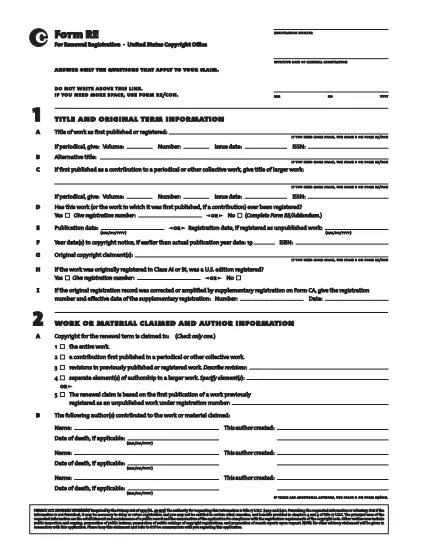
Form RE is the United States Copyright Office’s standard registration form for works that were not registered during their original term. Whether you are filing for a literary, musical, or visual work, the fillable PDF version lets you complete the entire process quickly and accurately.

Using Formize’s secure PDF filler, you can edit, sign, and save Form RE directly in your browser – no extra software required. Once completed, simply download the signed PDF and submit it to the Copyright Office.

Below you’ll find a quick guide to each section of the form, tips for avoiding common errors, and step‑by‑step instructions for an effortless online filing experience.

FAQ
  • What is the purpose of Form RE?

    Form RE is used to register a work that was not registered during its original term, or to add an addendum to an existing registration.

  • Can I submit Form RE electronically?

    Yes. After completing the fillable PDF with Formize, you can upload the signed file through the Copyright Office’s electronic filing portal.

  • Do I need a lawyer to fill out Form RE?

    No. The form is designed for creators to complete on their own. However, you may consult an attorney for complex copyright issues.

  • What happens if I make a mistake on the form?

    The Formize filler highlights missing or invalid entries before you can save. If an error is discovered after submission, you can file a correction using Form RE/Addendum.

  • Is there a filing fee for Form RE?

    Yes. The current fee schedule is available on the Copyright Office website. Fees must be paid at the time of submission.

  • How long does it take for the Copyright Office to process Form RE?

    Standard processing takes approximately 3‑6 months, but expedited processing is available for an additional fee.

  • Can I use Form RE for works created outside the United States?

    Form RE is intended for works that are eligible for U.S. copyright protection. Foreign works may require additional documentation.

  • What format should I use when submitting the completed form?

    Submit the signed PDF file exactly as downloaded from the Formize filler. Do not convert it to another format.

HOW TO

How to fill out Form RE for free, online in 5 easy steps:

  1. 1
    Open the Fillable Form
    Click the “Fill out this form” button on the page. The Formize PDF Filler app will load directly in your browser.
  2. 2
    Complete All Required Fields
    Enter the requested information for each section of Form RE. The filler validates entries in real time.
  3. 3
    Add Your Electronic Signature
    Use the built‑in signature tool to sign the form electronically. This satisfies the Copyright Office’s signing requirement.
  4. 4
    Review and Save
    Double‑check every field, then click “Save” to download the completed PDF to your device.
  5. 5
    Submit to the Copyright Office
    Mail or upload the saved PDF according to the Copyright Office’s submission guidelines.
Formize PDF Filler app
ABOUT

Copyright Office Forms

Form RE is one of the official forms that are used by the United States Copyright Office, a department of the Library of Congress, to register and protect copyrights. The Copyright Office is responsible for administering copyright laws in the United States, including the registration of copyrights, recordation of copyright transfers and licenses, and providing information and services related to copyright.

Here are some examples of Copyright Office forms:

Copyright Registration Application: This is the main form used to register a copyright with the U.S. Copyright Office. Different application forms are available for various types of works, such as literary works, visual arts, musical compositions, sound recordings, motion pictures, and more. The application collects information about the work being registered, the author, the claimant, and other relevant details.

Document Recordation Forms: These forms are used to record transfers of copyrights, such as assignments or licenses, with the Copyright Office. They provide a way to establish a public record of the transfer of copyright ownership.

DMCA Designated Agent Directory Form: This form is used to designate an agent with the Copyright Office under the Digital Millennium Copyright Act (DMCA). The designated agent is responsible for receiving and handling takedown notices related to online copyright infringement.

Copyright Office Fee Schedule: While not a specific form, the fee schedule provides information about the fees associated with various copyright services, including registration, recordation, and other related services.

It's important to note that the specific forms and requirements may change over time, and different forms may be required for different types of copyright registrations or services. It's advisable to visit the official website of the U.S. Copyright Office (www.copyright.gov) or consult with legal professionals specializing in copyright law to obtain accurate and up-to-date information regarding the specific Copyright Office forms relevant to your copyright-related needs.

FEATURES

PDF Filler

The easiest way to fill Form RE online

  • Quickly fill out Form RE
    Looking for a way to quickly fill Form RE online? With our online free PDF form filler, you’ll know how to how to edit and fill this pdf document in less than a minute.
  • Easy to use online PDF editor
    Fed up with printing out PDF files so you can edit them, before rescanning and sending them back? Edit PDF documents for free online. Use our online pdf editor to save time and paper.
  • Great tools, all platforms
    Wondering how to fill in Form RE on a Mac, or maybe how to use a PDF filler free? Our online PDF tools work on all platforms.
  • Secure file storage
    Completed "Form RE" files are stored in a secured database managed by Amazon Cloud hosting. You can delete your files from our system anytime. In any case, these files are automatically deleted after 24 hours.
  • Chat with Form RE
    Chat with "Form RE" on Chatize that is a free PDF reader assistant. Ask questions and get answers from "Form RE". Just click on Chat With Document button above.

Delete filling session

Delete the selected filling session? In this case, your progress in completing the form will be lost.

Delete editing session

Delete the selected editing session? In this case, your progress in creating and editing the form will be lost.