
Select language

Secure Test Declaration – Fillable PDF Form

  1. Language English
  2. Country USA
  3. Department Copyright Office
Fill out this form
Secure Test Declaration – Fillable PDF Form

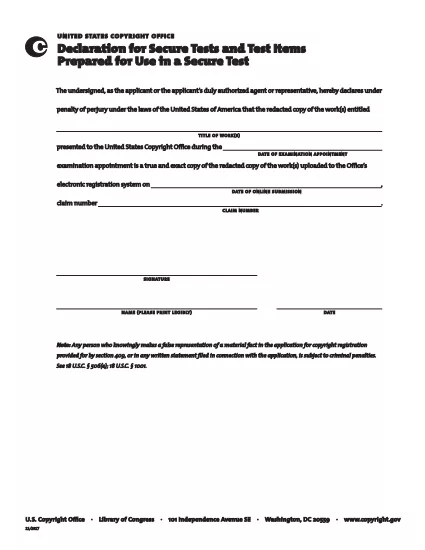
The Secure Test Declaration is a legally‑required statement used by the United States Copyright Office to certify that a test item is protected and will be handled securely. Our fillable PDF version lets you complete the form quickly, accurately, and without installing any extra software.

With Formize’s integrated PDF Filler, you can open the document directly in your browser, enter the required information, and save or print a certified copy. This eliminates the hassle of downloading, editing, and re‑uploading static PDFs.

Below you’ll find a brief overview of the form’s sections, tips for avoiding common errors, and step‑by‑step instructions for completing the declaration online.

What Is a Secure Test Declaration?

A Secure Test Declaration confirms that the test material you are submitting is confidential, that you have the authority to submit it, and that you understand the penalties for false statements. It is commonly required for copyrighted works that involve proprietary testing methods or confidential data.

Key Sections of the Form

  • Applicant Information – Name, address, and contact details.
  • Test Description – Title, purpose, and nature of the test.
  • Security Measures – How the test will be protected.
  • Declaration Statement – Signature line confirming truthfulness.

How to Fill Out the Secure Test Declaration Online

Instead of downloading the PDF and opening it in a separate editor, simply click the "Fill out this form" button on this page. The Formize PDF Filler app will load automatically, allowing you to complete every field directly in your browser.

Common Mistakes to Avoid

  • Leaving required fields blank – the filler will highlight missing information.
  • Using an unofficial signature image – type your name in the signature field for a legally accepted electronic signature.
  • Submitting outdated contact details – double‑check phone numbers and email addresses before saving.

Where to Submit the Completed Form

After saving the completed declaration, you can either:

  1. Upload the PDF through the Copyright Office’s online portal.
  2. Print, sign physically (if required), and mail it to the address listed on the form.

For most users, the electronic submission option is faster and provides immediate confirmation of receipt.

FAQ
  • Do I need Adobe Acrobat to fill out the Secure Test Declaration?

    No. Formize’s online PDF Filler works in any modern browser, so you don’t need Acrobat or any other software.

  • Can I edit the form after I’ve saved it?

    Yes. Open the saved PDF with Formize again, make any necessary changes, and re‑save.

  • Is an electronic signature accepted by the Copyright Office?

    For the Secure Test Declaration, an electronic signature entered through the Formize filler is considered valid, provided the form is submitted electronically.

  • What happens if I submit incomplete information?

    The filler will highlight missing required fields before you can save. Submitting an incomplete form may delay processing.

  • Is there a fee to download or use the Secure Test Declaration form?

    The PDF download and online filling are free. Any filing fees are set by the Copyright Office and are paid separately during submission.

HOW TO

How to fill out secure test declaration for free, online in 4 easy steps:

  1. 1
    Open the Fillable Form
    Click the "Fill out this form" button on the page. The Formize PDF Filler loads in a new tab.
  2. 2
    Enter Your Information
    Complete each highlighted field – the filler will guide you through Applicant Information, Test Description, and Security Measures.
  3. 3
    Sign Electronically
    Type your name in the signature field. The system records a timestamp for legal validity.
  4. 4
    Save and Submit
    Click "Save PDF" to download a copy, then upload it to the Copyright Office portal or print and mail as instructed.
Formize PDF Filler app
ABOUT

Copyright Office Forms

secure test declaration is one of the official forms that are used by the United States Copyright Office, a department of the Library of Congress, to register and protect copyrights. The Copyright Office is responsible for administering copyright laws in the United States, including the registration of copyrights, recordation of copyright transfers and licenses, and providing information and services related to copyright.

Here are some examples of Copyright Office forms:

Copyright Registration Application: This is the main form used to register a copyright with the U.S. Copyright Office. Different application forms are available for various types of works, such as literary works, visual arts, musical compositions, sound recordings, motion pictures, and more. The application collects information about the work being registered, the author, the claimant, and other relevant details.

Document Recordation Forms: These forms are used to record transfers of copyrights, such as assignments or licenses, with the Copyright Office. They provide a way to establish a public record of the transfer of copyright ownership.

DMCA Designated Agent Directory Form: This form is used to designate an agent with the Copyright Office under the Digital Millennium Copyright Act (DMCA). The designated agent is responsible for receiving and handling takedown notices related to online copyright infringement.

Copyright Office Fee Schedule: While not a specific form, the fee schedule provides information about the fees associated with various copyright services, including registration, recordation, and other related services.

It's important to note that the specific forms and requirements may change over time, and different forms may be required for different types of copyright registrations or services. It's advisable to visit the official website of the U.S. Copyright Office (www.copyright.gov) or consult with legal professionals specializing in copyright law to obtain accurate and up-to-date information regarding the specific Copyright Office forms relevant to your copyright-related needs.

FEATURES

PDF Filler

The easiest way to fill secure test declaration online

  • Quickly fill out secure test declaration
    Looking for a way to quickly fill secure test declaration online? With our online free PDF form filler, you’ll know how to how to edit and fill this pdf document in less than a minute.
  • Easy to use online PDF editor
    Fed up with printing out PDF files so you can edit them, before rescanning and sending them back? Edit PDF documents for free online. Use our online pdf editor to save time and paper.
  • Great tools, all platforms
    Wondering how to fill in secure test declaration on a Mac, or maybe how to use a PDF filler free? Our online PDF tools work on all platforms.
  • Secure file storage
    Completed "secure test declaration" files are stored in a secured database managed by Amazon Cloud hosting. You can delete your files from our system anytime. In any case, these files are automatically deleted after 24 hours.
  • Chat with secure test declaration
    Chat with "secure test declaration" on Chatize that is a free PDF reader assistant. Ask questions and get answers from "secure test declaration". Just click on Chat With Document button above.

Delete filling session

Delete the selected filling session? In this case, your progress in completing the form will be lost.

Delete editing session

Delete the selected editing session? In this case, your progress in creating and editing the form will be lost.