
Select language

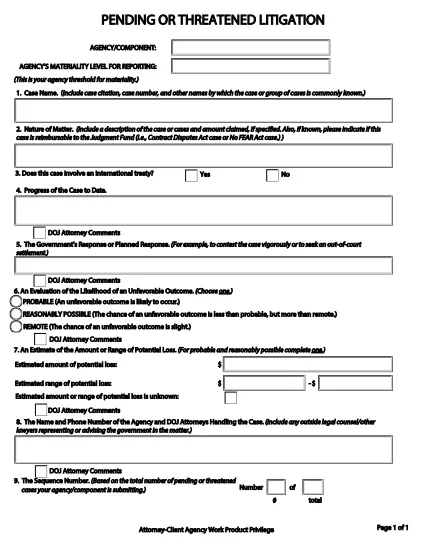
Pending or Threatened Litigation Form (Fillable PDF)

  1. Language English
  2. Country USA
  3. Department Department of Justice
  4. Agency Civil Division
Fill out this form
Pending or Threatened Litigation Form (Fillable PDF)

The Pending or Threatened Litigation Form is a required reporting document for federal agencies that need to disclose pending or threatened legal actions. Historically the form is provided as a static PDF, but with Formize you can complete it directly in your browser—no Adobe Acrobat or other editor needed.

This page gives you everything you need to know: what the form covers, step‑by‑step instructions for filling it out, common pitfalls to avoid, and a direct link to the official PDF supplied by the U.S. Department of Justice.

When you click the Fill out this form button below, Formize’s PDF Filler app loads the official document, transforms it into a fillable web form, and saves your entries securely.

Key sections of the form include:

  • Case identification and docket numbers
  • Agency or component submitting the report
  • Attorney‑client privilege and work‑product claims
  • Brief description of the litigation or threat

Accurate completion helps your agency stay compliant with DOJ reporting requirements and ensures transparency for congressional oversight.

FAQ
  • Do I need Adobe Acrobat to fill out this form?

    No. Formize converts the PDF into a web‑based fillable form, so any modern browser is sufficient.

  • Is the information I enter saved securely?

    Yes. All data is stored temporarily in your browser session and never shared with third parties unless you choose to download or submit it.

  • Can I edit the form after I’ve saved it?

    Absolutely. Use the **Save** button to create a draft, then return to the same URL to continue editing.

  • What if I make a mistake in a field?

    Formize highlights validation errors instantly. You can correct the entry before saving or downloading the final PDF.

  • Is this the official DOJ form?

    Yes. The PDF linked below is the exact version provided by the U.S. Department of Justice (Civil Division).

  • Can I print a hard copy after filling it out?

    After completing the form, click **Download** to get a filled PDF, then print it like any standard document.

  • Do I need an account to use Formize?

    No account is required for one‑time use. Simply click the button, fill the form, and download or submit as needed.

HOW TO

How to fill out pending litigation form for free, online in 4 easy steps:

  1. 1
    Open the Fillable Form
    Click the **Fill out this form** button on this page. Formize will load the official DOJ PDF directly in your browser.
  2. 2
    Enter Required Information
    Type into each field—case numbers, agency name, privilege claims, and a concise case description. The interface validates required fields in real time.
  3. 3
    Save & Review
    Use the **Save** button to store a draft. Review all entries for accuracy; Formize highlights any missing or incorrectly formatted data.
  4. 4
    Submit or Print
    When finished, you can either download a completed PDF for internal filing or submit the form electronically if your agency’s workflow allows it.
Formize PDF Filler app
ABOUT

Department of Justice (DOJ) Forms

pending litigation form is one of the official forms that are used by the United States Department of Justice and its various divisions, agencies, and components. The DOJ is a federal executive department responsible for enforcing federal laws, defending the interests of the United States in legal matters, and administering justice.

Here are some examples of Department of Justice forms:

Application for Federal Assistance (SF-424): This form is used by organizations applying for federal grants or financial assistance administered by the DOJ or its components. It collects information about the organization, the proposed project, and the budget.

Civil Rights Complaint Form: This form is used to file a complaint with the DOJ's Civil Rights Division regarding alleged violations of civil rights laws, such as discrimination based on race, gender, disability, or national origin.

Victim Notification Request Form: This form is used by crime victims to request notification about the status and proceedings of a federal criminal case, as part of the DOJ's efforts to provide information and support to crime victims.

Immigration Forms: The DOJ's Executive Office for Immigration Review (EOIR) administers immigration courts and immigration-related proceedings. Various forms are used in immigration court proceedings, such as Form EOIR-42B for applications for relief from removal or Form EOIR-28 for appeals.

ATF Forms: The Bureau of Alcohol, Tobacco, Firearms, and Explosives (ATF), a component of the DOJ, has its own set of forms for various purposes, as mentioned in a previous response.

Drug Enforcement Administration (DEA) Forms: The DEA, another component of the DOJ, uses its own forms for matters related to controlled substances, including applications for registration, reporting, and record-keeping requirements.

These examples highlight a few categories of DOJ forms, but the specific forms used by the Department of Justice can vary depending on the division, agency, or component involved and the nature of the services or proceedings. It's advisable to consult the official website of the specific division or agency within the DOJ or seek legal advice to obtain accurate and up-to-date information regarding the specific DOJ forms relevant to your situation.

FEATURES

PDF Filler

The easiest way to fill pending litigation form online

  • Quickly fill out pending litigation form
    Looking for a way to quickly fill pending litigation form online? With our online free PDF form filler, you’ll know how to how to edit and fill this pdf document in less than a minute.
  • Easy to use online PDF editor
    Fed up with printing out PDF files so you can edit them, before rescanning and sending them back? Edit PDF documents for free online. Use our online pdf editor to save time and paper.
  • Great tools, all platforms
    Wondering how to fill in pending litigation form on a Mac, or maybe how to use a PDF filler free? Our online PDF tools work on all platforms.
  • Secure file storage
    Completed "pending litigation form" files are stored in a secured database managed by Amazon Cloud hosting. You can delete your files from our system anytime. In any case, these files are automatically deleted after 24 hours.
  • Chat with pending litigation form
    Chat with "pending litigation form" on Chatize that is a free PDF reader assistant. Ask questions and get answers from "pending litigation form". Just click on Chat With Document button above.

Delete filling session

Delete the selected filling session? In this case, your progress in completing the form will be lost.

Delete editing session

Delete the selected editing session? In this case, your progress in creating and editing the form will be lost.