
Select language

Online Fillable Job Application Form

  1. Language English
  2. Country USA
  3. Activity Employment
  4. Department Department of Labor
Fill out this form
Online Fillable Job Application Form

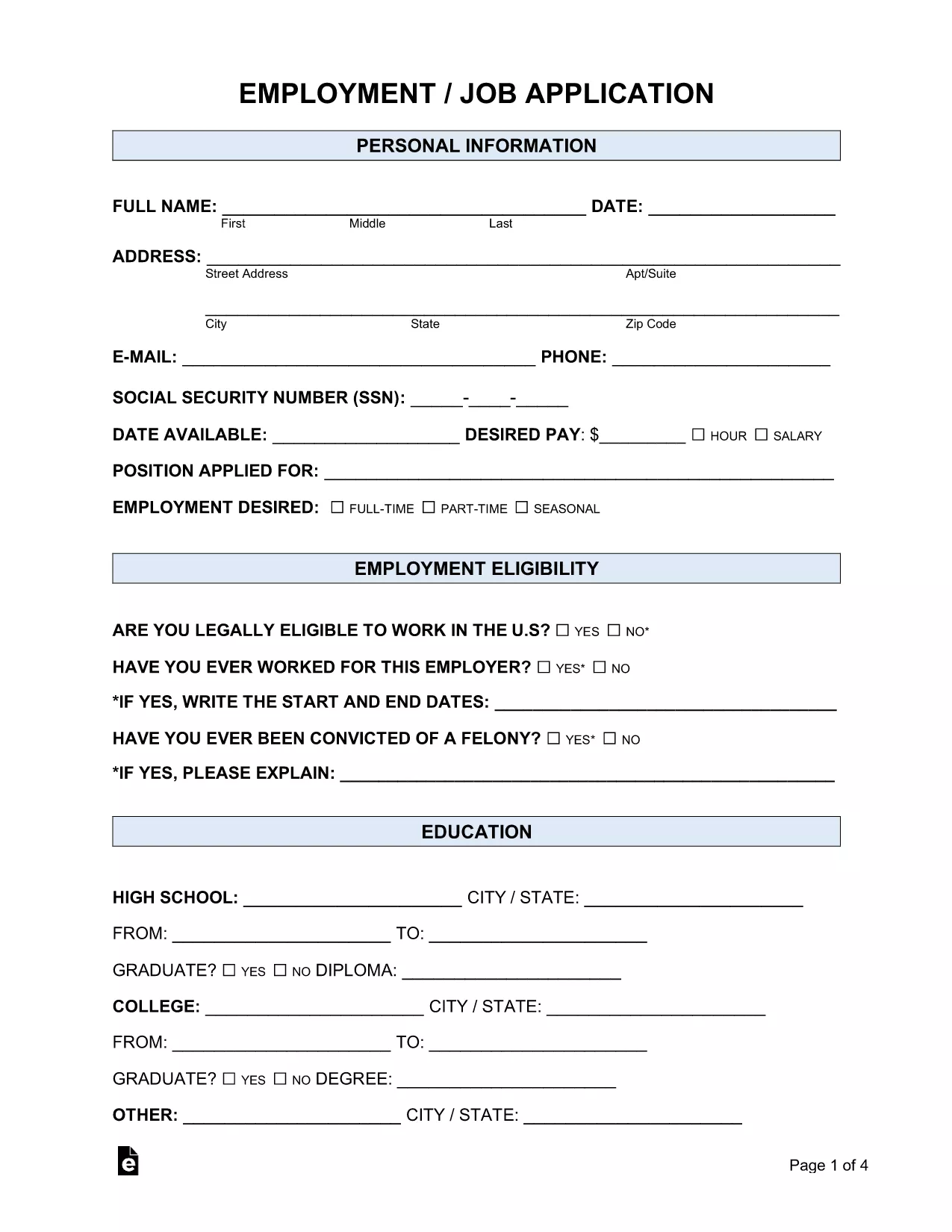
Looking for a simple way to submit a professional job application? Our fillable Employment Job Application PDF lets you complete the entire form online, without printing or installing any software. Powered by Formize’s PDF Filler, the form is secure, saves your data in real time, and can be downloaded or emailed directly to employers.

Whether you’re applying for a full‑time position, a part‑time role, or an internship, this form covers all the essential sections:

  • Personal information and contact details
  • Employment history and references
  • Education background
  • Availability and salary expectations
  • Signature and date

Because the form is fully fillable, you can type directly into each field, use drop‑down menus where available, and add attachments such as a résumé. The built‑in validation helps you avoid common errors, ensuring a smooth submission process.

Ready to get started? Just click the "Fill out this form" button below, wait for the Formize PDF Filler app to load, and follow the quick step‑by‑step guide.

FAQ
  • Do I need Adobe Reader to fill out this form?

    No. The Formize PDF Filler works in any modern browser, so you can complete the form without installing additional software.

  • Can I save my progress and return later?

    Yes. Use the "Save" button in the filler to download a partially completed PDF and reload it later.

  • Is my personal data secure?

    Formize uses SSL encryption for all data transmitted between your browser and our servers, keeping your information private.

  • What file format will I receive after completing the form?

    You will receive a standard PDF file that can be opened with any PDF viewer and attached to email applications.

  • Can I add a digital signature?

    Yes. The filler includes a signature field where you can draw or upload an image of your signature.

  • Is there a limit to how many times I can use the form?

    No. The fillable PDF can be used repeatedly for multiple job applications.

HOW TO

How to fill out job application form for free, online in 4 easy steps:

  1. 1
    Click the Fill Out Button
    Press the "Fill out this form" button on the page. The Formize PDF Filler app will open in a new tab.
  2. 2
    Wait for the Filler to Load
    The app loads the fillable PDF automatically. This usually takes a few seconds.
  3. 3
    Enter Your Information
    Type directly into each field, select options from drop‑downs, and attach your resume if required.
  4. 4
    Review and Save
    Check all entries for accuracy, then click "Save" to download a completed copy or "Email" to send it to the employer.
Formize PDF Filler app
ABOUT

Department of Labor (DOL) Forms

job application form is one of the official forms that are used by the United States Department of Labor and its various agencies to collect information, administer programs, and enforce labor-related laws and regulations. The Department of Labor is a federal executive department responsible for promoting and protecting the welfare of workers, ensuring fair employment practices, and overseeing various aspects of labor and employment in the United States.

Here are some examples of Department of Labor forms:

Employment Eligibility Verification (Form I-9): While administered by the U.S. Citizenship and Immigration Services (USCIS), Form I-9 is often associated with the Department of Labor. It is used by employers to verify the identity and employment eligibility of individuals hired for employment in the United States.

Family and Medical Leave Act (FMLA) Forms: The DOL's Wage and Hour Division administers the FMLA, and various forms are used to implement and comply with the provisions of this federal law, including the Certification of Health Care Provider form and the FMLA Notice of Eligibility and Rights & Responsibilities form.

Occupational Safety and Health Administration (OSHA) Forms: OSHA, a division of the DOL, requires certain employers to maintain records of workplace injuries and illnesses using forms such as OSHA Form 300, OSHA Form 300A, and OSHA Form 301.

Unemployment Insurance Forms: The DOL's Employment and Training Administration oversees the Unemployment Insurance (UI) program, and various forms are used by state workforce agencies to administer and process UI benefits claims.

Wage and Hour Compliance Forms: The DOL's Wage and Hour Division enforces various labor laws, including the Fair Labor Standards Act (FLSA) and the Family and Medical Leave Act (FMLA). Employers may be required to use specific forms to maintain compliance with these laws, such as records of hours worked, wage rates, and other related information.

These examples represent some common categories of Department of Labor forms, but there are many other forms used by the DOL and its various agencies to carry out their responsibilities related to labor and employment. The specific forms required may vary depending on the program, regulation, or enforcement action involved. It's advisable to visit the official website of the U.S. Department of Labor (www.dol.gov) or consult with the relevant DOL agencies or legal professionals to obtain accurate and up-to-date information regarding the specific DOL forms relevant to your labor-related needs or compliance requirements.

FEATURES

PDF Filler

The easiest way to fill job application form online

  • Quickly fill out job application form
    Looking for a way to quickly fill job application form online? With our online free PDF form filler, you’ll know how to how to edit and fill this pdf document in less than a minute.
  • Easy to use online PDF editor
    Fed up with printing out PDF files so you can edit them, before rescanning and sending them back? Edit PDF documents for free online. Use our online pdf editor to save time and paper.
  • Great tools, all platforms
    Wondering how to fill in job application form on a Mac, or maybe how to use a PDF filler free? Our online PDF tools work on all platforms.
  • Secure file storage
    Completed "job application form" files are stored in a secured database managed by Amazon Cloud hosting. You can delete your files from our system anytime. In any case, these files are automatically deleted after 24 hours.
  • Chat with job application form
    Chat with "job application form" on Chatize that is a free PDF reader assistant. Ask questions and get answers from "job application form". Just click on Chat With Document button above.

Delete filling session

Delete the selected filling session? In this case, your progress in completing the form will be lost.

Delete editing session

Delete the selected editing session? In this case, your progress in creating and editing the form will be lost.