
Select language

DS-4170 (2021) Fillable PDF Form – Download & Complete Online

  1. Language English
  2. Country USA
  3. Department Department of State
Fill out this form
DS-4170 (2021) Fillable PDF Form – Download & Complete Online

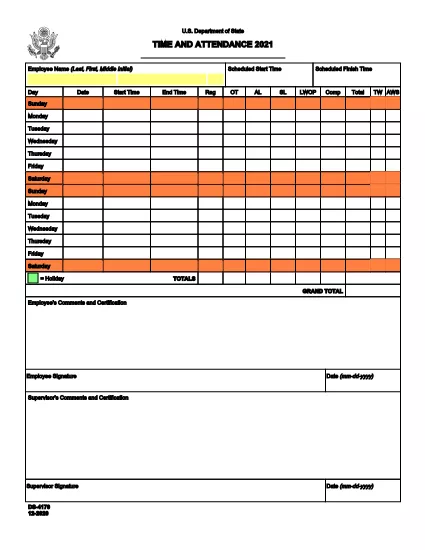
The DS-4170 (2021) is the official Time and Attendance record used by employees of the U.S. Department of State. It captures daily work hours, overtime, leave types, and employee certifications. This page gives you a direct link to the original fillable PDF and step‑by‑step instructions for completing it online with Formize’s PDF Filler.

What Is the DS-4170 Form?

Issued by the Department of State, the DS-4170 tracks each employee’s scheduled and actual work hours, ensuring accurate payroll and compliance with federal labor regulations. The 2021 version includes updated fields for remote work and flexible scheduling.

Key Sections & Fields Explained

  • Employee Name – Enter last name, first name, and middle initial exactly as they appear on your badge.
  • Day / Date – Fill in the calendar day and date (MM‑DD‑YYYY) for each entry.
  • Start Time & Scheduled Start – Record the actual clock‑in time and the pre‑approved start time.
  • End Time & Scheduled Finish – Record the actual clock‑out time and the scheduled finish time.
  • Hours Type – Check the appropriate boxes: Reg, OT, AL, SL, LWOP, Comp.
  • Total & Grand Total – The form automatically sums daily totals; verify the final grand total.
  • Employee Certification – Sign and date to certify accuracy.
  • Supervisor Certification – Supervisor signs after review.

How to Fill the DS-4170 Form Online

Instead of downloading the PDF and opening a separate editor, simply click the Fill out this form button below. The Formize PDF Filler app loads in your browser, letting you type, select checkboxes, and add a digital signature without leaving the page.

Common Mistakes to Avoid

  • Leaving any mandatory field blank – the filler will highlight missing data.
  • Using the wrong date format – the form requires MM‑DD‑YYYY.
  • Mixing AM/PM designations – be consistent for all time entries.
  • Forgetting the employee or supervisor certification – unsigned forms are rejected.

Where to Submit the Completed Form

After you finish, download the completed PDF or email it directly to your supervisor’s official address. Keep a copy for your records. If your agency requires electronic submission, follow the internal portal instructions provided by the Department of State.

FAQ
  • Is the DS-4170 form available as a fillable PDF?

    Yes. The official 2021 version is a fillable PDF hosted by the U.S. Department of State and can be completed online with Formize.

  • Do I need Adobe Acrobat to fill the DS-4170?

    No. Formize’s web‑based PDF Filler works in any modern browser, so you don’t need any additional software.

  • Can I save my progress and finish later?

    Yes. Use the “Save” button in the filler to download a partially completed PDF, then reopen it later to continue.

  • What format should I use for dates and times?

    Enter dates as MM‑DD‑YYYY and times in 12‑hour format with AM/PM (e.g., 08:30 AM).

  • Who must sign the DS-4170 form?

    Both the employee and the supervising officer must sign and date the certification sections before submission.

  • Where do I submit the completed DS-4170?

    Submit the PDF to your department’s HR or payroll office as instructed, typically via email or the internal document portal.

  • Is there a paper‑only version of the DS-4170?

    A printable version exists, but the fillable PDF is recommended for accuracy and faster processing.

  • What if I make a mistake after signing?

    Contact your supervisor immediately. You may need to void the signed copy and submit a corrected version.

HOW TO

How to fill out DS-4170 2021 for free, online in 5 easy steps:

  1. 1
    Click the Fill Button
    Press the “Fill out this form” button on the page to launch Formize’s PDF Filler in your browser.
  2. 2
    Wait for the Filler to Load
    The app loads in a few seconds; you’ll see the DS-4170 PDF with editable fields.
  3. 3
    Complete Each Section
    Enter your name, dates, times, and select the appropriate hour‑type checkboxes. The filler highlights required fields.
  4. 4
    Add Your Signature
    Use your mouse, trackpad, or touch screen to sign in the certification box, then type the date.
  5. 5
    Save or Email the Form
    When finished, click “Download” to save a copy or “Email” to send it directly to your supervisor.
Formize PDF Filler app
ABOUT

Department of State (DOS) Forms

DS-4170 2021 is one of application forms that are used by the United States Department of State (DOS) to collect information and process various services related to international travel, visas, passports, and consular services. The DOS is responsible for managing U.S. foreign policy, international relations, and providing services to U.S. citizens and foreign nationals.

Here are some examples of Department of State forms:

Passport Application Forms: These forms are used to apply for a U.S. passport, which is an official document issued by the government that allows individuals to travel internationally. Passport application forms collect personal information, details about citizenship, identity, and other required information.

Nonimmigrant Visa Application Forms: The DOS oversees the issuance of nonimmigrant visas, which allow foreign nationals to temporarily visit the United States for various purposes such as tourism, business, study, or work. Nonimmigrant visa application forms, such as the DS-160, DS-156, or DS-260, are used to gather information about the applicant's personal details, travel history, purpose of travel, and other relevant information.

Immigrant Visa Application Forms: For individuals seeking to immigrate to the United States, immigrant visa application forms are used. These forms collect detailed information about the applicant's personal history, family members, employment history, and other relevant information. Examples include the DS-260 form for family-based immigration or the DS-230 form for diversity visa lottery winners.

Consular Report of Birth Abroad (CRBA) Form: This form is used to document the birth of a U.S. citizen child abroad to U.S. citizen parents. It collects information about the child, parents, and supporting documentation.

Affidavit of Support Forms: When sponsoring an immigrant to the United States, a U.S. citizen or lawful permanent resident may need to submit an Affidavit of Support form. This form, such as the I-864 or I-134, is used to demonstrate the financial ability to support the intending immigrant and prevent them from becoming a public charge.

Consular Services Forms: The DOS provides various consular services to U.S. citizens and foreign nationals, such as notarial services, requests for emergency assistance, or renunciation of U.S. citizenship. Specific forms are used for these services, including forms DS-11, DS-3053, or DS-4079, depending on the nature of the service requested.

It's important to note that the specific forms used by the U.S. Department of State can change over time, and different services may require different forms. It's advisable to visit the official website of the U.S. Department of State or consult with the nearest U.S. embassy or consulate for the most up-to-date and accurate information regarding the specific forms required for various services.

FEATURES

PDF Filler

The easiest way to fill DS-4170 2021 online

  • Quickly fill out DS-4170 2021
    Looking for a way to quickly fill DS-4170 2021 online? With our online free PDF form filler, you’ll know how to how to edit and fill this pdf document in less than a minute.
  • Easy to use online PDF editor
    Fed up with printing out PDF files so you can edit them, before rescanning and sending them back? Edit PDF documents for free online. Use our online pdf editor to save time and paper.
  • Great tools, all platforms
    Wondering how to fill in DS-4170 2021 on a Mac, or maybe how to use a PDF filler free? Our online PDF tools work on all platforms.
  • Secure file storage
    Completed "DS-4170 2021" files are stored in a secured database managed by Amazon Cloud hosting. You can delete your files from our system anytime. In any case, these files are automatically deleted after 24 hours.
  • Chat with DS-4170 2021
    Chat with "DS-4170 2021" on Chatize that is a free PDF reader assistant. Ask questions and get answers from "DS-4170 2021". Just click on Chat With Document button above.

Delete filling session

Delete the selected filling session? In this case, your progress in completing the form will be lost.

Delete editing session

Delete the selected editing session? In this case, your progress in creating and editing the form will be lost.