
Select language

JF‑57‑EPR Employee Performance Report (Fillable PDF)

  1. Language English
  2. Country USA
  3. Department Department of State
JF‑57‑EPR Employee Performance Report (Fillable PDF)

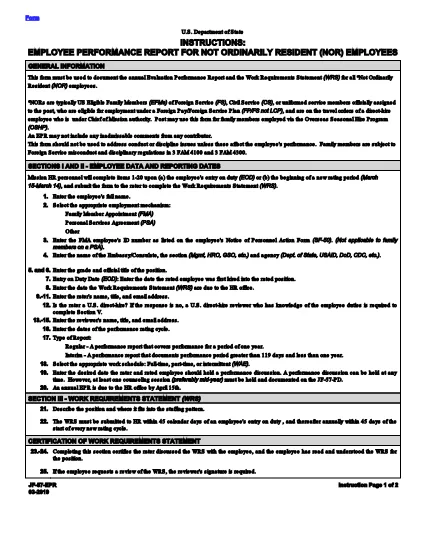
The JF‑57‑EPR (Employee Performance Report) is the official form used by the U.S. Department of State to document the performance of Not Ordinarily Resident (NOR) employees. This fillable PDF lets you complete the report quickly, securely, and without any additional software.

What Is the JF‑57‑EPR?

The JF‑57‑EPR captures an employee’s achievements, competencies, and developmental needs for a specific rating period. It is required for annual performance reviews, promotions, and eligibility for certain benefits.

How to Complete the Fillable JF‑57‑EPR Online

Follow the simple steps below to fill out the form directly in your browser using Formize’s PDF Filler app.

Common Mistakes to Avoid

  • Leaving any required field blank – the filler will flag it before you can submit.
  • Including inadmissible comments or disciplinary language that is unrelated to performance.
  • Using the form for conduct or discipline issues that are covered by other regulations (see 3 FAM 4100/4300).

FAQs About the JF‑57‑EPR

Answers to the most frequently asked questions are provided below. If you need more detail, refer to the official PDF linked at the end of this page.

FAQ
  • Who should use the JF‑57‑EPR?

    The form is used for Not Ordinarily Resident (NOR) employees of the U.S. Department of State to record annual performance.

  • Can I edit the PDF after I download it?

    Yes, but the easiest method is to complete the form using the online Formize filler, which saves all data automatically.

  • What happens if I enter inadmissible comments?

    Inadmissible comments may invalidate the report. The filler will warn you if you include prohibited language.

  • Is a digital signature accepted?

    Yes. The Formize filler includes a secure e‑signature field that meets Department of State requirements.

  • Where can I find the official PDF version?

    The official, fillable PDF is linked at the bottom of this page and can be accessed directly via the URL provided.

HOW TO

How to fill out JF-57-EPR for free, online in 4 easy steps:

  1. 1
    Click the Fill Button
    On this page, click the **Fill out this form** button. The Formize PDF Filler app will open in a new tab.
  2. 2
    Wait for the Filler to Load
    The app loads the JF‑57‑EPR PDF and automatically detects all fillable fields. This usually takes a few seconds.
  3. 3
    Complete Each Section
    Enter the required information, following the on‑screen prompts. Required fields are highlighted in blue.
  4. 4
    Save or Download
    When you’re finished, click **Save** to store the completed form in your Formize account, or **Download** to get a copy on your device.
Formize PDF Filler app
ABOUT

Department of State (DOS) Forms

JF-57-EPR is one of application forms that are used by the United States Department of State (DOS) to collect information and process various services related to international travel, visas, passports, and consular services. The DOS is responsible for managing U.S. foreign policy, international relations, and providing services to U.S. citizens and foreign nationals.

Here are some examples of Department of State forms:

Passport Application Forms: These forms are used to apply for a U.S. passport, which is an official document issued by the government that allows individuals to travel internationally. Passport application forms collect personal information, details about citizenship, identity, and other required information.

Nonimmigrant Visa Application Forms: The DOS oversees the issuance of nonimmigrant visas, which allow foreign nationals to temporarily visit the United States for various purposes such as tourism, business, study, or work. Nonimmigrant visa application forms, such as the DS-160, DS-156, or DS-260, are used to gather information about the applicant's personal details, travel history, purpose of travel, and other relevant information.

Immigrant Visa Application Forms: For individuals seeking to immigrate to the United States, immigrant visa application forms are used. These forms collect detailed information about the applicant's personal history, family members, employment history, and other relevant information. Examples include the DS-260 form for family-based immigration or the DS-230 form for diversity visa lottery winners.

Consular Report of Birth Abroad (CRBA) Form: This form is used to document the birth of a U.S. citizen child abroad to U.S. citizen parents. It collects information about the child, parents, and supporting documentation.

Affidavit of Support Forms: When sponsoring an immigrant to the United States, a U.S. citizen or lawful permanent resident may need to submit an Affidavit of Support form. This form, such as the I-864 or I-134, is used to demonstrate the financial ability to support the intending immigrant and prevent them from becoming a public charge.

Consular Services Forms: The DOS provides various consular services to U.S. citizens and foreign nationals, such as notarial services, requests for emergency assistance, or renunciation of U.S. citizenship. Specific forms are used for these services, including forms DS-11, DS-3053, or DS-4079, depending on the nature of the service requested.

It's important to note that the specific forms used by the U.S. Department of State can change over time, and different services may require different forms. It's advisable to visit the official website of the U.S. Department of State or consult with the nearest U.S. embassy or consulate for the most up-to-date and accurate information regarding the specific forms required for various services.

FEATURES

PDF Filler

The easiest way to fill JF-57-EPR online

  • Quickly fill out JF-57-EPR
    Looking for a way to quickly fill JF-57-EPR online? With our online free PDF form filler, you’ll know how to how to edit and fill this pdf document in less than a minute.
  • Easy to use online PDF editor
    Fed up with printing out PDF files so you can edit them, before rescanning and sending them back? Edit PDF documents for free online. Use our online pdf editor to save time and paper.
  • Great tools, all platforms
    Wondering how to fill in JF-57-EPR on a Mac, or maybe how to use a PDF filler free? Our online PDF tools work on all platforms.
  • Secure file storage
    Completed "JF-57-EPR" files are stored in a secured database managed by Amazon Cloud hosting. You can delete your files from our system anytime. In any case, these files are automatically deleted after 24 hours.
  • Chat with JF-57-EPR
    Chat with "JF-57-EPR" on Chatize that is a free PDF reader assistant. Ask questions and get answers from "JF-57-EPR". Just click on Chat With Document button above.

Delete filling session

Delete the selected filling session? In this case, your progress in completing the form will be lost.

Delete editing session

Delete the selected editing session? In this case, your progress in creating and editing the form will be lost.