
Select language

MVR-3 Fillable PDF – North Carolina DMV Vehicle Form

  1. Language English
  2. Country USA
  3. Activity Vehicle Registration
  4. Department Department of Transport
  5. State North Carolina
Fill out this form
MVR-3 Fillable PDF – North Carolina DMV Vehicle Form

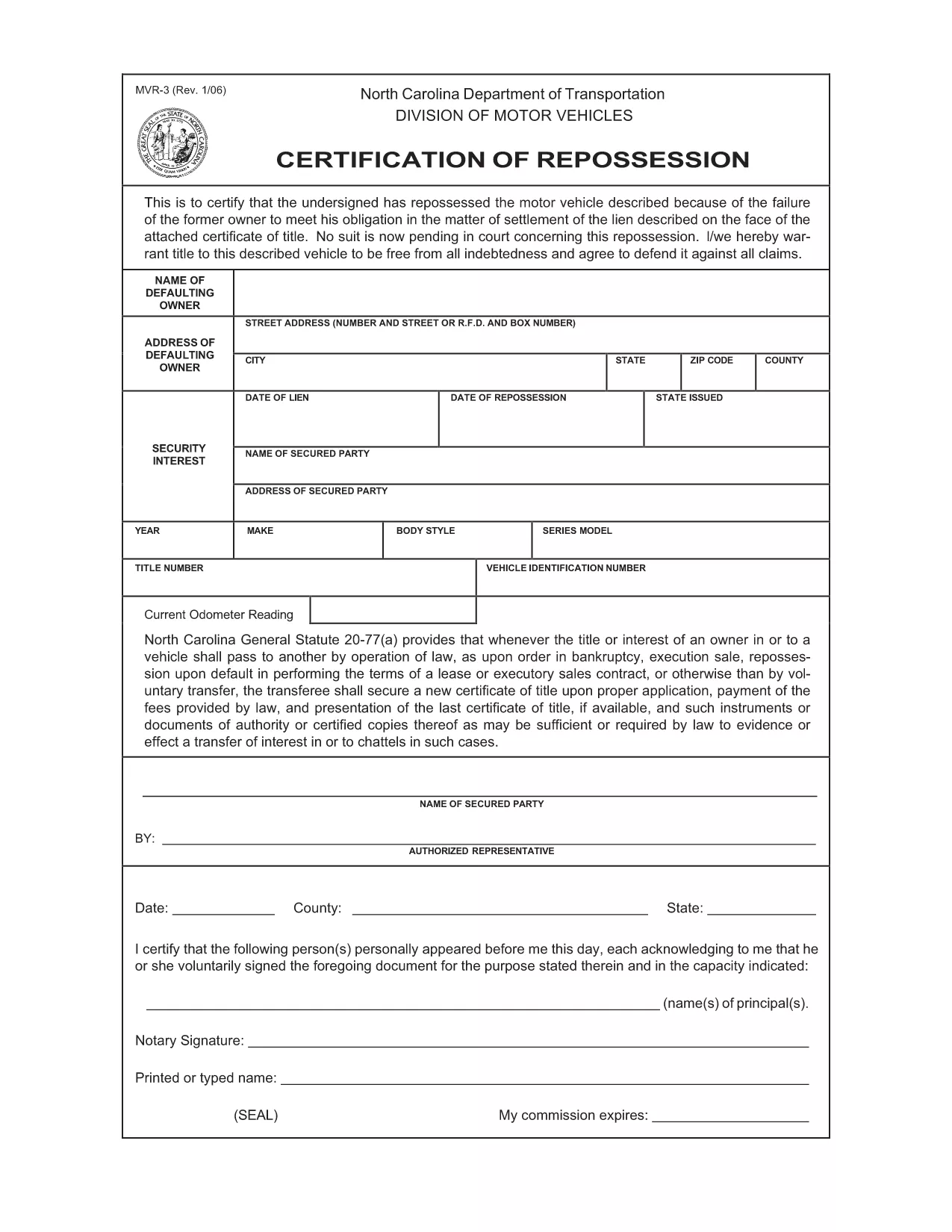
The MVR-3 is the official North Carolina Department of Transportation (NCDOT) vehicle registration application. Whether you’re registering a new vehicle, updating ownership information, or correcting a title, the MVR-3 is the required paperwork.

What Is the MVR-3 Form?

The MVR-3 collects essential vehicle details such as VIN, make, model, year, and current odometer reading. It also captures owner information, lienholder data, and any special exemptions.

Key Sections of the MVR-3

  • Section A – Owner Information: Name, address, driver’s license number.
  • Section B – Vehicle Details: VIN, year, make, model, body style.
  • Section C – Lienholder Data (if applicable): Name and address of the lienholder.
  • Section D – Certification & Signature: Owner’s signature and date.

How to Complete the Form Online

Instead of printing, downloading, and hand‑filling the PDF, use Formize’s built‑in filler:

  1. Click the "Fill out this form" button on this page.
  2. Wait a few seconds while the Formize PDF Filler loads the MVR-3.
  3. Enter your information directly into each field. The filler validates required entries in real time.
  4. Review the completed form for accuracy.
  5. Save a copy to your device or print it for submission at your local NCDOT office.

Common Mistakes & Tips

  • Incorrect VIN: Double‑check the 17‑character VIN; a single digit error can delay processing.
  • Missing Signature: The form is invalid without the owner’s signature and date.
  • Odometer Disclosure: Provide the exact current mileage; tampering can result in penalties.
  • Out‑of‑date Address: Ensure the mailing address matches the one on file with the DMV.

Download & Save Your Completed Form

After filling out the MVR-3 with Formize, you can download a PDF copy for your records or print it for immediate submission. Keep a saved copy in case the DMV requests additional information.

FAQ
  • What is the purpose of the MVR-3 form?

    The MVR-3 is used to register a vehicle, transfer ownership, or correct title information with the North Carolina DMV.

  • Can I submit the MVR-3 electronically?

    North Carolina currently requires a printed and signed copy for most transactions, but you can fill it out online and print it yourself.

  • Do I need a notary for the MVR-3?

    No notary is required unless a lienholder specifically requests notarization on the lien section.

  • How long does it take for the DMV to process the MVR-3?

    Processing typically takes 7‑10 business days after the form is submitted, provided all information is correct.

  • What should I do if I make a mistake on the form?

    Cross out the error with a single line, initial it, and write the correct information. Alternatively, start a new form to avoid confusion.

  • Is there a fee associated with filing the MVR-3?

    Yes, filing fees vary depending on the transaction type (e.g., title transfer, registration renewal). Check the NCDOT fee schedule for current rates.

  • Where can I get help if I have questions about the MVR-3?

    Contact your local NCDOT office or visit the official NCDOT website for FAQs and contact information.

HOW TO

How to fill out MVR-3 for free, online in 5 easy steps:

  1. 1
    Open the Fillable Form
    Click the "Fill out this form" button on the page to launch the Formize PDF Filler.
  2. 2
    Wait for the Filler to Load
    A short loading screen appears while the MVR-3 PDF is prepared for editing.
  3. 3
    Enter Your Information
    Type directly into each highlighted field. Required fields are marked with an asterisk.
  4. 4
    Review and Validate
    Check every section for completeness. The filler will alert you to any missing or invalid entries.
  5. 5
    Save or Print
    Download the completed PDF to your device or print it for submission at your local NCDOT office.
Formize PDF Filler app
ABOUT

Vehicle Registration Forms

MVR-3 is one of DMV forms, also known as Department of Motor Vehicles forms, that are documents used in various transactions and processes related to motor vehicles. The DMV is a government agency responsible for driver licensing, vehicle registration, and enforcing motor vehicle laws. The specific DMV forms available can vary by jurisdiction, but here are some common examples:

Driver's License Forms: These forms are used to apply for a driver's license or to request changes or renewals. They typically require personal information, proof of identity, and may include sections for medical information or driving history.

Vehicle Registration Forms: These forms are used to register a motor vehicle with the DMV. They require vehicle information, ownership details, and proof of insurance.

Title Transfer Forms: When buying or selling a vehicle, these forms are used to transfer ownership from one party to another. They require information about the buyer, seller, vehicle details, and may include a bill of sale.

Vehicle Release of Liability Forms: When selling or transferring ownership of a vehicle, these forms notify the DMV that the seller is no longer responsible for the vehicle. It helps protect the seller from liability for accidents or incidents involving the vehicle after the sale.

License Plate and Registration Renewal Forms: These forms are used to renew vehicle registration or request new license plates. They typically require information about the registered owner, current registration details, and payment of applicable fees.

Driving Records Request Forms: These forms allow individuals to request their driving records from the DMV, which provide information about driving violations, license status, and other relevant details.

Specialty or Personalized License Plate Forms: These forms are used to apply for personalized or specialty license plates, which allow individuals to customize their license plate with specific characters or designs.

These are just a few examples of the many forms that may be available through the DMV. The specific forms and requirements can vary by jurisdiction, so it is important to consult the local DMV website or visit a DMV office to obtain the correct forms for your particular needs.

FEATURES

PDF Filler

The easiest way to fill MVR-3 online

  • Quickly fill out MVR-3
    Looking for a way to quickly fill MVR-3 online? With our online free PDF form filler, you’ll know how to how to edit and fill this pdf document in less than a minute.
  • Easy to use online PDF editor
    Fed up with printing out PDF files so you can edit them, before rescanning and sending them back? Edit PDF documents for free online. Use our online pdf editor to save time and paper.
  • Great tools, all platforms
    Wondering how to fill in MVR-3 on a Mac, or maybe how to use a PDF filler free? Our online PDF tools work on all platforms.
  • Secure file storage
    Completed "MVR-3" files are stored in a secured database managed by Amazon Cloud hosting. You can delete your files from our system anytime. In any case, these files are automatically deleted after 24 hours.
  • Chat with MVR-3
    Chat with "MVR-3" on Chatize that is a free PDF reader assistant. Ask questions and get answers from "MVR-3". Just click on Chat With Document button above.

Delete filling session

Delete the selected filling session? In this case, your progress in completing the form will be lost.

Delete editing session

Delete the selected editing session? In this case, your progress in creating and editing the form will be lost.