
Select language

Virginia DMV CRD 93 Information Request Form (Fillable PDF)

  1. Country USA
  2. Language English
  3. Activity Driver's License
  4. State Virginia
Fill out this form
Virginia DMV CRD 93 Information Request Form (Fillable PDF)

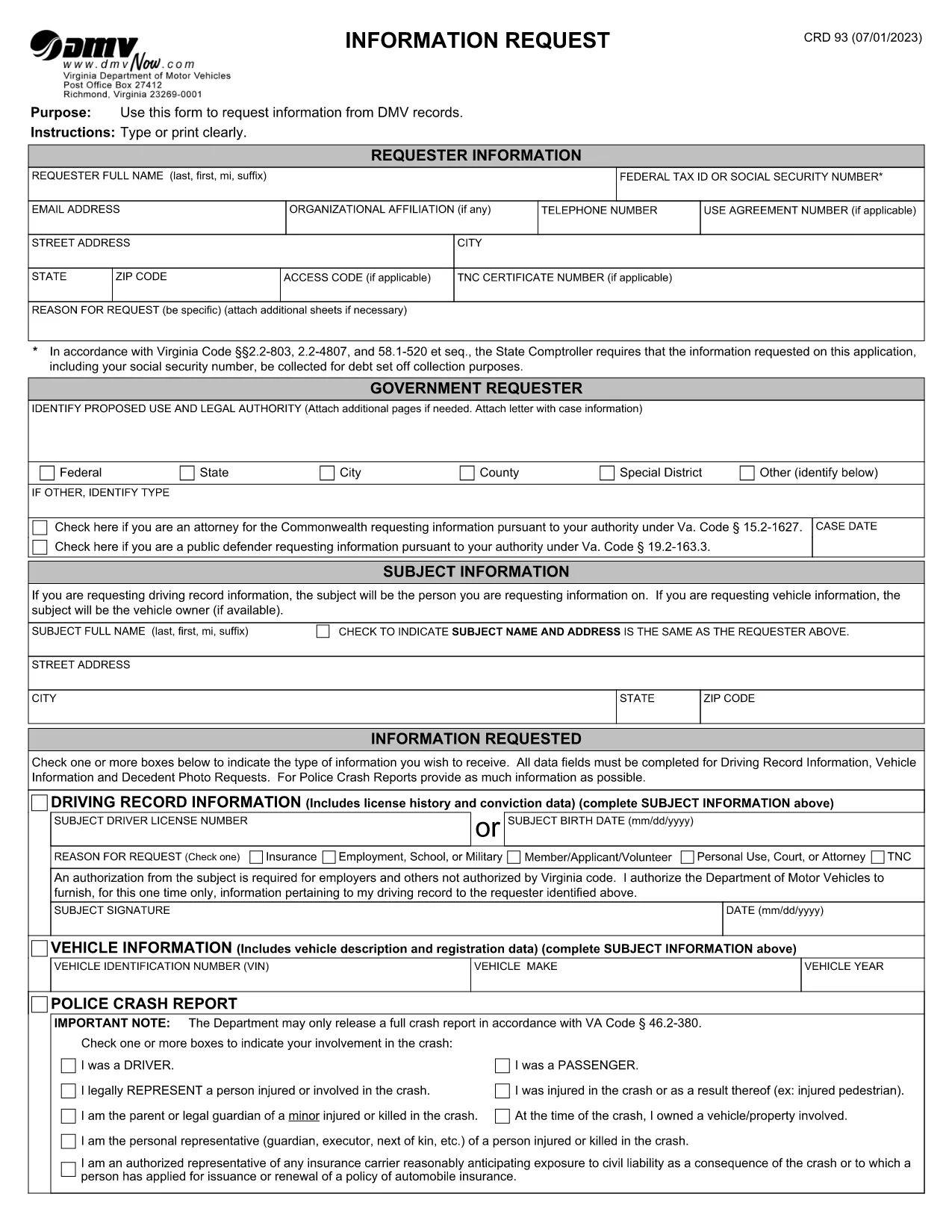
The CRD 93 is Virginia’s official Information Request form used to obtain driving records, vehicle data, crash reports, and other DMV‑maintained information. Traditionally you would print, fill, sign, and mail the form, but with Formize you can complete the same document entirely online – faster, error‑free, and fully fillable PDF ready.

What Is the CRD 93 Form?

Issued by the Virginia Department of Motor Vehicles (DMV), the CRD 93 allows individuals, businesses, and law‑enforcement agencies to request specific records such as:

  • Driver’s license history
  • Vehicle registration details
  • Police crash reports
  • Decedent photographs and other special‑request items

Because the form contains sensitive personal data, the DMV requires a clear statement of purpose and, in many cases, a fee.

How to Complete the CRD 93 Online with Formize

Instead of downloading, printing, and scanning, simply click the “Fill out this form” button below. Formize will load the official PDF into its secure PDF Filler app, letting you type, sign, and save directly in your browser.

Common Mistakes to Avoid

  • Leaving required fields blank: The DMV will reject incomplete requests.
  • Incorrect identification numbers: Double‑check Social Security or Tax ID numbers.
  • Vague reason for request: Provide a specific, lawful purpose (e.g., “court‑ordered driver‑record review”).
  • Missing signatures: Use the electronic signature tool; a handwritten signature on a printed copy is no longer required.

Where to Submit Your Request

After completing the form, download the signed PDF and mail it to:

Virginia Department of Motor Vehicles
Information Request Division
P.O. Box 27412
Richmond, VA 23269‑7412

Include any required fees (check or money order) as instructed on the last page of the form.

Download the Official Fillable PDF

Ready to start? Click the button below to open the official CRD 93 PDF in Formize’s filler.

Fill out this form

FAQ
  • What is the purpose of the CRD 93 form?

    The CRD 93 is used to request specific DMV records in Virginia, such as driver histories, vehicle registrations, crash reports, and decedent photos.

  • Can I submit the CRD 93 electronically?

    Virginia DMV still requires a mailed PDF with any applicable fees, but you can complete the form electronically using Formize and then print or email the PDF to yourself for mailing.

  • Do I need a Virginia address to use this form?

    No. The form can be used by anyone who has a lawful reason to request the records, regardless of residency, as long as the request complies with Virginia law.

  • How long does it take to receive the requested records?

    Processing times vary. Standard requests typically take 10‑15 business days after the DMV receives your completed form and payment.

  • What fees are associated with a CRD 93 request?

    Fees depend on the type of record requested (e.g., driver history, crash report). The fee schedule is listed on the last page of the form.

  • Is a handwritten signature still required?

    No. An electronic signature created in the Formize PDF Filler satisfies the DMV’s signature requirement.

  • Can I request records for someone else?

    Yes, but you must provide a valid reason, proof of authority (e.g., power of attorney), and the subject’s identifying information.

  • What should I do if I make a mistake on the form?

    Because the PDF is fillable, you can edit any field before saving. If you’ve already downloaded the PDF, simply open it again in Formize, correct the error, and re‑save.

HOW TO

How to fill out CRD 93 for free, online in 5 easy steps:

  1. 1
    Open the Fillable Form
    Click the “Fill out this form” button above. The official CRD 93 PDF loads instantly in Formize’s secure PDF Filler.
  2. 2
    Enter Your Information
    Type your name, Tax ID or Social Security Number, address, and detailed reason for the request directly into the fields.
  3. 3
    Add Subject Details
    Provide the driver’s license number, vehicle VIN, or other identifiers for the record you are requesting.
  4. 4
    Sign Electronically
    Use the built‑in signature tool to add a digital signature. No printer or scanner needed.
  5. 5
    Save and Submit
    Download the completed PDF, attach the required fee, and mail it to the Virginia DMV address shown on the form.
Formize PDF Filler app
ABOUT

Driving License Application Forms

In most countries, it's mandatory to have a driving license before you can hit the road. Getting a driving license is an important milestone for anyone who wants to drive a car.

CRD 93 is one of Driving License Application forms that are documents used to gather information from people who want to apply for a driving license. It usually contains fields for the applicant's name, date of birth, ID number, contact information, as well as their driver's license history and experience.

FEATURES

PDF Filler

The easiest way to fill CRD 93 online

  • Quickly fill out CRD 93
    Looking for a way to quickly fill CRD 93 online? With our online free PDF form filler, you’ll know how to how to edit and fill this pdf document in less than a minute.
  • Easy to use online PDF editor
    Fed up with printing out PDF files so you can edit them, before rescanning and sending them back? Edit PDF documents for free online. Use our online pdf editor to save time and paper.
  • Great tools, all platforms
    Wondering how to fill in CRD 93 on a Mac, or maybe how to use a PDF filler free? Our online PDF tools work on all platforms.
  • Secure file storage
    Completed "CRD 93" files are stored in a secured database managed by Amazon Cloud hosting. You can delete your files from our system anytime. In any case, these files are automatically deleted after 24 hours.
  • Chat with CRD 93
    Chat with "CRD 93" on Chatize that is a free PDF reader assistant. Ask questions and get answers from "CRD 93". Just click on Chat With Document button above.

Delete filling session

Delete the selected filling session? In this case, your progress in completing the form will be lost.

Delete editing session

Delete the selected editing session? In this case, your progress in creating and editing the form will be lost.