
Select language

DI-17 Classroom Instruction Attendance Roster (Fillable PDF)

  1. Country USA
  2. Language English
  3. Activity Driver's License
  4. State Virginia
Fill out this form
DI-17 Classroom Instruction Attendance Roster (Fillable PDF)

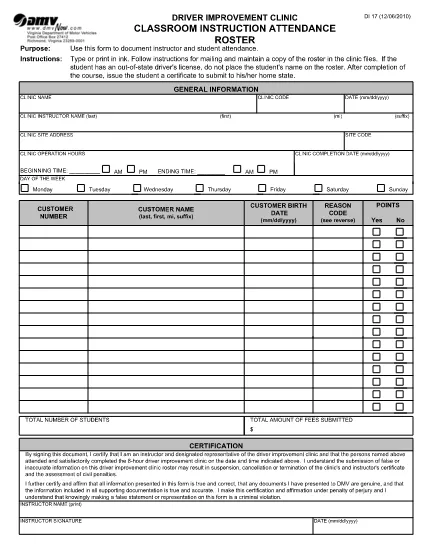
The DI-17 is the Virginia Department of Motor Vehicles (DMV) form used to record attendance for classroom driver‑education instruction. Schools, driving instructors, and training programs must submit this roster within 24 hours of completing a class.

What Is the DI-17 Form?

DI-17 captures essential details such as the instructor’s name, student information, dates of instruction, and the specific curriculum covered. It ensures compliance with Virginia DMV regulations and helps verify that learners have met the required training hours before taking the road‑skills test.

How to Complete the DI-17 Online

With Formize’s fillable PDF technology you can complete the DI‑17 directly in your browser—no extra software needed. Follow the simple steps below:

  • Click the Fill out this form button on this page.
  • Wait for the Formize PDF Filler app to load (usually a few seconds).
  • Enter all required fields exactly as they appear on the original paper form.
  • Use the Save button to store a copy on your device or in the cloud.
  • When finished, click Download to get the completed PDF ready for submission.

Common Errors to Avoid

Even a small mistake can delay processing. Keep these tips in mind:

  • Incorrect dates: Verify the class date matches the DMV’s calendar.
  • Missing signatures: Both the instructor and each student must sign.
  • Illegible handwriting: The fillable fields ensure clear, legible text.
  • Wrong form version: Use the latest DI‑17 PDF provided by the Virginia DMV (the link below is always up‑to‑date).

Submit Your Completed DI-17

After saving the filled PDF, upload it to the Virginia DMV Extranet portal or email it according to your organization’s instructions. The DMV requires receipt within 24 hours of the class.

Why Use Formize Fillable PDF

Formize turns static PDFs into interactive, web‑based forms. Benefits include:

  • Instant access: No downloads or installations.
  • Data accuracy: Built‑in validation reduces entry errors.
  • Secure storage: Your completed form is saved locally or to cloud storage of your choice.
  • Compliance‑ready: The PDF matches the official DMV layout exactly.

Ready to start? Click the button below and fill out the DI‑17 in seconds.

FAQ
  • What is the purpose of the DI‑17 form?

    The DI‑17 records attendance for classroom driver‑education instruction and verifies that students have completed the required training before taking the road‑skills test.

  • Can I fill out the DI‑17 on a mobile device?

    Yes. Formize’s fillable PDF works on smartphones and tablets with any modern browser.

  • Do I need Adobe Acrobat to complete the DI‑17?

    No. The Formize PDF Filler runs entirely in the browser, eliminating the need for separate PDF editors.

  • How soon must the DI‑17 be submitted after a class?

    Virginia DMV requires the completed DI‑17 to be submitted within 24 hours of the class date.

  • What if I make a mistake after saving the form?

    Open the saved PDF again in the Formize filler, correct the error, and re‑save before submitting.

  • Is the DI‑17 form free to download?

    Yes. The official DI‑17 PDF is provided by the Virginia DMV at no cost.

  • Do I need a DMV account to use the fillable version?

    No. You can fill out and download the PDF without a DMV login; however, submission through the Extranet may require an authorized account.

  • Can I print the completed DI‑17 after filling it online?

    Absolutely. After saving, you can print the PDF for your records or to submit a hard copy if required.

HOW TO

How to fill out DI-17 for free, online in 5 easy steps:

  1. 1
    Click the Fill‑out Button
    On this page, press the “Fill out this form” button to launch the Formize PDF Filler.
  2. 2
    Wait for the Filler to Load
    The web app loads the DI‑17 PDF in a few seconds. No download or installation is required.
  3. 3
    Enter Required Information
    Complete each fillable field with accurate data—dates, instructor name, student details, and signatures.
  4. 4
    Review and Save
    Double‑check all entries, then click Save to store a copy on your device or cloud storage.
  5. 5
    Download or Submit
    Download the finished PDF and upload it to the Virginia DMV Extranet portal, or follow your organization’s submission guidelines.
Formize PDF Filler app
ABOUT

Driving License Application Forms

In most countries, it's mandatory to have a driving license before you can hit the road. Getting a driving license is an important milestone for anyone who wants to drive a car.

DI-17 is one of Driving License Application forms that are documents used to gather information from people who want to apply for a driving license. It usually contains fields for the applicant's name, date of birth, ID number, contact information, as well as their driver's license history and experience.

FEATURES

PDF Filler

The easiest way to fill DI-17 online

  • Quickly fill out DI-17
    Looking for a way to quickly fill DI-17 online? With our online free PDF form filler, you’ll know how to how to edit and fill this pdf document in less than a minute.
  • Easy to use online PDF editor
    Fed up with printing out PDF files so you can edit them, before rescanning and sending them back? Edit PDF documents for free online. Use our online pdf editor to save time and paper.
  • Great tools, all platforms
    Wondering how to fill in DI-17 on a Mac, or maybe how to use a PDF filler free? Our online PDF tools work on all platforms.
  • Secure file storage
    Completed "DI-17" files are stored in a secured database managed by Amazon Cloud hosting. You can delete your files from our system anytime. In any case, these files are automatically deleted after 24 hours.
  • Chat with DI-17
    Chat with "DI-17" on Chatize that is a free PDF reader assistant. Ask questions and get answers from "DI-17". Just click on Chat With Document button above.

Delete filling session

Delete the selected filling session? In this case, your progress in completing the form will be lost.

Delete editing session

Delete the selected editing session? In this case, your progress in creating and editing the form will be lost.