
Select language

Virginia DL 569 Emergency Contact Application (Fillable PDF)

  1. Country USA
  2. Language English
  3. Activity Driver's License
  4. State Virginia
Fill out this form
Virginia DL 569 Emergency Contact Application (Fillable PDF)

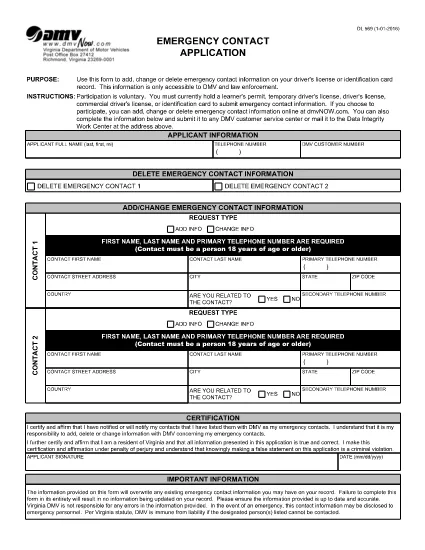
The DL 569 is the Virginia Department of Motor Vehicles (DMV) Emergency Contact Application. It lets you add, change, or delete emergency contact information linked to your driver’s license or state ID. Keeping this information up‑to‑date can help law enforcement and DMV staff reach your designated contacts quickly in an emergency.

What Is the DL 569 Form?

This form is a short, printable PDF that captures:

  • Primary and secondary emergency contacts
  • Relationship to you
  • Phone numbers and mailing address
  • Signature and date

Because it’s a fillable PDF, you can complete it directly in your browser without needing special software.

How to Fill Out the DL 569 Online

Instead of downloading the PDF and opening a separate editor, simply click the “Fill out this form” button on this page. The Formize PDF Filler will load instantly, allowing you to type, select, and sign the form online.

  1. Click Fill out this form below.
  2. The Formize PDF Filler app opens in a new tab.
  3. Enter each field carefully – the form will highlight required sections.
  4. Save your progress at any time with the Save button.
  5. When finished, click Submit to download the completed PDF.

Common Mistakes to Avoid

  • Leaving a required field blank – the filler will block submission.
  • Entering an incorrect phone format (use 10‑digit numbers without dashes).
  • Forgetting to sign and date the form.
  • Using a non‑Virginia address for a Virginia driver’s license.

Where to Submit Your Completed Form

After you download the completed PDF, you can:

  • Mail it to your local Virginia DMV office.
  • Drop it off in person at any DMV service center.
  • Upload it via the Virginia DMV online portal if you have an account.

Make sure to keep a copy for your records.

FAQ
  • Do I need Adobe Acrobat to fill out DL 569?

    No. The Formize PDF Filler works in any modern browser, so you can complete the form without installing additional software.

  • Can I edit the form after I download it?

    Yes, but you’ll need a PDF editor. To avoid extra steps, finish all edits in the online filler before downloading.

  • Is there a fee to submit the DL 569?

    No. The Emergency Contact Application is free to complete and submit.

  • How long does the DMV keep my emergency contact information?

    The DMV retains the information as long as your driver’s license or ID is active. Update the form whenever contacts change.

  • What if I make a mistake on the form?

    Simply reopen the fillable PDF, correct the error, and download a new version before submitting.

  • Can I submit the form electronically?

    Yes, if you have a Virginia DMV online account you can upload the completed PDF directly through the portal.

  • Do I need to provide both a primary and secondary contact?

    Providing a secondary contact is optional but recommended for added safety.

  • Is the DL 569 accepted for non‑Virginia licenses?

    The form is specific to Virginia driver’s licenses and state IDs only.

HOW TO

How to fill out DL 569 for free, online in 5 easy steps:

  1. 1
    Open the Fillable Form
    Click the "Fill out this form" button below. The Formize PDF Filler loads instantly in a new browser tab.
  2. 2
    Enter Your Information
    Type your emergency contacts, relationship, phone numbers, and address directly into the highlighted fields.
  3. 3
    Save and Review
    Use the Save button to keep a draft. Review each entry for accuracy before finalizing.
  4. 4
    Submit and Download
    When all fields are completed, click Submit to generate a finished PDF. Download and keep a copy for your records.
  5. 5
    Send to the DMV
    Mail, drop off, or upload the completed PDF to your nearest Virginia DMV office.
Formize PDF Filler app
ABOUT

Driving License Application Forms

In most countries, it's mandatory to have a driving license before you can hit the road. Getting a driving license is an important milestone for anyone who wants to drive a car.

DL 569 is one of Driving License Application forms that are documents used to gather information from people who want to apply for a driving license. It usually contains fields for the applicant's name, date of birth, ID number, contact information, as well as their driver's license history and experience.

FEATURES

PDF Filler

The easiest way to fill DL 569 online

  • Quickly fill out DL 569
    Looking for a way to quickly fill DL 569 online? With our online free PDF form filler, you’ll know how to how to edit and fill this pdf document in less than a minute.
  • Easy to use online PDF editor
    Fed up with printing out PDF files so you can edit them, before rescanning and sending them back? Edit PDF documents for free online. Use our online pdf editor to save time and paper.
  • Great tools, all platforms
    Wondering how to fill in DL 569 on a Mac, or maybe how to use a PDF filler free? Our online PDF tools work on all platforms.
  • Secure file storage
    Completed "DL 569" files are stored in a secured database managed by Amazon Cloud hosting. You can delete your files from our system anytime. In any case, these files are automatically deleted after 24 hours.
  • Chat with DL 569
    Chat with "DL 569" on Chatize that is a free PDF reader assistant. Ask questions and get answers from "DL 569". Just click on Chat With Document button above.

Delete filling session

Delete the selected filling session? In this case, your progress in completing the form will be lost.

Delete editing session

Delete the selected editing session? In this case, your progress in creating and editing the form will be lost.