
Select language

Employer Declaration for Ignition Interlock Exemption

  1. Language English
  2. Country USA
  3. Activity Driver's License
  4. State Washington
Fill out this form
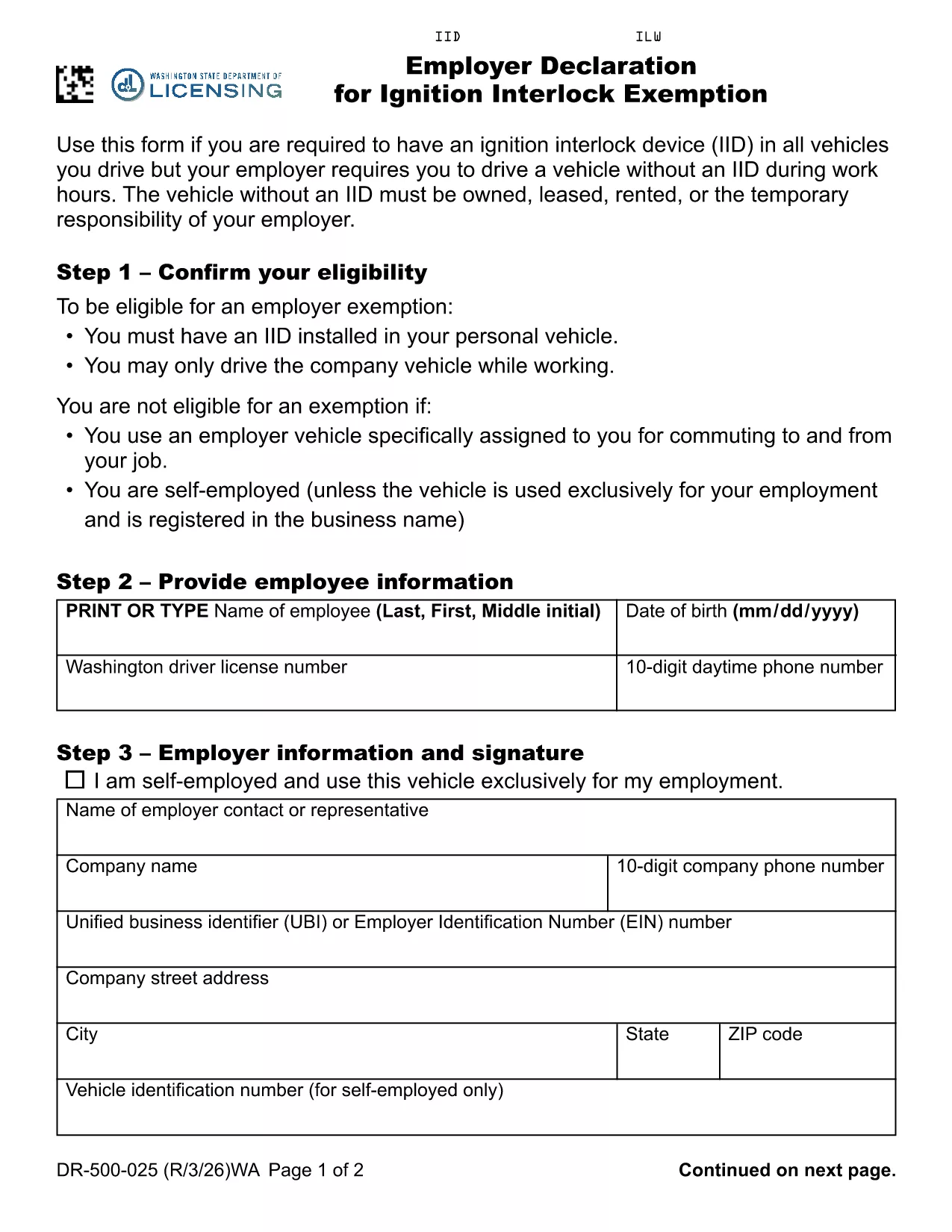
Employer Declaration for Ignition Interlock Exemption

Washington law requires drivers with an ignition interlock device (IID) to have the device installed in every vehicle they operate. If your employer requires you to drive a company‑owned, leased, rented or temporarily assigned vehicle that does not have an IID, you must submit an Employer Declaration for Ignition Interlock Exemption (RCW 46.20.720 (6)(b)). This fillable PDF form satisfies the Department of Licensing’s requirement and protects both you and your employer.

What Is an Ignition Interlock Exemption?

An exemption allows a driver who is otherwise required to use an IID to operate a specific vehicle without the device, provided the vehicle is under the employer’s responsibility during work hours. The exemption is granted on a case‑by‑case basis and must be documented with a signed employer declaration.

Who Needs This Declaration?

  • Employees who have an IID installed in their personal vehicle.
  • Employees whose job requires them to drive a company vehicle that does not have an IID.
  • Employers who temporarily assign vehicles to employees during work hours.

How to Complete the Form Online

Instead of downloading the PDF and editing it manually, simply click the "Fill out this form" button below. The Formize PDF Filler app will load the fillable PDF directly in your browser.

Common Mistakes to Avoid

  • Leaving the employer’s address or phone number blank.
  • Forgetting to include the vehicle’s VIN, make, and model.
  • Not signing the declaration electronically before submitting.
  • Submitting an incomplete form, which can delay the exemption approval.

Where to Submit the Completed Form

After you finish the online fill‑out, download the completed PDF and mail it to the Washington State Department of Licensing, or submit it electronically if your employer uses the state’s online portal. Keep a copy for your records.

FAQ
  • Do I need a separate exemption for each company vehicle?

    Yes. Each vehicle that does not have an IID must be listed on a separate Employer Declaration form.

  • Can my employer fill out the form on my behalf?

    The employer can complete the employer‑specific sections, but the driver must sign the declaration electronically.

  • Is an electronic signature accepted?

    Washington State Department of Licensing accepts electronic signatures submitted through a certified PDF filler like Formize.

  • How long does the exemption approval take?

    Processing typically takes 5‑10 business days after the Department receives a complete, signed declaration.

  • What happens if the form is incomplete?

    An incomplete form will be returned for correction, which can delay the exemption and may result in a citation if you drive without an IID.

  • Do I need to renew the exemption?

    The exemption is valid as long as the driver’s IID requirement remains in effect. If circumstances change, a new declaration must be submitted.

  • Can I use this form if I work outside Washington?

    This specific declaration is for Washington State drivers under RCW 46.20.720. Other states have their own exemption procedures.

HOW TO

How to fill out ignition interlock exemption for free, online in 6 easy steps:

  1. 1
    Click the Fill‑out Button
    Press the "Fill out this form" button on the page to launch the Formize PDF Filler.
  2. 2
    Wait for the Filler to Load
    The fillable PDF will appear in your browser within a few seconds.
  3. 3
    Enter Employer Information
    Type the employer’s name, address, and contact details in the highlighted fields.
  4. 4
    Provide Vehicle Details
    Enter the VIN, make, model, and license plate of the company vehicle you will drive.
  5. 5
    Sign Electronically
    Use the signature field to sign the declaration electronically.
  6. 6
    Submit or Download
    Click "Submit" to send the form directly to the Washington Department of Licensing, or download the completed PDF for mailing.
Formize PDF Filler app
ABOUT

Driving License Application Forms

In most countries, it's mandatory to have a driving license before you can hit the road. Getting a driving license is an important milestone for anyone who wants to drive a car.

ignition interlock exemption is one of Driving License Application forms that are documents used to gather information from people who want to apply for a driving license. It usually contains fields for the applicant's name, date of birth, ID number, contact information, as well as their driver's license history and experience.

FEATURES

PDF Filler

The easiest way to fill ignition interlock exemption online

  • Quickly fill out ignition interlock exemption
    Looking for a way to quickly fill ignition interlock exemption online? With our online free PDF form filler, you’ll know how to how to edit and fill this pdf document in less than a minute.
  • Easy to use online PDF editor
    Fed up with printing out PDF files so you can edit them, before rescanning and sending them back? Edit PDF documents for free online. Use our online pdf editor to save time and paper.
  • Great tools, all platforms
    Wondering how to fill in ignition interlock exemption on a Mac, or maybe how to use a PDF filler free? Our online PDF tools work on all platforms.
  • Secure file storage
    Completed "ignition interlock exemption" files are stored in a secured database managed by Amazon Cloud hosting. You can delete your files from our system anytime. In any case, these files are automatically deleted after 24 hours.
  • Chat with ignition interlock exemption
    Chat with "ignition interlock exemption" on Chatize that is a free PDF reader assistant. Ask questions and get answers from "ignition interlock exemption". Just click on Chat With Document button above.

Delete filling session

Delete the selected filling session? In this case, your progress in completing the form will be lost.

Delete editing session

Delete the selected editing session? In this case, your progress in creating and editing the form will be lost.