
Select language

MV3644 Medical Examination Report – Fillable PDF Form

  1. Language English
  2. Country USA
  3. Activity Driver's License
  4. State Wisconsin
Fill out this form
MV3644 Medical Examination Report – Fillable PDF Form

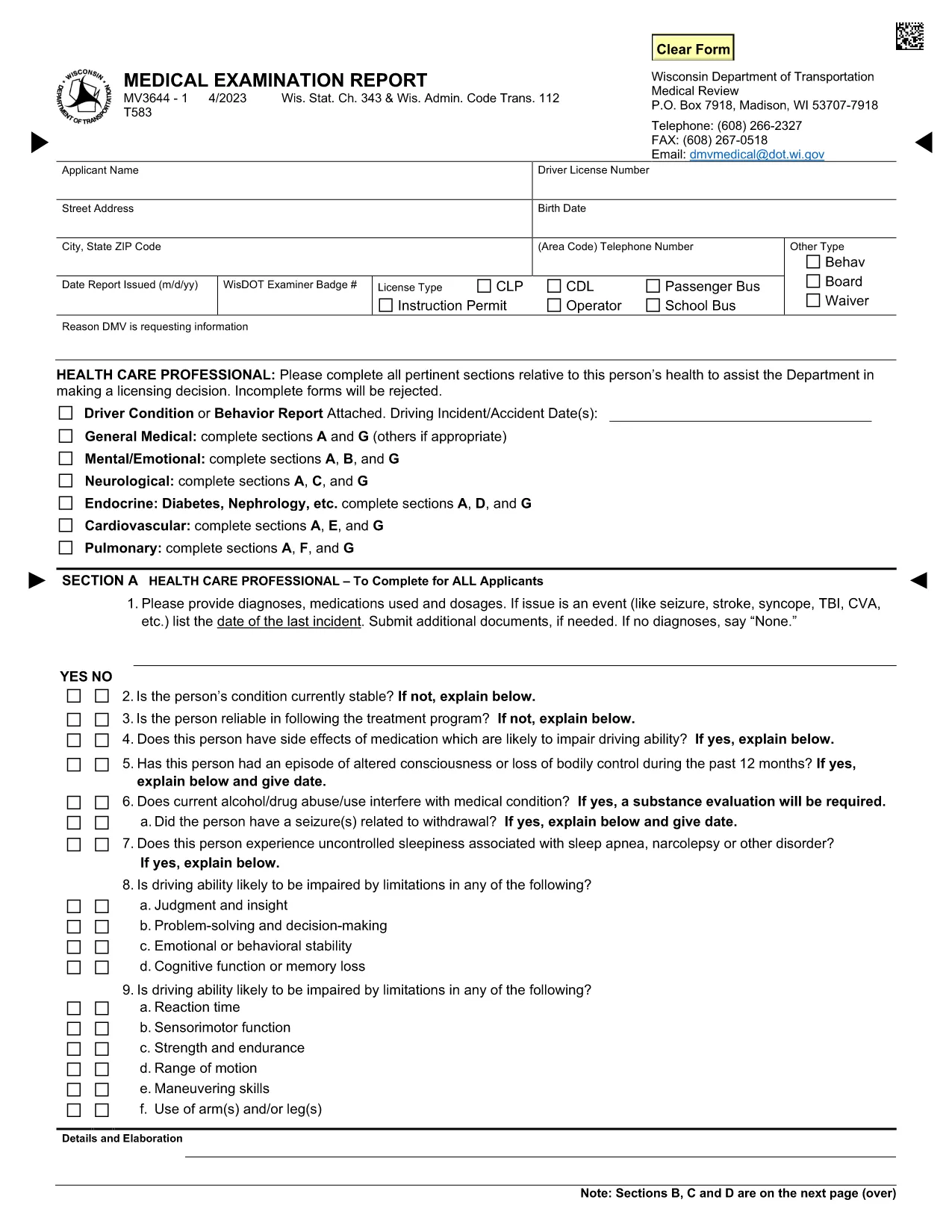
The MV3644 Medical Examination Report is the official form used by the Wisconsin Department of Transportation (WisDOT) to evaluate the medical fitness of commercial driver’s license (CDL) applicants and renewals. This fillable PDF lets healthcare providers record vital health information quickly and securely.

Using the online fillable PDF MV3644 saves you time, eliminates the need for printing, scanning, or faxing, and ensures that every required field is completed correctly. The form is accepted by the Wisconsin DMV for all CDL medical examinations.

Key sections of the MV3644 include applicant details, medical history, physical examination findings, medications, and the provider’s certification. Accurate completion helps avoid delays in license processing.

FAQ
  • Who must complete the MV3644 form?

    The MV3644 must be completed by a licensed healthcare provider for any driver applying for or renewing a commercial driver’s license (CDL) in Wisconsin.

  • Can I print the MV3644 form and fill it by hand?

    While a handwritten version is technically accepted, using the fillable PDF reduces errors and speeds up processing. Many DMV offices prefer the electronic version.

  • How often do I need a new MV3644?

    A new MV3644 is required for each CDL application, renewal, or when the examiner determines a follow‑up examination is necessary (usually every 2‑5 years depending on age and medical history).

  • What happens if I miss a required field?

    The Wisconsin DMV will reject an incomplete MV3644, causing delays. The Formize filler highlights missing data, helping you avoid this issue.

  • Do I need to submit the original signed form?

    WisDOT accepts the electronically signed PDF as the original document. Keep a copy for your records.

  • Is the MV3644 form accepted for non‑commercial licenses?

    No. The MV3644 is specifically for commercial driver’s licenses and related endorsements.

  • Can I save my progress and return later?

    Yes. The Formize PDF Filler allows you to save a draft locally and continue editing at any time before final submission.

  • Where do I send the completed MV3644?

    Submit the completed form to the Wisconsin Department of Transportation’s Driver Licensing division, either electronically via their portal or by mailing the printed copy to the address on the form.

HOW TO

How to fill out MV3644 for free, online in 6 easy steps:

  1. 1
    Click the Fill‑out Button
    On this page, click the “Fill out this form” button. The Formize PDF Filler app will open in a new tab.
  2. 2
    Formize PDF Filler Loads
    The fillable MV3644 PDF loads instantly. No download or extra software is required.
  3. 3
    Enter the Required Information
    Complete each section – applicant data, medical history, physical exam findings, medications, and examiner certification – using your keyboard or touch screen.
  4. 4
    Review and Validate
    Use the built‑in validation to ensure all mandatory fields are filled. Correct any highlighted errors before proceeding.
  5. 5
    E‑sign or Add a Signature Image
    When the examiner is ready, click the signature field to add an electronic signature or upload a scanned signature image.
  6. 6
    Save or Download the Completed Form
    After confirming all data, click “Save” to store the form in your browser or “Download” to get a copy you can submit to WisDOT.
Formize PDF Filler app
ABOUT

Driving License Application Forms

MV3644 is one of Driver's license forms that are documents used to apply for a driver's license or to request various services related to driver's licenses. These forms are typically provided by the department or agency responsible for issuing driver's licenses in a specific jurisdiction, such as the Department of Motor Vehicles (DMV) in the United States.

Common driver's license forms include:

Driver's License Application: This form is used to apply for a new driver's license or to renew an existing one. It typically requires personal information such as name, address, date of birth, and Social Security number.

Identification Documents: Some jurisdictions require specific identification documents to verify the applicant's identity and residency. These may include forms such as a birth certificate, passport, or social security card.

Vision Examination: Many driver's license applications require a vision examination form, where an authorized medical professional or eye care specialist certifies that the applicant meets the minimum vision requirements for driving.

Driver's Education Forms: In some cases, individuals may need to provide proof of completing a driver's education course, such as a driver's education completion certificate or a form signed by an instructor.

Medical Evaluation: Certain medical conditions may require additional forms to be completed by a healthcare professional. These forms verify the applicant's physical and mental fitness to drive.

Address Change Form: If a driver's license holder moves to a new address, they may need to fill out an address change form to update their driver's license information.

Driver's license forms can be obtained from the local DMV office or downloaded from their website. It is important to carefully complete and submit the required forms along with any supporting documents to ensure a smooth application or service process.

FEATURES

PDF Filler

The easiest way to fill MV3644 online

  • Quickly fill out MV3644
    Looking for a way to quickly fill MV3644 online? With our online free PDF form filler, you’ll know how to how to edit and fill this pdf document in less than a minute.
  • Easy to use online PDF editor
    Fed up with printing out PDF files so you can edit them, before rescanning and sending them back? Edit PDF documents for free online. Use our online pdf editor to save time and paper.
  • Great tools, all platforms
    Wondering how to fill in MV3644 on a Mac, or maybe how to use a PDF filler free? Our online PDF tools work on all platforms.
  • Secure file storage
    Completed "MV3644" files are stored in a secured database managed by Amazon Cloud hosting. You can delete your files from our system anytime. In any case, these files are automatically deleted after 24 hours.
  • Chat with MV3644
    Chat with "MV3644" on Chatize that is a free PDF reader assistant. Ask questions and get answers from "MV3644". Just click on Chat With Document button above.

Delete filling session

Delete the selected filling session? In this case, your progress in completing the form will be lost.

Delete editing session

Delete the selected editing session? In this case, your progress in creating and editing the form will be lost.