
Select language

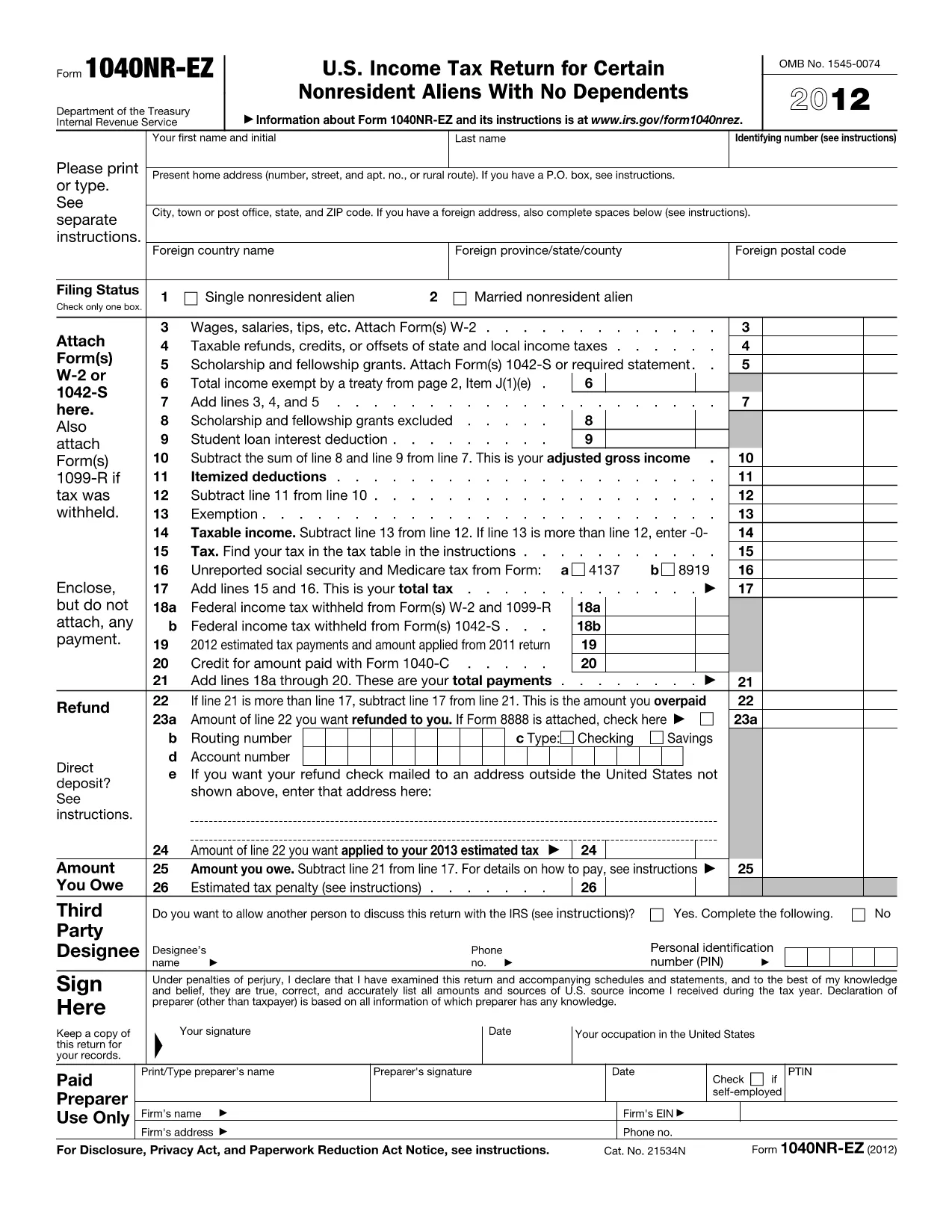
1040NR EZ Tax Form – Download Fillable PDF

  1. Country USA
  2. Language English
  3. Activity Taxes
  4. Department IRS
Fill out this form
1040NR EZ Tax Form – Download Fillable PDF

Looking for a quick way to download and complete the IRS 1040NR EZ tax form? You’ve come to the right place. Our fillable PDF lets you enter all required information directly in your browser, then save or print the final document for submission.

Why Choose the Fillable 1040NR EZ PDF?

The fillable version eliminates the hassle of printing, writing, and scanning. It’s fully compatible with Formize’s online PDF filler, which automatically validates fields, calculates totals, and ensures the layout matches the official IRS version.

How to Complete the 1040NR EZ Form Online

Follow these simple steps to finish your non‑resident tax return without leaving the page:

  1. Click the "Fill out this form" button below.
  2. Wait a few seconds while the Formize PDF Filler app loads.
  3. Enter your personal details, income information, and any applicable deductions.
  4. Review the automatically calculated tax amount.
  5. Save the completed PDF to your computer or export it directly to your preferred cloud storage.

Common Mistakes to Avoid on the 1040NR EZ

  • Incorrect filing status: Verify you qualify for the "EZ" version before starting.
  • Missing Social Security Number or ITIN: The form will flag empty required fields.
  • Math errors: The online filler auto‑calculates totals, preventing simple arithmetic mistakes.
  • Wrong address format: Use the exact mailing address shown on your IRS notice.

Where to Submit Your Completed Form

After saving the filled PDF, mail it to the IRS address listed in the form’s instructions, or submit it electronically if you’re using an authorized e‑file provider. Keep a copy for your records.

Ready to get started? Click the button below and let Formize handle the rest.

FAQ
  • Is the 1040NR EZ form available for free?

    Yes. The fillable PDF is free to download and complete using Formize’s online filler.

  • Can I edit the form after I save it?

    Absolutely. Open the saved PDF again in Formize’s filler to make changes before final submission.

  • Do I need a special PDF reader to fill the form?

    No. The Formize PDF Filler works directly in your web browser—no extra software required.

  • What if I make a mistake while filling the form?

    The online filler validates required fields and calculations, but you can always go back and edit any section before saving.

  • Where should I mail the completed 1040NR EZ?

    The mailing address is printed on the last page of the form’s instructions. Use the address that corresponds to your state of residence.

  • Is the fillable PDF accepted by the IRS?

    Yes. The PDF maintains the exact layout and field positions of the official IRS version, so it is fully compliant.

HOW TO

How to fill out 1040NR EZ for free, online in 5 easy steps:

  1. 1
    Open the Fillable Form
    Click the "Fill out this form" button on the page to launch the Formize PDF Filler.
  2. 2
    Load the Formize App
    Wait a few seconds while the online filler loads – it works in all modern browsers.
  3. 3
    Enter Your Information
    Fill each field with your personal and income details. Required fields are highlighted.
  4. 4
    Review and Save
    Check the auto‑calculated totals, then save the completed PDF to your computer or cloud storage.
  5. 5
    Submit to the IRS
    Print and mail the form to the IRS address, or use an approved e‑file service if you prefer electronic submission.
Formize PDF Filler app
ABOUT

Federal tax forms

1040NR EZ is one of Federal tax forms that are documents used to report and file federal income taxes with the Internal Revenue Service (IRS) in the United States. These forms are used by individuals, businesses, and organizations to report their income, deductions, and other relevant information necessary for calculating their federal tax liability.

The most commonly used federal tax form is the Form 1040, which is used by individual taxpayers to report their personal income tax. Other commonly used forms include the Form 1065 for partnerships, Form 1120 for corporations, and Form 990 for tax-exempt organizations.

Federal tax forms typically require taxpayers to report various sources of income, such as wages, salaries, and tips, as well as income from investments, rental properties, and other sources. The forms also allow taxpayers to claim deductions and credits for various expenses, such as charitable contributions, mortgage interest, and healthcare expenses.

It is important to file federal tax forms accurately and on time, as failure to do so can result in penalties and interest charges from the IRS.

FEATURES

PDF Filler

The easiest way to fill 1040NR EZ online

  • Quickly fill out 1040NR EZ
    Looking for a way to quickly fill 1040NR EZ online? With our online free PDF form filler, you’ll know how to how to edit and fill this pdf document in less than a minute.
  • Easy to use online PDF editor
    Fed up with printing out PDF files so you can edit them, before rescanning and sending them back? Edit PDF documents for free online. Use our online pdf editor to save time and paper.
  • Great tools, all platforms
    Wondering how to fill in 1040NR EZ on a Mac, or maybe how to use a PDF filler free? Our online PDF tools work on all platforms.
  • Secure file storage
    Completed "1040NR EZ" files are stored in a secured database managed by Amazon Cloud hosting. You can delete your files from our system anytime. In any case, these files are automatically deleted after 24 hours.
  • Chat with 1040NR EZ
    Chat with "1040NR EZ" on Chatize that is a free PDF reader assistant. Ask questions and get answers from "1040NR EZ". Just click on Chat With Document button above.

Delete filling session

Delete the selected filling session? In this case, your progress in completing the form will be lost.

Delete editing session

Delete the selected editing session? In this case, your progress in creating and editing the form will be lost.