Select language

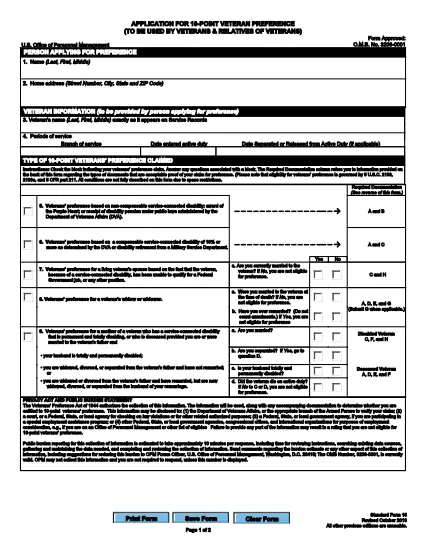
SF‑15 Application for 10‑Point Veteran’s Preference – Fillable PDF

  1. Language English
  2. Country USA
  3. Department Office of Personnel Management
  4. Activity Employment
Fill out this form
SF‑15 Application for 10‑Point Veteran’s Preference – Fillable PDF

SF‑15 Application for 10‑Point Veteran’s Preference – Fillable PDF

What Is the SF‑15 Form?

The SF‑15, Application for 10‑Point Veteran’s Preference, is an official United States Office of Personnel Management (OPM) form used by federal agencies to grant eligible veterans a ten‑point hiring advantage. It is required for any federal job application where the veteran preference is claimed.

How to Complete the SF‑15 Online

With Formize you can fill out the SF‑15 directly in your browser – no extra software needed. Follow these simple steps:

  • Click the Fill out this form button on the page.
  • Wait a few seconds while the Formize PDF Filler loads the fillable version of the SF‑15.
  • Enter your information in the highlighted fields, using the tab key to move quickly between sections.
  • When you finish, click Save to download the completed PDF or Submit if your agency accepts electronic submissions.

Common Mistakes to Avoid

  • Leaving required fields blank – the form will not validate until every mandatory box is completed.
  • Using non‑black ink or fancy fonts – stick to standard fonts and black text for readability.
  • Entering incorrect dates – double‑check your service dates; errors can delay processing.
  • Uploading a scanned copy instead of the fillable version – the fillable PDF ensures data is captured correctly.

Download & Secure Your Completed Form

After you save the filled PDF, store it in a secure location. Federal agencies often require a PDF attachment with your electronic job application, so keep a copy handy for future submissions.

Related Government Application Resources

Need more forms? Explore other OPM PDFs such as the SF‑50 (Notification of Personnel Action) or the SF‑86 (Security Clearance Questionnaire). All are available as fillable PDFs through Formize.

FAQ
  • What is the purpose of the SF‑15 form?

    The SF‑15 is used to claim a ten‑point preference for eligible veterans when applying for federal civilian positions.

  • Can I edit the SF‑15 after I have saved it?

    Yes. Open the saved PDF in Formize’s online editor to make changes, or edit it in any standard PDF editor that supports fillable fields.

  • Do I need Adobe Acrobat to fill out the SF‑15?

    No. Formize provides a browser‑based fillable PDF, so you can complete the form without installing any software.

  • Is the SF‑15 accepted for all federal agencies?

    Most federal agencies that consider veteran preference require the SF‑15. Always check the specific job announcement for any additional forms.

  • What should I do if a field won’t accept my input?

    Make sure you are using plain text (no special characters) and that the field is not marked as read‑only. If the problem persists, reload the form in Formize.

  • How do I securely share the completed SF‑15 with an agency?

    Save the completed PDF, then attach it to your online job application or upload it via the agency’s secure portal. Keep a copy for your records.

  • Can I print the filled SF‑15?

    Absolutely. After saving, open the PDF in any viewer and print it using standard printer settings.

HOW TO

How to fill out SF-15 for free, online in 3 easy steps:

  1. 1
    Click the Fill‑out Button
    Press the “Fill out this form” button on the page to launch the Formize PDF Filler.
  2. 2
    Load the Fillable PDF
    The fillable version of the SF‑15 will appear within a few seconds. No download or extra software is required.
  3. 3
    Enter Your Information and Save
    Complete each highlighted field, then click “Save” to download the completed PDF or “Submit” if your agency accepts direct electronic submission.
Formize PDF Filler app
ABOUT

Office of Personnel Management (OPM) Forms

SF-15 is one of the official forms that are used by the United States Office of Personnel Management, which is an independent agency of the federal government responsible for managing the civil service workforce and federal employee benefits. The OPM establishes policies and regulations related to federal employment, administers various personnel programs, and provides services to federal employees, retirees, and job applicants.

Here are some examples of Office of Personnel Management forms:

Standard Form 86 (SF-86): This form is used for the background investigation process for individuals applying for a security clearance. It collects comprehensive personal, employment, education, and financial information, as well as details about foreign contacts and activities.

Standard Form 2809 (SF-2809): This form is used to enroll in the Federal Employees Health Benefits (FEHB) Program, which provides health insurance coverage to federal employees, retirees, and their eligible family members.

Standard Form 2817 (SF-2817): This form is used to apply for continuation of coverage under the Federal Employees Dental and Vision Insurance Program (FEDVIP) after retirement or separation from federal service.

Standard Form 3107 (SF-3107): This form is used to apply for retirement benefits under the Civil Service Retirement System (CSRS).

Standard Form 2801 (SF-2801): This form is used to apply for retirement benefits under the Federal Employees Retirement System (FERS).

Standard Form 15 (SF-15): This form is used to apply for veteran's preference in federal employment. It is submitted by veterans or their eligible family members seeking employment opportunities in the federal government.

These examples represent some common OPM forms used in the context of federal employment and employee benefits. However, the OPM has a range of other forms related to various personnel programs, retirement, insurance, and other aspects of federal employment. The specific forms required may vary depending on the nature of the transaction, program, or benefit being sought. It's advisable to consult the official website of the U.S. Office of Personnel Management (www.opm.gov) or seek guidance from the OPM or relevant human resources personnel to obtain accurate and up-to-date information regarding the specific OPM forms relevant to your federal employment or benefits-related needs.

FEATURES

PDF Filler

The easiest way to fill SF-15 online

  • Quickly fill out SF-15
    Looking for a way to quickly fill SF-15 online? With our online free PDF form filler, you’ll know how to how to edit and fill this pdf document in less than a minute.
  • Easy to use online PDF editor
    Fed up with printing out PDF files so you can edit them, before rescanning and sending them back? Edit PDF documents for free online. Use our online pdf editor to save time and paper.
  • Great tools, all platforms
    Wondering how to fill in SF-15 on a Mac, or maybe how to use a PDF filler free? Our online PDF tools work on all platforms.
  • Secure file storage
    Completed "SF-15" files are stored in a secured database managed by Amazon Cloud hosting. You can delete your files from our system anytime. In any case, these files are automatically deleted after 24 hours.
  • Chat with SF-15
    Chat with "SF-15" on Chatize that is a free PDF reader assistant. Ask questions and get answers from "SF-15". Just click on Chat With Document button above.

Delete filling session

Delete the selected filling session? In this case, your progress in completing the form will be lost.

Delete editing session

Delete the selected editing session? In this case, your progress in creating and editing the form will be lost.