
Select language

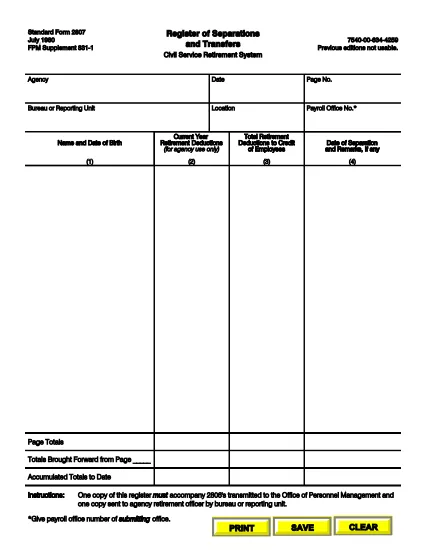
SF‑2807 Register of Separations and Transfers – Fillable PDF

  1. Language English
  2. Country USA
  3. Department Office of Personnel Management
  4. Sector Standard Forms
Fill out this form
SF‑2807 Register of Separations and Transfers – Fillable PDF

The Standard Form 2807 (SF‑2807) is the official Register of Separations and Transfers used by the Civil Service Retirement System (CSRS) and the Federal Employees Retirement System (FERS). Federal agencies must submit this form whenever an employee separates from service or transfers to another position. Our fillable PDF makes the process fast, accurate, and fully compliant.

What is the SF‑2807 Form?

SF‑2807 captures essential data about an employee’s separation or transfer, including dates, reasons, and final pay details. It is required to accompany the SF‑2806 (Separation Notice) and must be sent to the Office of Personnel Management (OPM) and the agency’s retirement officer.

How to Complete the SF‑2807 Online

Follow these simple steps to fill out the form directly in your browser using Formize’s PDF Filler:

  • Click the "Fill out this form" button on the page.
  • The Formize PDF Filler loads automatically – no extra software needed.
  • Enter the requested information in each field. Use the Tab key to move quickly between fields.
  • When finished, click Save & Download to get a completed PDF copy.
  • Print or email the file as instructed by your agency.

Common Mistakes to Avoid

  • Leaving blank fields: Every required box must be completed; otherwise, OPM will reject the submission.
  • Incorrect dates: Verify the separation or transfer date against your official personnel record.
  • Handwritten edits: Do not cross out or write over printed text. Use the digital form to make corrections.
  • Mismatched signatures: Ensure the signing authority uses the same name format as on other retirement documents.

Where to Submit the Completed Form

After saving the filled PDF, send it to the following recipients:

  • OPM: Upload via the OPM portal or email to the address provided by your agency.
  • Agency Retirement Officer: Submit a hard copy or electronic copy according to your agency’s policy.

FAQs About SF‑2807

Below are the most frequently asked questions from federal employees.

FAQ
  • Who must complete the SF‑2807?

    Any federal employee who is separating from service or transferring to a new position must have a completed SF‑2807 filed with OPM.

  • Can I submit a handwritten version of SF‑2807?

    No. OPM requires a clean, fillable PDF version without handwritten corrections. Use the online filler to avoid errors.

  • What is the deadline for submitting SF‑2807?

    The form should be submitted simultaneously with the SF‑2806. Most agencies require it within 10 business days of the separation date.

  • Do I need a digital signature?

    Yes. The signing authority can use an electronic signature within the Formize PDF Filler, which is accepted by OPM.

  • What should I do if I make a mistake after saving?

    Open the saved PDF again in the Formize filler, correct the error, and re‑save. Do not print, cross out, and rescan the document.

  • Is there a cost to use the fillable SF‑2807?

    No. The fillable PDF and Formize’s online filler are completely free for all federal employees.

  • Where can I find additional retirement forms?

    Visit the OPM website or your agency’s human resources portal for a full list of CSRS and FERS retirement forms.

HOW TO

How to fill out SF-2807 for free, online in 5 easy steps:

  1. 1
    Click the Fill‑out Button
    Locate the "Fill out this form" button on the page and click it to launch the Formize PDF Filler.
  2. 2
    Wait for the Filler to Load
    The fillable PDF loads directly in your browser – no download or installation required.
  3. 3
    Enter Your Information
    Complete each field using your keyboard. Use the Tab key to move quickly between sections.
  4. 4
    Save and Download
    When all fields are filled, click "Save & Download" to get a completed PDF copy on your device.
  5. 5
    Submit as Required
    Print or email the saved PDF to OPM and your agency’s retirement officer according to your agency’s guidelines.
Formize PDF Filler app
ABOUT

Office of Personnel Management (OPM) Forms

SF-2807 is one of the official forms that are used by the United States Office of Personnel Management, which is an independent agency of the federal government responsible for managing the civil service workforce and federal employee benefits. The OPM establishes policies and regulations related to federal employment, administers various personnel programs, and provides services to federal employees, retirees, and job applicants.

Here are some examples of Office of Personnel Management forms:

Standard Form 86 (SF-86): This form is used for the background investigation process for individuals applying for a security clearance. It collects comprehensive personal, employment, education, and financial information, as well as details about foreign contacts and activities.

Standard Form 2809 (SF-2809): This form is used to enroll in the Federal Employees Health Benefits (FEHB) Program, which provides health insurance coverage to federal employees, retirees, and their eligible family members.

Standard Form 2817 (SF-2817): This form is used to apply for continuation of coverage under the Federal Employees Dental and Vision Insurance Program (FEDVIP) after retirement or separation from federal service.

Standard Form 3107 (SF-3107): This form is used to apply for retirement benefits under the Civil Service Retirement System (CSRS).

Standard Form 2801 (SF-2801): This form is used to apply for retirement benefits under the Federal Employees Retirement System (FERS).

Standard Form 15 (SF-15): This form is used to apply for veteran's preference in federal employment. It is submitted by veterans or their eligible family members seeking employment opportunities in the federal government.

These examples represent some common OPM forms used in the context of federal employment and employee benefits. However, the OPM has a range of other forms related to various personnel programs, retirement, insurance, and other aspects of federal employment. The specific forms required may vary depending on the nature of the transaction, program, or benefit being sought. It's advisable to consult the official website of the U.S. Office of Personnel Management (www.opm.gov) or seek guidance from the OPM or relevant human resources personnel to obtain accurate and up-to-date information regarding the specific OPM forms relevant to your federal employment or benefits-related needs.

FEATURES

PDF Filler

The easiest way to fill SF-2807 online

  • Quickly fill out SF-2807
    Looking for a way to quickly fill SF-2807 online? With our online free PDF form filler, you’ll know how to how to edit and fill this pdf document in less than a minute.
  • Easy to use online PDF editor
    Fed up with printing out PDF files so you can edit them, before rescanning and sending them back? Edit PDF documents for free online. Use our online pdf editor to save time and paper.
  • Great tools, all platforms
    Wondering how to fill in SF-2807 on a Mac, or maybe how to use a PDF filler free? Our online PDF tools work on all platforms.
  • Secure file storage
    Completed "SF-2807" files are stored in a secured database managed by Amazon Cloud hosting. You can delete your files from our system anytime. In any case, these files are automatically deleted after 24 hours.
  • Chat with SF-2807
    Chat with "SF-2807" on Chatize that is a free PDF reader assistant. Ask questions and get answers from "SF-2807". Just click on Chat With Document button above.

Delete filling session

Delete the selected filling session? In this case, your progress in completing the form will be lost.

Delete editing session

Delete the selected editing session? In this case, your progress in creating and editing the form will be lost.