
Select language

U.S. Passport Renewal Application (Form DS‑82) – Fillable PDF

  1. Language English
  2. Country USA
  3. Activity Passport
Fill out this form
U.S. Passport Renewal Application (Form DS‑82) – Fillable PDF

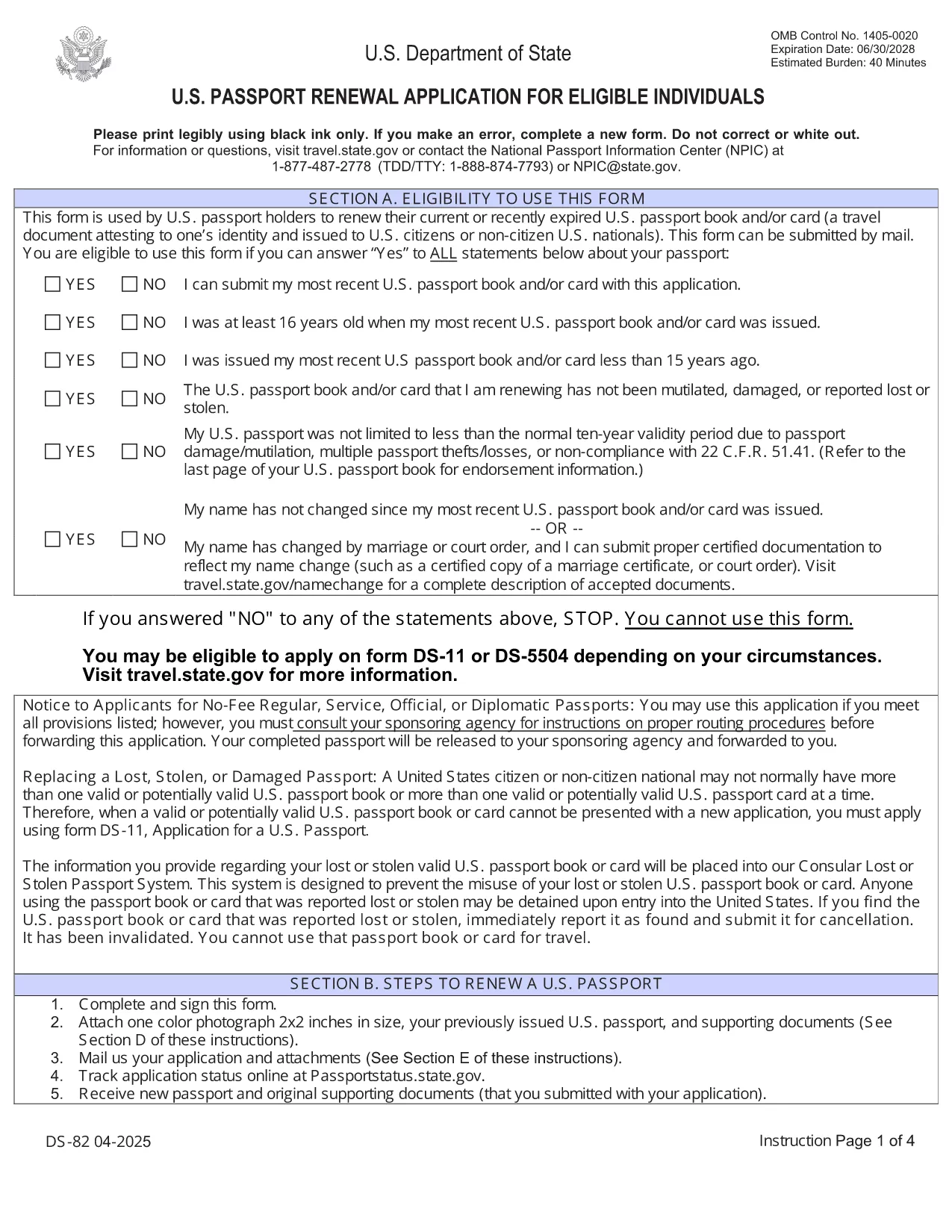
Need to renew your U.S. passport quickly and without errors? The DS‑82 is the official application for eligible individuals. Our fillable PDF, powered by the Formize PDF Filler, lets you complete the form directly in your browser, save a copy, and print it ready for submission.

Why Use the Fillable DS‑82 Form

  • Instant online editing: No need to print, write, scan, or fax.
  • Auto‑validation: Formize checks required fields and formatting as you type.
  • Secure storage: Save a digital copy for future reference.
  • Time‑saving: Complete the entire application in minutes.

How to Complete the DS‑82 Online with Formize

Just click the "Fill out this form" button below and wait for the Formize PDF Filler app to load. The interface mirrors the official DS‑82 layout, so you’ll know exactly where each piece of information belongs.

Common Mistakes to Avoid

  • Leaving the Middle Name field blank when you have one – it must match your current legal name.
  • Submitting an expired passport photo (must be taken within the last 6 months).
  • Forgetting to sign the form – an unsigned DS‑82 is rejected.
  • Using a non‑U.S. mailing address without a proper explanation.

Where to Submit Your Renewal

After completing and printing the form, mail it with your current passport, a new passport photo, and the renewal fee to the address listed on the U.S. Department of State website. If you’re using a passport acceptance facility, bring the printed form and supporting documents.

Frequently Asked Questions

Explore the most common questions below. If you need more help, the State Department’s official site has detailed guidance.

FAQ
  • Who can use the DS‑82 form?

    U.S. citizens with a passport that is still valid or expired less than 5 years ago, and who can submit the same name and personal data as on the current passport.

  • Can I renew my passport if my name changed?

    Yes, but you must also submit a legal name‑change document (marriage certificate, court order, etc.) along with the DS‑82.

  • How long does the renewal process take?

    Standard processing is about 8‑11 weeks. Expedited service (for an additional fee) reduces the time to 5‑7 weeks.

  • Do I need to bring my old passport?

    Yes. Your current passport must be submitted with the DS‑82; it will be returned to you after processing.

  • What photo requirements apply?

    The photo must be 2×2 inches, taken within the last 6 months, on a plain white background, and show a full‑face view.

  • Is the Formize filler secure?

    Yes. Formize uses HTTPS encryption and does not store any personal data after you download or print the completed PDF.

HOW TO

How to fill out DS-82 for free, online in 5 easy steps:

  1. 1
    Open the Fillable Form
    Click the "Fill out this form" button on the page. The Formize PDF Filler will open in a new tab.
  2. 2
    Wait for the Filler to Load
    Allow a few seconds for the app to initialize. You’ll see the DS‑82 layout with editable fields.
  3. 3
    Enter Your Information
    Fill in each field exactly as it appears on your current passport and supporting documents. Required fields are marked with an asterisk.
  4. 4
    Review and Validate
    Use the built‑in validation to check for missing or incorrectly formatted entries. Correct any highlighted issues.
  5. 5
    Save, Print, and Submit
    Save a digital copy, then print the completed form. Mail it with your passport, photo, and fee to the address provided by the U.S. Department of State.
Formize PDF Filler app
ABOUT

Passport Forms

DS-82 is one of Passport forms that are documents used to apply for a passport, which is a travel document that certifies the identity and nationality of the holder and allows them to travel internationally. Passport forms can vary depending on the country issuing the passport, but they generally contain personal information about the applicant, such as name, date of birth, and place of birth, as well as information about the applicant's parents and any previous passports or travel documents.

In the United States, the two most common passport forms are the DS-11 and DS-82. The DS-11 form is used for first-time applicants, minors, or individuals who are not eligible to use the DS-82 form. The DS-82 form is used for passport renewals by mail for eligible applicants. Both forms require the applicant to provide personal information and supporting documentation, such as a passport photo and proof of citizenship.

Other countries may have different passport forms and requirements, but the basic process typically involves completing a passport application, providing supporting documentation, and attending an interview with a passport official at a government facility or embassy. It is important to note that the passport application process can take several weeks or even months, so it is recommended to apply well in advance of any planned travel.

FEATURES

PDF Filler

The easiest way to fill DS-82 online

  • Quickly fill out DS-82
    Looking for a way to quickly fill DS-82 online? With our online free PDF form filler, you’ll know how to how to edit and fill this pdf document in less than a minute.
  • Easy to use online PDF editor
    Fed up with printing out PDF files so you can edit them, before rescanning and sending them back? Edit PDF documents for free online. Use our online pdf editor to save time and paper.
  • Great tools, all platforms
    Wondering how to fill in DS-82 on a Mac, or maybe how to use a PDF filler free? Our online PDF tools work on all platforms.
  • Secure file storage
    Completed "DS-82" files are stored in a secured database managed by Amazon Cloud hosting. You can delete your files from our system anytime. In any case, these files are automatically deleted after 24 hours.
  • Chat with DS-82
    Chat with "DS-82" on Chatize that is a free PDF reader assistant. Ask questions and get answers from "DS-82". Just click on Chat With Document button above.

Delete filling session

Delete the selected filling session? In this case, your progress in completing the form will be lost.

Delete editing session

Delete the selected editing session? In this case, your progress in creating and editing the form will be lost.