
Select language

Pennsylvania MV-150 Vehicle Registration Form – Fillable PDF

  1. Language English
  2. Country USA
  3. Department PennDOT
  4. Activity Vehicle Registration
Fill out this form
Pennsylvania MV-150 Vehicle Registration Form – Fillable PDF

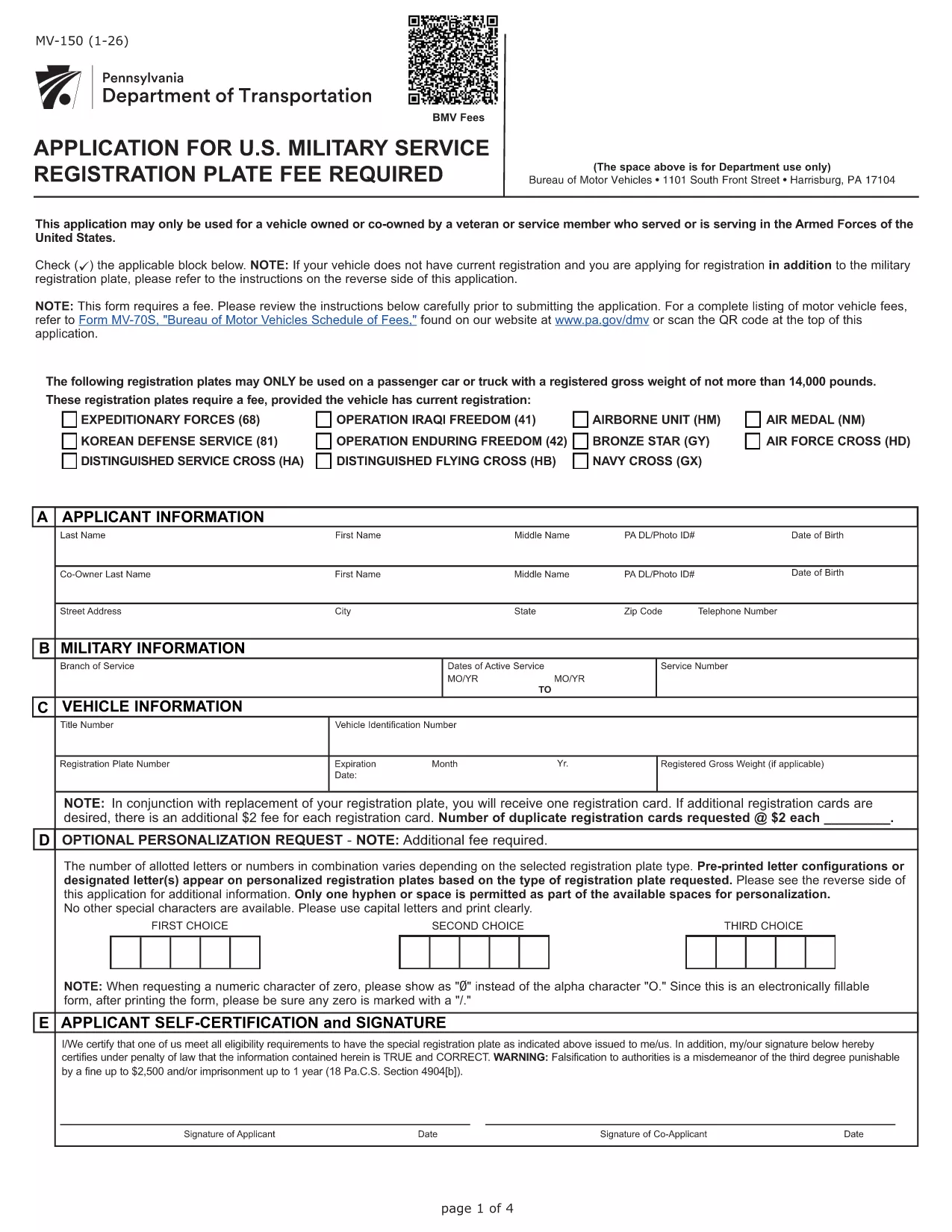
The MV-150 is Pennsylvania’s official vehicle registration application used by the Department of Transportation (PennDOT). Whether you are registering a new vehicle, renewing a plate, or updating ownership information, the MV-150 must be completed accurately and submitted with the appropriate fee.

What Is the MV-150 Form?

The MV-150 collects essential details about the vehicle, the owner, and any lienholders. It is required for:

  • Initial registration of a newly purchased vehicle
  • Renewal of an existing registration
  • Transfer of ownership
  • Adding or removing a license plate

How to Complete the MV-150 Online with Formize

Instead of downloading the PDF and editing it with a separate program, you can fill it out directly on our page using the Formize PDF Filler app:

  1. Click the "Fill out this form" button below the description.
  2. Wait a few seconds while the Formize PDF Filler loads the MV-150.
  3. Enter your information in each fillable field – the interface is intuitive and saves your progress automatically.
  4. Review the entered data, then click Submit to download the completed PDF.
  5. Print the filled PDF and attach it to your payment (check or money order) before mailing it to PennDOT.

Common Mistakes & Tips for a Smooth Submission

  • Incorrect VIN or Plate Number: Double‑check the Vehicle Identification Number (VIN) and license plate details before submitting.
  • Missing Signature: The owner’s signature is required; use the signature field in Formize or print and sign the downloaded PDF.
  • Wrong Fee Amount: Verify the current registration fee on the PennDOT website; attaching an incorrect payment may delay processing.
  • Incomplete Owner Information: Provide full name, address, and phone number; partial entries cause the form to be returned.

Where to Submit Your Completed MV-150

After filling out the form, mail the printed PDF together with your payment to:

Pennsylvania Department of Transportation
Bureau of Motor Vehicles
1101 North Front Street
Harrisburg, PA 17120

For faster processing, you may also take the completed form to any PennDOT Driver & Vehicle Service Center.

Frequently Asked Questions

Below are answers to the most common questions about the MV-150.

FAQ
  • Do I need a PennDOT account to use the Formize filler?

    No. The Formize filler works directly in your browser without any login or account.

  • Can I save my progress and finish the form later?

    Yes. The filler automatically stores your entries locally. When you return, click "Load saved data" to continue.

  • Is the MV-150 form free to download?

    The PDF itself is provided by PennDOT at no cost. You only pay the registration fee when you submit the form.

  • What if I make a mistake after downloading the PDF?

    Print a new copy using the Formize filler, correct the error, and submit the updated version. Avoid hand‑editing the PDF with external editors.

  • How long does it take for PennDOT to process my MV-150?

    Processing typically takes 7‑10 business days after receipt, provided all information and payment are correct.

  • Can I submit the MV-150 electronically?

    PennDOT currently requires a printed, signed form with payment. Electronic submission is not accepted for this form.

  • What fee should I include with my MV-150?

    Visit the PennDOT fee schedule page for the latest registration fees based on vehicle type and weight.

  • Do I need to attach the MV-140 with the MV-150?

    If you are renewing registration, you must also submit the MV-140 (Request for Registration) along with the MV-150.

HOW TO

How to fill out MV-150 for free, online in 5 easy steps:

  1. 1
    Open the Fillable Form
    Click the "Fill out this form" button on the page. The Formize PDF Filler will load the MV-150 automatically.
  2. 2
    Enter Your Information
    Fill in each field – owner details, vehicle data, and lienholder information if applicable. The app saves your entries in real time.
  3. 3
    Review and Download
    Check all entries for accuracy, then click the "Download Completed PDF" button to get a printable version of the filled form.
  4. 4
    Print and Sign
    Print the completed PDF, sign where required, and attach it to your payment.
  5. 5
    Mail to PennDOT
    Send the package to the PennDOT address listed on the page or bring it to a local Driver & Vehicle Service Center.
Formize PDF Filler app
ABOUT

Vehicle Registration Forms

If you own or lease a motor vehicle, trailer or boat, you must meet certain obligations to keep your vehicle legally registered and safe.

MV-150 is one of Vehicle registration forms that are documents that are used to register a motor vehicle with the relevant state or provincial authority. These forms are typically required when a person purchases a new or used vehicle or when they move to a new state or province with a vehicle.

The exact requirements and forms needed for vehicle registration can vary by location, but generally, the process involves providing information about the vehicle, the owner, and any liens on the vehicle.

Once the registration forms and fees are submitted, the state or provincial authority will issue a registration certificate or license plate to the owner of the vehicle. This registration allows the vehicle to be legally operated on public roads and highways.

FEATURES

PDF Filler

The easiest way to fill MV-150 online

  • Quickly fill out MV-150
    Looking for a way to quickly fill MV-150 online? With our online free PDF form filler, you’ll know how to how to edit and fill this pdf document in less than a minute.
  • Easy to use online PDF editor
    Fed up with printing out PDF files so you can edit them, before rescanning and sending them back? Edit PDF documents for free online. Use our online pdf editor to save time and paper.
  • Great tools, all platforms
    Wondering how to fill in MV-150 on a Mac, or maybe how to use a PDF filler free? Our online PDF tools work on all platforms.
  • Secure file storage
    Completed "MV-150" files are stored in a secured database managed by Amazon Cloud hosting. You can delete your files from our system anytime. In any case, these files are automatically deleted after 24 hours.
  • Chat with MV-150
    Chat with "MV-150" on Chatize that is a free PDF reader assistant. Ask questions and get answers from "MV-150". Just click on Chat With Document button above.

Delete filling session

Delete the selected filling session? In this case, your progress in completing the form will be lost.

Delete editing session

Delete the selected editing session? In this case, your progress in creating and editing the form will be lost.