
Select language

PennDOT Form MV-436A – Fillable PDF

  1. Language English
  2. Country USA
  3. Department PennDOT
  4. Activity Vehicle Registration
Fill out this form
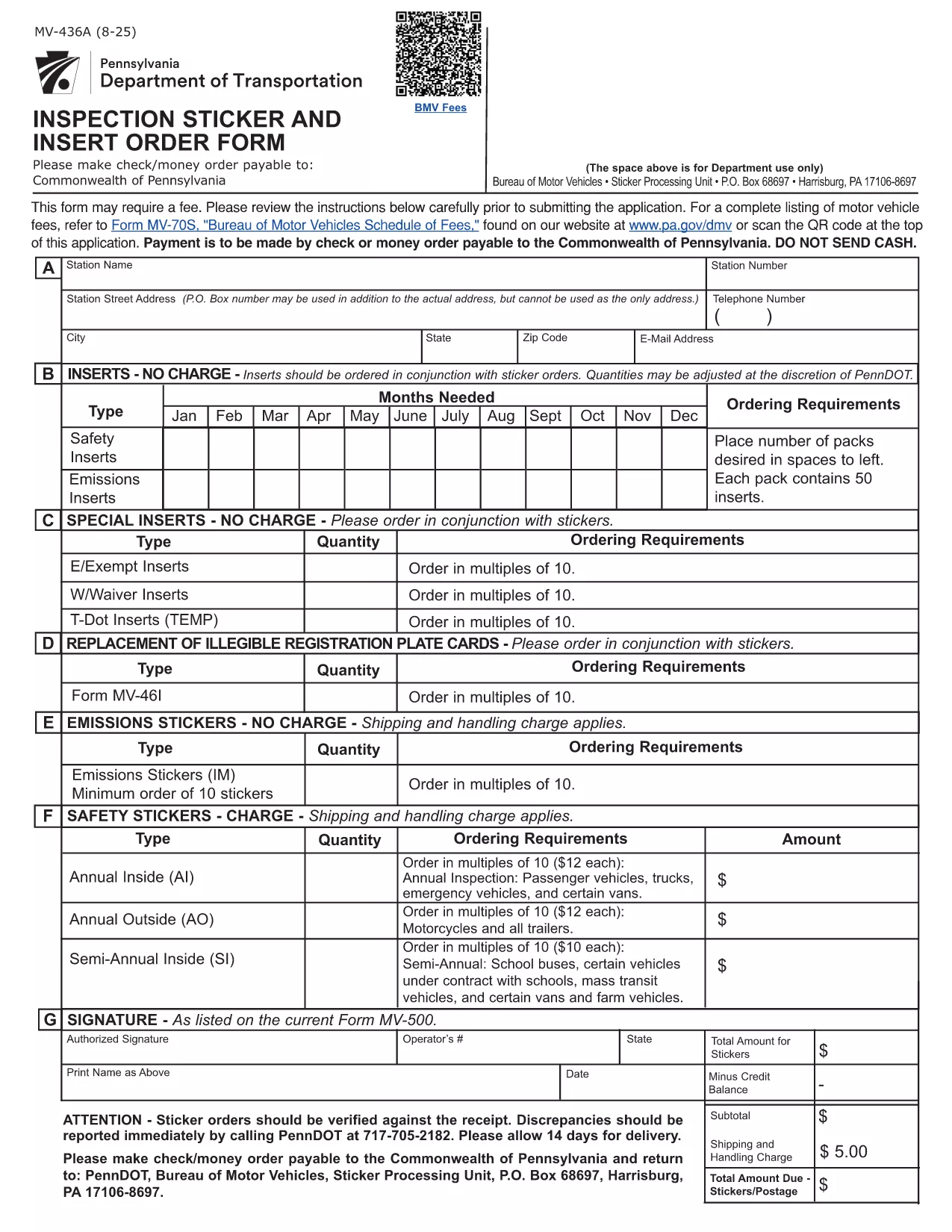
PennDOT Form MV-436A – Fillable PDF

The PennDOT Form MV-436A is the official Pennsylvania Department of Transportation document used for requests such as vehicle title corrections, name changes, and other motor‑vehicle record updates. Instead of printing, printing, and hand‑writing, you can complete the form instantly online with Formize’s fillable PDF viewer.

What Is Form MV-436A?

This form is required when you need to:

  • Correct errors on a vehicle title
  • Change the name of the vehicle owner
  • Request a duplicate title due to loss or damage
  • Update other motor‑vehicle record information

It is issued by the Pennsylvania Department of Transportation (PennDOT) and must be signed by the vehicle owner or an authorized representative.

How to Fill Out MV-436A Online with Formize

Follow these simple steps to complete the form without any PDF editor:

  1. Click the "Fill out this form" button on this page.
  2. Wait a few seconds while the Formize PDF Filler app loads the fillable version of MV‑436A.
  3. Enter your information in each field. The interface highlights required fields and validates data in real time.
  4. When you’re finished, click Save & Download to get a completed PDF you can print or email.

No software download, no Adobe Acrobat needed – just a browser and an internet connection.

Key Fields and Common Mistakes

Pay special attention to these sections:

  • Owner Information – Ensure the name matches the current title exactly.
  • Vehicle Identification Number (VIN) – Double‑check the 17‑character VIN for typos.
  • Signature – The electronic signature must be legible; avoid using generic placeholders.

Common mistake: Leaving the "Date of Birth" field blank or using an incorrect format will cause the form to be rejected.

Where to Submit the Completed Form

After downloading the completed PDF, mail it to:

PennDOT – Bureau of Motor Vehicles
1101 North 12th Street
Harrisburg, PA 17104‑0001

Or bring the printed form to any PennDOT Driver License Center. Include any required supporting documents (e.g., proof of identity, vehicle title).

Download the Official PDF

If you prefer the traditional method, you can download the official, unfilled PDF directly from the Pennsylvania government website. The link below points to the exact file used by PennDOT.

Download MV‑436A (PDF)

FAQ
  • Is Form MV-436A available as a fillable PDF?

    Yes. Using Formize, you can fill out the PDF directly in your browser without any additional software.

  • Can I submit the form electronically?

    PennDOT currently requires a printed and signed copy. After filling it online, download, print, and mail or deliver it.

  • What should I do if I make a mistake after saving?

    Open the saved PDF again with Formize, edit the incorrect fields, and re‑save the document.

  • Do I need a Pennsylvania driver’s license to use MV-436A?

    No. The form is for vehicle title and record changes and can be completed by any legal owner, even if they do not hold a PA driver’s license.

  • How long does it take PennDOT to process the form?

    Processing typically takes 7‑10 business days after receipt, provided all required supporting documents are included.

  • Is there a fee for filing MV-436A?

    Yes. Refer to PennDOT’s Schedule of Fees (Form MV-70S) for the current amount, which varies based on the request type.

  • Can I use a mobile device to fill out MV-436A?

    Absolutely. The Formize filler works on smartphones and tablets; just ensure you have a stable internet connection.

  • What if I lose the completed form after downloading?

    You can re‑open the saved PDF with any PDF viewer, but you will need to re‑enter the data. Keeping a digital copy on your computer or cloud storage is recommended.

HOW TO

How to fill out MV-436A for free, online in 4 easy steps:

  1. 1
    Open the Fillable Form
    Click the "Fill out this form" button on the page. The Formize PDF Filler will open in your browser.
  2. 2
    Enter Your Information
    Type directly into each highlighted field. Required fields are marked with an asterisk.
  3. 3
    Validate and Save
    After completing all sections, click "Save & Download" to receive a completed PDF you can print or email.
  4. 4
    Submit to PennDOT
    Print the saved PDF and mail or deliver it to the PennDOT address listed on the form.
Formize PDF Filler app
ABOUT

Vehicle Registration Forms

If you own or lease a motor vehicle, trailer or boat, you must meet certain obligations to keep your vehicle legally registered and safe.

MV-436A is one of Vehicle registration forms that are documents that are used to register a motor vehicle with the relevant state or provincial authority. These forms are typically required when a person purchases a new or used vehicle or when they move to a new state or province with a vehicle.

The exact requirements and forms needed for vehicle registration can vary by location, but generally, the process involves providing information about the vehicle, the owner, and any liens on the vehicle.

Once the registration forms and fees are submitted, the state or provincial authority will issue a registration certificate or license plate to the owner of the vehicle. This registration allows the vehicle to be legally operated on public roads and highways.

FEATURES

PDF Filler

The easiest way to fill MV-436A online

  • Quickly fill out MV-436A
    Looking for a way to quickly fill MV-436A online? With our online free PDF form filler, you’ll know how to how to edit and fill this pdf document in less than a minute.
  • Easy to use online PDF editor
    Fed up with printing out PDF files so you can edit them, before rescanning and sending them back? Edit PDF documents for free online. Use our online pdf editor to save time and paper.
  • Great tools, all platforms
    Wondering how to fill in MV-436A on a Mac, or maybe how to use a PDF filler free? Our online PDF tools work on all platforms.
  • Secure file storage
    Completed "MV-436A" files are stored in a secured database managed by Amazon Cloud hosting. You can delete your files from our system anytime. In any case, these files are automatically deleted after 24 hours.
  • Chat with MV-436A
    Chat with "MV-436A" on Chatize that is a free PDF reader assistant. Ask questions and get answers from "MV-436A". Just click on Chat With Document button above.

Delete filling session

Delete the selected filling session? In this case, your progress in completing the form will be lost.

Delete editing session

Delete the selected editing session? In this case, your progress in creating and editing the form will be lost.