
Select language

PennDOT Form MV‑73A – Fillable Employee Service Report

  1. Language English
  2. Country USA
  3. Department PennDOT
  4. Activity Vehicle Registration
Fill out this form
PennDOT Form MV‑73A – Fillable Employee Service Report

What Is Form MV‑73A?

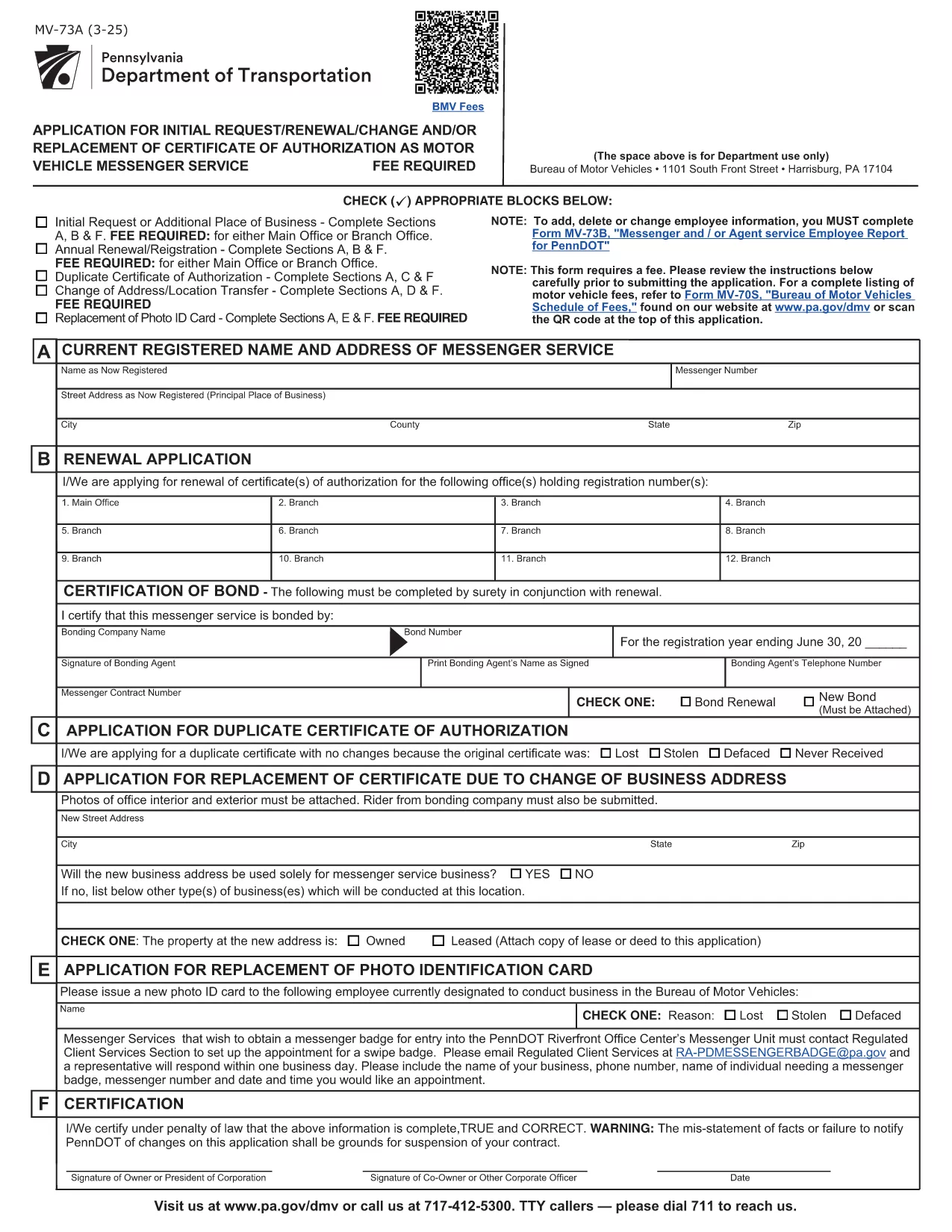
Form MV‑73A is the Pennsylvania Department of Transportation (PennDOT) “Messenger and/or Agent Service Employee Report.” It is required when a messenger, agent, or employee provides services on behalf of a motor vehicle dealer or a registered motor vehicle service provider. The form captures employee details, service type, and any fees associated with the service.

How to Complete the Fillable PDF

Instead of downloading the PDF and editing it manually, simply click the “Fill out this form” button on this page. The Formize PDF Filler app will load the official MV‑73A document, allowing you to type directly into each field, add dates, and select check‑boxes.

Once all required fields are completed, you can review, save, or print the form for submission.

Common Mistakes to Avoid

  • Leaving the “Signature” or “Date” fields blank – both are mandatory.
  • Entering an incorrect employee ID number; double‑check the ID on the employee badge.
  • Using a non‑fillable version of the PDF – the Formize version ensures every field is editable.
  • Forgetting to attach supporting documents (e.g., proof of agency registration).

Where to Submit the Form

After completing the form, submit it to the PennDOT office that issued the original request. Most dealers fax or mail the completed MV‑73A to their local PennDOT Motor Vehicle Services office. Check the instructions on the form for the correct address or fax number.

Download the Official PDF

If you prefer to keep a copy of the original, you can download the official, government‑issued PDF directly from the link below. This file is the source used by the Formize filler.

Download MV‑73A PDF

FAQ
  • Do I need Adobe Acrobat to fill out MV‑73A?

    No. The Formize PDF Filler works in any modern browser, so you don’t need Adobe Acrobat or any extra software.

  • Is there a fee to submit Form MV‑73A?

    The form itself is free, but PennDOT may charge a processing fee depending on the service reported. Check the form’s instructions for details.

  • Can I save my progress and finish later?

    Yes. Use the “Save” button in the Formize filler to download a partially‑filled PDF, then reopen it later to continue.

  • What should I do if I make a mistake after submitting?

    Contact the PennDOT office where you submitted the form. They will advise whether you need to submit a corrected MV‑73A or an amendment.

  • Is the fillable PDF compatible with mobile devices?

    The Formize filler is responsive and works on smartphones and tablets, allowing you to complete the form on the go.

  • How long does it take PennDOT to process the form?

    Processing times vary, but most offices complete the review within 7‑10 business days after receipt.

  • Do I need a notary for the signature on MV‑73A?

    A notary is not required for MV‑73A unless specifically stated in the accompanying instructions.

HOW TO

How to fill out MV-73A for free, online in 4 easy steps:

  1. 1
    Click the Fill‑out Button
    Press the “Fill out this form” button on the page to launch the Formize PDF Filler.
  2. 2
    Wait for the Filler to Load
    The fillable version of MV‑73A will appear in your browser. All fields become editable automatically.
  3. 3
    Enter Your Information
    Type directly into each field, select dates from the calendar widget, and check the appropriate boxes.
  4. 4
    Review, Save, and Submit
    After completing the form, review it for errors, then download or print the completed PDF to submit to PennDOT.
Formize PDF Filler app
ABOUT

Vehicle Registration Forms

MV-73A is one of DMV forms, also known as Department of Motor Vehicles forms, that are documents used in various transactions and processes related to motor vehicles. The DMV is a government agency responsible for driver licensing, vehicle registration, and enforcing motor vehicle laws. The specific DMV forms available can vary by jurisdiction, but here are some common examples:

Driver's License Forms: These forms are used to apply for a driver's license or to request changes or renewals. They typically require personal information, proof of identity, and may include sections for medical information or driving history.

Vehicle Registration Forms: These forms are used to register a motor vehicle with the DMV. They require vehicle information, ownership details, and proof of insurance.

Title Transfer Forms: When buying or selling a vehicle, these forms are used to transfer ownership from one party to another. They require information about the buyer, seller, vehicle details, and may include a bill of sale.

Vehicle Release of Liability Forms: When selling or transferring ownership of a vehicle, these forms notify the DMV that the seller is no longer responsible for the vehicle. It helps protect the seller from liability for accidents or incidents involving the vehicle after the sale.

License Plate and Registration Renewal Forms: These forms are used to renew vehicle registration or request new license plates. They typically require information about the registered owner, current registration details, and payment of applicable fees.

Driving Records Request Forms: These forms allow individuals to request their driving records from the DMV, which provide information about driving violations, license status, and other relevant details.

Specialty or Personalized License Plate Forms: These forms are used to apply for personalized or specialty license plates, which allow individuals to customize their license plate with specific characters or designs.

These are just a few examples of the many forms that may be available through the DMV. The specific forms and requirements can vary by jurisdiction, so it is important to consult the local DMV website or visit a DMV office to obtain the correct forms for your particular needs.

FEATURES

PDF Filler

The easiest way to fill MV-73A online

  • Quickly fill out MV-73A
    Looking for a way to quickly fill MV-73A online? With our online free PDF form filler, you’ll know how to how to edit and fill this pdf document in less than a minute.
  • Easy to use online PDF editor
    Fed up with printing out PDF files so you can edit them, before rescanning and sending them back? Edit PDF documents for free online. Use our online pdf editor to save time and paper.
  • Great tools, all platforms
    Wondering how to fill in MV-73A on a Mac, or maybe how to use a PDF filler free? Our online PDF tools work on all platforms.
  • Secure file storage
    Completed "MV-73A" files are stored in a secured database managed by Amazon Cloud hosting. You can delete your files from our system anytime. In any case, these files are automatically deleted after 24 hours.
  • Chat with MV-73A
    Chat with "MV-73A" on Chatize that is a free PDF reader assistant. Ask questions and get answers from "MV-73A". Just click on Chat With Document button above.

Delete filling session

Delete the selected filling session? In this case, your progress in completing the form will be lost.

Delete editing session

Delete the selected editing session? In this case, your progress in creating and editing the form will be lost.