Select language

USDA TM-11 Export Certificate – Fillable PDF Form

  1. Language English
  2. Country USA
  3. Activity Agriculture
  4. Department USDA
Fill out this form
USDA TM-11 Export Certificate – Fillable PDF Form

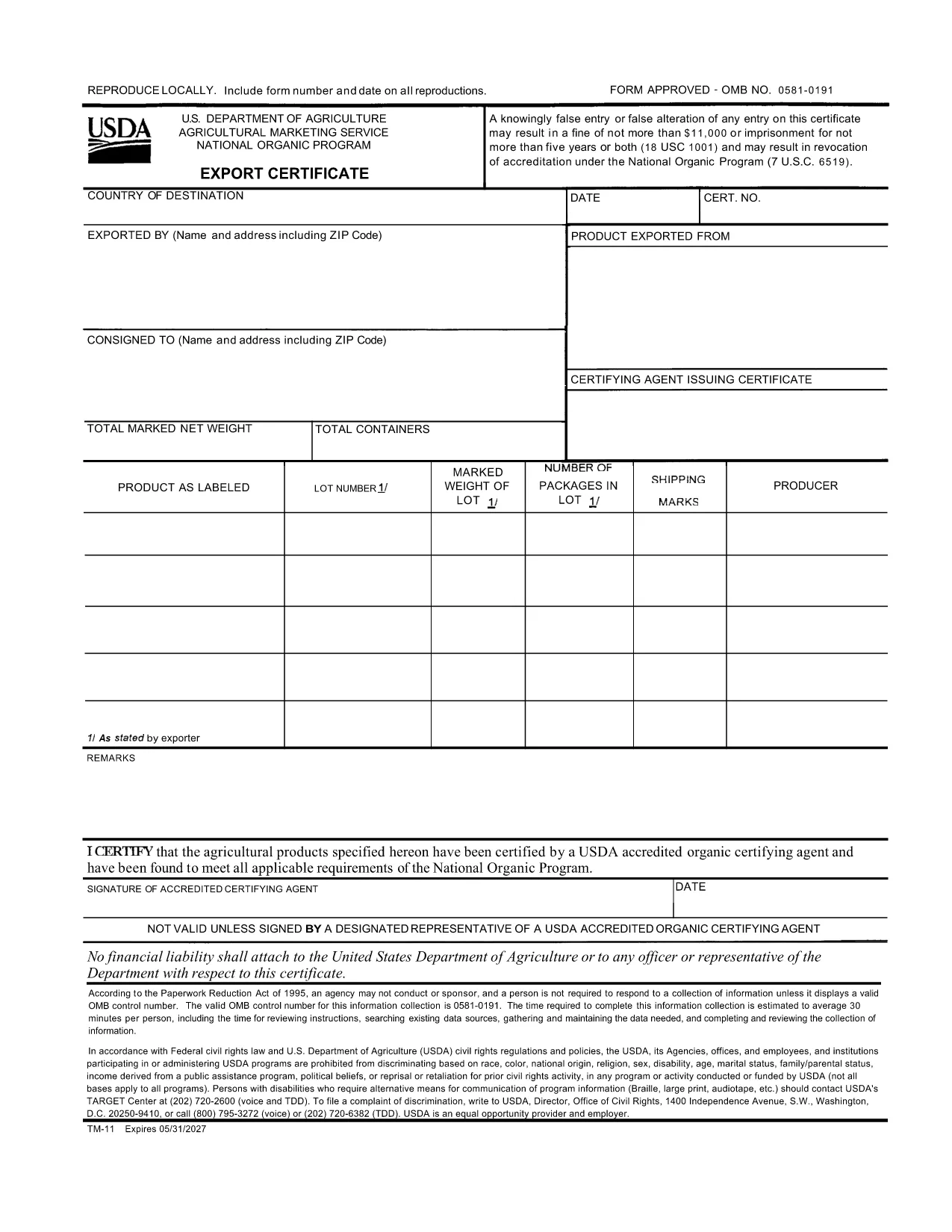
The TM-11 Export Certificate is the USDA‑approved document required for exporting organic products to certain foreign markets. Whether you are shipping to Taiwan, Japan, or other USDA‑recognized trade partners, a correctly completed TM-11 ensures your shipment meets all organic compliance standards.

What Is the TM-11 Export Certificate?

Form TM‑11 is issued by the U.S. Department of Agriculture (USDA) Agricultural Marketing Service (AMS). It verifies that the goods being exported comply with the organic regulations of both the United States and the destination country. The form must be signed by an accredited certifying agent (ACA) and accompany the shipment.

How to Complete the TM-11 Form Online

With Formize’s built‑in PDF filler, you can complete the TM‑11 without downloading any software. Just click the “Fill out this form” button, wait for the Formize PDF Filler to load, and start entering your information directly in the browser.

Common Mistakes to Avoid

  • Leaving required fields blank – every section marked with an asterisk must be completed.
  • Incorrect certification numbers – double‑check the ACA’s certification number before submitting.
  • Signature errors – the ACA must sign the form electronically or print, sign, and scan the final PDF.
  • Mismatched product descriptions – ensure the product name matches the USDA organic certification.

Download the Fillable PDF Instantly

Click the button below to open the official USDA TM‑11 PDF in the Formize filler. When you finish, download the completed form and attach it to your export documentation package.

FAQ
  • What is the purpose of Form TM‑11?

    Form TM‑11 serves as the official USDA Export Certificate for organic products, confirming compliance with U.S. and foreign organic standards.

  • Can I sign the TM‑11 electronically?

    Yes. The Formize filler allows electronic signatures for the exporter. The certifying agent must still provide a handwritten signature or an approved electronic signature.

  • Do I need a separate PDF for each shipment?

    A new TM‑11 must be completed for each export batch. Re‑using an old certificate can lead to compliance violations.

  • Is the TM‑11 form free to download?

    Yes. The USDA provides the TM‑11 PDF at no cost. Formize hosts the fillable version for free use.

  • What countries accept the USDA TM‑11?

    Countries with USDA organic trade agreements—such as Taiwan, Japan, and others listed in the USDA Export Arrangement—accept the TM‑11.

  • What if I make a mistake after submitting?

    Correct the error on a new TM‑11 form and attach it to the shipment. Keep both the original and corrected copies for records.

HOW TO

How to fill out TM-11 for free, online in 3 easy steps:

  1. 1
    Open the TM-11 Form
    Click the “Fill out this form” button on this page. The Formize PDF Filler will load directly in your browser.
  2. 2
    Enter Your Information
    Fill in each required field—exporter details, product description, destination country, and certification numbers.
  3. 3
    Save and Download
    When all fields are completed, click “Save” to download the filled PDF. Attach the file to your export paperwork.
Formize PDF Filler app
ABOUT

TM-11 template

With the traditional set of features for viewing and filling out a PDF document, combined with the benefits of a web application and responsive layout, you can complete TM-11 in minutes.

FEATURES

PDF Filler

The easiest way to fill TM-11 online

  • Quickly fill out TM-11
    Looking for a way to quickly fill TM-11 online? With our online free PDF form filler, you’ll know how to how to edit and fill this pdf document in less than a minute.
  • Easy to use online PDF editor
    Fed up with printing out PDF files so you can edit them, before rescanning and sending them back? Edit PDF documents for free online. Use our online pdf editor to save time and paper.
  • Great tools, all platforms
    Wondering how to fill in TM-11 on a Mac, or maybe how to use a PDF filler free? Our online PDF tools work on all platforms.
  • Secure file storage
    Completed "TM-11" files are stored in a secured database managed by Amazon Cloud hosting. You can delete your files from our system anytime. In any case, these files are automatically deleted after 24 hours.
  • Chat with TM-11
    Chat with "TM-11" on Chatize that is a free PDF reader assistant. Ask questions and get answers from "TM-11". Just click on Chat With Document button above.

Delete filling session

Delete the selected filling session? In this case, your progress in completing the form will be lost.

Delete editing session

Delete the selected editing session? In this case, your progress in creating and editing the form will be lost.