
Select language

Arizona Form 36-0100 – Vehicle for Hire Application (Fillable PDF)

  1. Language English
  2. Country USA
  3. Activity Vehicle Registration
  4. State Arizona
Fill out this form
Arizona Form 36-0100 – Vehicle for Hire Application (Fillable PDF)

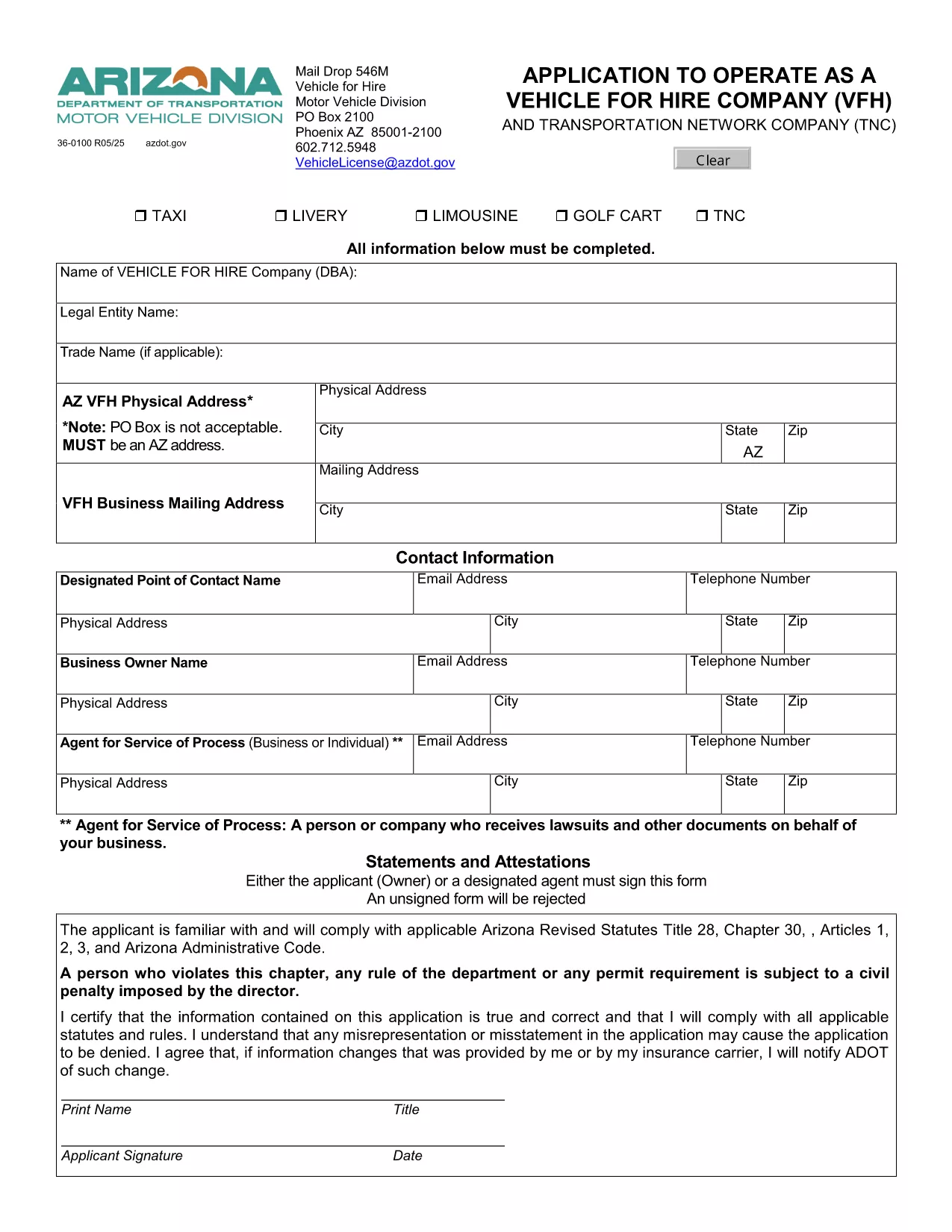
Form 36-0100 is the official Arizona Department of Transportation (ADOT) application used by individuals and companies that want to operate a vehicle for hire, such as taxis, rideshare services, or limousine companies. This fillable PDF lets you enter all required information directly in your browser, save a copy, and print a signed version for submission.

What Is Form 36-0100?

The form collects essential details about the applicant, the vehicle(s), insurance coverage, and compliance with state safety regulations. It is required before any vehicle can be legally used for commercial passenger transport in Arizona.

How to Complete the Fillable Form Online

Instead of downloading the PDF and opening it in a separate editor, simply click the “Fill out this form” button on this page. The Formize PDF Filler app will load instantly, allowing you to:

  • Enter text into every field using your keyboard.
  • Select dates, checkboxes, and dropdown options.
  • Save your progress and return later if needed.
  • Export a completed, printable PDF with one click.

Common Mistakes to Avoid

  • Leaving required fields blank: The form will highlight missing information before you can submit.
  • Using non‑black ink for signatures: Print the final PDF and sign with a black pen as required by ADOT.
  • Submitting outdated insurance documents: Verify that your policy dates cover the entire period you intend to operate.

Where to Submit Your Completed Form

After printing and signing, mail the form to:

Vehicle for Hire Division
Arizona Department of Transportation
PO Box 2100
Phoenix, AZ 85001‑2100

Or deliver it in person to any ADOT Motor Vehicle Division office.

Need More Help?

If you have questions about eligibility, insurance requirements, or the submission process, contact the ADOT Vehicle Licensing Unit at VehicleLicense@azdot.gov or call 602‑712‑5948.

FAQ
  • Is Form 36-0100 available in a fillable format?

    Yes. On this page you can fill it out online with the Formize PDF Filler, then download the completed PDF.

  • Do I need a separate insurance certificate?

    ADOT requires a current commercial liability insurance policy that covers passenger transport. Attach a copy with your application.

  • Can I submit the form electronically?

    Arizona law still requires a printed, signed copy. After filling it online, print, sign, and mail the form.

  • How long does the approval process take?

    Typically 10–15 business days after ADOT receives the completed, signed application and supporting documents.

  • What if I make a mistake after submitting?

    Contact the Vehicle for Hire Division to request a correction form. Do not alter the already‑submitted PDF.

  • Is there a fee for filing Form 36-0100?

    Yes. The current application fee is listed on the form’s first page and must be paid by check or money order.

  • Do I need to renew this form annually?

    The vehicle for hire license must be renewed each year, but the same Form 36-0100 is used for renewal with updated information.

  • Can I use this form for a rideshare company?

    Absolutely. Any business that transports passengers for compensation in Arizona uses Form 36-0100.

HOW TO

How to fill out Form 36-0100 for free, online in 5 easy steps:

  1. 1
    Open the Fillable Form
    Click the “Fill out this form” button on the page. The Formize PDF Filler loads directly in your browser.
  2. 2
    Enter Your Information
    Complete each field – personal details, vehicle information, insurance data, and declarations – using your keyboard.
  3. 3
    Save & Review
    Use the “Save” button to store a draft. Review all entries; required fields will be highlighted if missed.
  4. 4
    Export and Print
    When finished, click “Export PDF”. Print the document, sign with a black pen, and attach any supporting documents.
  5. 5
    Submit to ADOT
    Mail or deliver the signed PDF to the Vehicle for Hire Division address listed on the form.
Formize PDF Filler app
ABOUT

Vehicle Registration Forms

If you own or lease a motor vehicle, trailer or boat, you must meet certain obligations to keep your vehicle legally registered and safe.

Form 36-0100 is one of Vehicle registration forms that are documents that are used to register a motor vehicle with the relevant state or provincial authority. These forms are typically required when a person purchases a new or used vehicle or when they move to a new state or province with a vehicle.

The exact requirements and forms needed for vehicle registration can vary by location, but generally, the process involves providing information about the vehicle, the owner, and any liens on the vehicle.

Once the registration forms and fees are submitted, the state or provincial authority will issue a registration certificate or license plate to the owner of the vehicle. This registration allows the vehicle to be legally operated on public roads and highways.

FEATURES

PDF Filler

The easiest way to fill Form 36-0100 online

  • Quickly fill out Form 36-0100
    Looking for a way to quickly fill Form 36-0100 online? With our online free PDF form filler, you’ll know how to how to edit and fill this pdf document in less than a minute.
  • Easy to use online PDF editor
    Fed up with printing out PDF files so you can edit them, before rescanning and sending them back? Edit PDF documents for free online. Use our online pdf editor to save time and paper.
  • Great tools, all platforms
    Wondering how to fill in Form 36-0100 on a Mac, or maybe how to use a PDF filler free? Our online PDF tools work on all platforms.
  • Secure file storage
    Completed "Form 36-0100" files are stored in a secured database managed by Amazon Cloud hosting. You can delete your files from our system anytime. In any case, these files are automatically deleted after 24 hours.
  • Chat with Form 36-0100
    Chat with "Form 36-0100" on Chatize that is a free PDF reader assistant. Ask questions and get answers from "Form 36-0100". Just click on Chat With Document button above.

Delete filling session

Delete the selected filling session? In this case, your progress in completing the form will be lost.

Delete editing session

Delete the selected editing session? In this case, your progress in creating and editing the form will be lost.