
Select language

Connecticut Cert-106 Vehicle Use Tax Refund Form (Fillable PDF)

  1. Language English
  2. Country USA
  3. Activity Vehicle Registration
  4. State Connecticut
Fill out this form
Connecticut Cert-106 Vehicle Use Tax Refund Form (Fillable PDF)

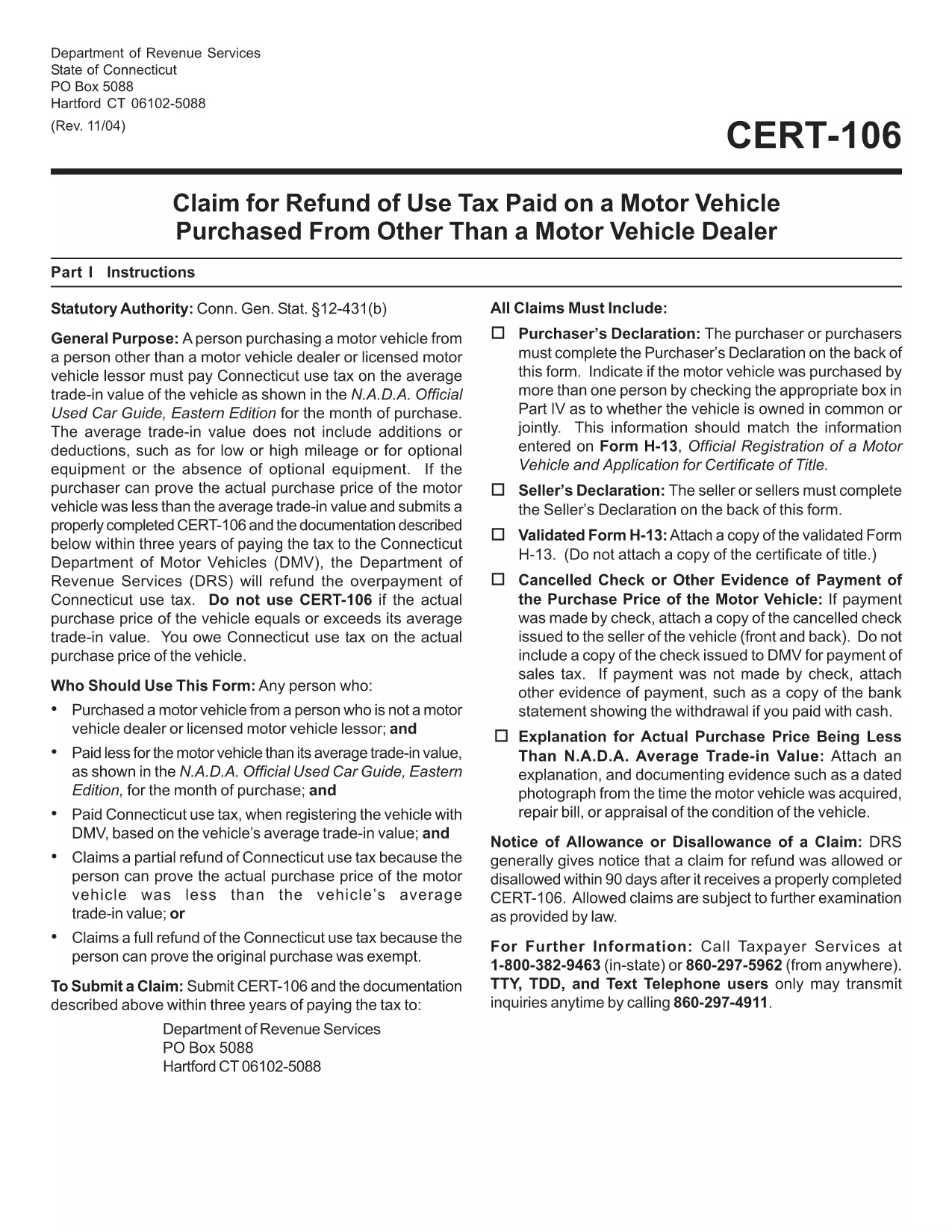
The Connecticut Cert-106 is the official claim form used to request a refund of use tax paid on a motor vehicle purchase. Whether you bought a car, truck, or motorcycle and believe you over‑paid tax, this fillable PDF lets you submit a proper request to the Connecticut Department of Revenue Services (DRS) quickly and accurately.

What is the Cert-106 Form?

Cert-106, officially titled “Claim for Refund of Use Tax Paid on Motor Vehicle Purchased,” collects essential details about the buyer, the vehicle, and the tax paid. The DRS reviews the information and, if eligible, issues a refund.

Who Needs to File Cert-106?

  • Individuals who purchased a vehicle and paid Connecticut use tax but qualify for a refund (e.g., out‑of‑state purchase, trade‑in adjustments).
  • Dealers or businesses that acted as the purchaser on behalf of a client.
  • Anyone who can provide proof of tax payment and supporting documentation within three years of the payment date.

How to Fill Out Cert-106 Online

Instead of printing, scanning, or manually typing, use Formize’s built‑in PDF filler:

  1. Click the "Fill out this form" button on this page.
  2. Wait a few seconds while the Formize PDF Filler app loads the Cert‑106 template.
  3. Enter your information directly into the fields (name, address, vehicle details, tax amount, etc.).
  4. Upload any required documents (receipt, proof of payment, vehicle title) using the attachment icons.
  5. Review the completed form, then click Save & Download or Submit according to your preferred filing method.

Common Mistakes to Avoid

  • Missing signatures: The purchaser’s declaration on the back of the form must be signed.
  • Incorrect dates: Use the exact date the tax was paid, not the purchase date.
  • Incomplete documentation: Attach the original receipt and any trade‑in paperwork; otherwise the claim will be rejected.
  • Submitting after three years: The DRS only accepts claims within three years of the tax payment.

Where to Submit Your Completed Form

After you’ve filled and saved the PDF, you can:

  • Mail it to Department of Revenue Services, PO Box 5088, Hartford, CT 06102‑5088.
  • Upload it through the Connecticut DRS online portal (if you have an account).
  • Deliver it in person to a local DRS office for immediate assistance.

Using Formize’s fillable PDF eliminates the hassle of printing, scanning, or re‑typing. Get your refund faster and keep a digital copy for your records.

FAQ
  • What is the purpose of Cert‑106?

    Cert‑106 is used to claim a refund of Connecticut use tax paid on a motor vehicle when the taxpayer qualifies for a refund.

  • Can I file Cert‑106 electronically?

    Yes. Fill the form online with Formize’s fillable PDF, save the completed document, and then upload or mail it to the Department of Revenue Services.

  • How long do I have to submit a Cert‑106 claim?

    Claims must be submitted within three years of the date the tax was paid.

  • What supporting documents are required?

    You need the original tax receipt, vehicle purchase agreement or title, and any trade‑in documentation that affects the tax amount.

  • Do I need a signature on the form?

    Yes. The purchaser’s declaration on the back of Cert‑106 must be signed for the claim to be valid.

  • Is there a filing fee for Cert‑106?

    No. There is no fee to submit a Cert‑106 claim, but you must provide accurate information to avoid processing delays.

  • Can a business use Cert‑106?

    Businesses that purchased a vehicle and paid use tax can also file Cert‑106 to request a refund.

  • What if my claim is denied?

    The DRS will send a written explanation. You can correct any errors and resubmit, or appeal the decision according to the DRS guidelines.

HOW TO

How to fill out cert-106 for free, online in 5 easy steps:

  1. 1
    Open the Fillable Form
    Click the "Fill out this form" button on the page. The Formize PDF Filler app will open automatically.
  2. 2
    Enter Your Information
    Type directly into each field – name, address, vehicle details, tax amount, and any other required data.
  3. 3
    Attach Supporting Documents
    Use the attachment icons to upload receipts, proof of tax payment, and the vehicle title.
  4. 4
    Review & Save
    Double‑check every entry, then click "Save & Download" to keep a copy or "Submit" to send it to the DRS.
  5. 5
    Send Your Claim
    Mail the saved PDF to the DRS address, upload it via the online portal, or deliver it in person.
Formize PDF Filler app
ABOUT

Vehicle Registration Forms

cert-106 is one of Vehicle registration forms that are documents used to register a motor vehicle with the relevant government authority, typically the Department of Motor Vehicles (DMV) or equivalent agency. These forms are required when a person purchases a new or used vehicle, transfers ownership of a vehicle, or moves to a new jurisdiction with a vehicle.

The specific vehicle registration forms can vary by jurisdiction, but they generally require the following information:

Vehicle Information: This includes details about the vehicle, such as the make, model, year, vehicle identification number (VIN), and odometer reading.

Owner Information: The form will require information about the vehicle's owner, including their name, address, contact information, and driver's license number.

Proof of Ownership: Depending on the circumstances, proof of ownership may be required, such as a title certificate, bill of sale, or manufacturer's certificate of origin (for new vehicles).

Insurance Information: Proof of valid vehicle insurance coverage is typically required. This may include providing the insurance policy number, dates of coverage, and insurance company details.

Payment of Fees: Vehicle registration involves payment of various fees, such as registration fees, taxes, and possibly other charges specific to the jurisdiction.

In addition to these basic requirements, some jurisdictions may have additional forms or documentation requirements. For example, emissions test results, safety inspections, or proof of residency might be necessary in certain areas.

Once the vehicle registration forms are completed and submitted, the government authority will issue a registration certificate, license plates, and registration stickers. These documents indicate that the vehicle is legally registered and authorized to be operated on public roads.

It is important to note that vehicle registration requirements can vary significantly by jurisdiction. Therefore, it is recommended to consult the local DMV or equivalent agency for the specific forms and procedures applicable to your location.

FEATURES

PDF Filler

The easiest way to fill cert-106 online

  • Quickly fill out cert-106
    Looking for a way to quickly fill cert-106 online? With our online free PDF form filler, you’ll know how to how to edit and fill this pdf document in less than a minute.
  • Easy to use online PDF editor
    Fed up with printing out PDF files so you can edit them, before rescanning and sending them back? Edit PDF documents for free online. Use our online pdf editor to save time and paper.
  • Great tools, all platforms
    Wondering how to fill in cert-106 on a Mac, or maybe how to use a PDF filler free? Our online PDF tools work on all platforms.
  • Secure file storage
    Completed "cert-106" files are stored in a secured database managed by Amazon Cloud hosting. You can delete your files from our system anytime. In any case, these files are automatically deleted after 24 hours.
  • Chat with cert-106
    Chat with "cert-106" on Chatize that is a free PDF reader assistant. Ask questions and get answers from "cert-106". Just click on Chat With Document button above.

Delete filling session

Delete the selected filling session? In this case, your progress in completing the form will be lost.

Delete editing session

Delete the selected editing session? In this case, your progress in creating and editing the form will be lost.