
Select language

Delaware MV725 Affidavit – Fillable PDF Form

  1. Language English
  2. Country USA
  3. Activity Vehicle Registration
  4. State Delaware
Fill out this form
Delaware MV725 Affidavit – Fillable PDF Form

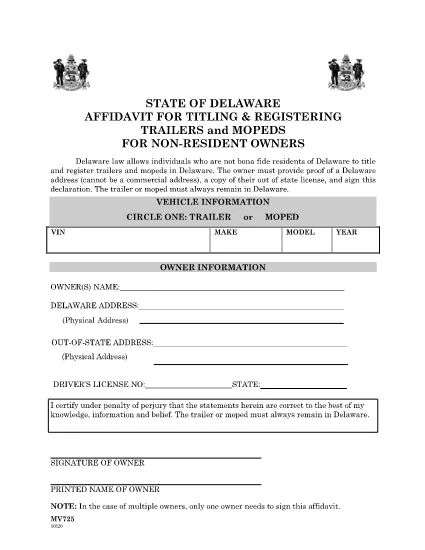
The Delaware MV725 Affidavit is the official declaration required for non‑resident owners who want to title or register a trailer or moped in the State of Delaware. This fillable PDF form is now available directly on Formize, allowing you to complete it online without the need for a separate PDF editor.

What Is the MV725 Affidavit?

Form MV725, titled “Affidavit for Titling/Registering of Trailers/Mopeds for Non‑Resident Owners,” verifies that the vehicle will be primarily kept in Delaware and that the owner meets the state’s residency‑address requirements (a residential, not commercial, address).

Who Must Use MV725?

  • Non‑resident individuals who own a trailer or moped and wish to obtain a Delaware title or registration.
  • Owners who can provide a valid Delaware residential address.
  • Anyone who must attach the affidavit to the title application packet submitted to the Delaware Division of Motor Vehicles (DMV).

How to Complete the MV725 Online

Instead of downloading the PDF and opening it in a separate editor, simply click the "Fill out this form" button on this page. The Formize PDF Filler app will load, and you can type directly into each field, add signatures, and save your progress.

Common Mistakes to Avoid

  • Using a commercial or business address – the DMV requires a residential address.
  • Leaving the signature line blank – the affidavit is not valid without a handwritten or electronic signature.
  • Failing to attach proof of Delaware residency (utility bill, lease, etc.) with the completed form.

Where to Submit the Completed Form

After you finish the online fill‑out, download the completed PDF and mail it with the title application package to the nearest Delaware DMV office, or submit it in person at any DMV location in Wilmington, Dover, or Georgetown.

Need the original PDF for offline use? You can also download the fillable PDF directly from the link below.

FAQ
  • Do I need a Delaware driver’s license to use MV725?

    No. The MV725 is for non‑resident owners. You only need a valid out‑of‑state driver’s license and a Delaware residential address.

  • Can I submit the form electronically?

    The Delaware DMV currently requires a printed, signed copy. After completing the form online, download and print it for submission.

  • What proof of address is accepted?

    A recent utility bill, lease agreement, or a notarized statement showing a residential Delaware address is accepted.

  • Is the MV725 required for all trailers?

    Yes, any trailer or moped owned by a non‑resident that will be titled or registered in Delaware must include the MV725 affidavit.

  • How long is the MV725 valid?

    The affidavit is valid for the specific title or registration transaction it accompanies. If you need to re‑apply later, a new MV725 must be completed.

  • What if I make a mistake after submission?

    Contact the Delaware DMV for guidance. In many cases, you’ll need to submit a corrected MV725 along with an explanation of the error.

HOW TO

How to fill out MV725 for free, online in 5 easy steps:

  1. 1
    Open the Fillable Form
    Click the "Fill out this form" button on the page. The Formize PDF Filler will open in a new tab.
  2. 2
    Enter Your Information
    Type directly into each field: owner name, Delaware address, vehicle details, and any required dates.
  3. 3
    Add Your Signature
    Use the signature tool to draw or upload your signature. The affidavit is not valid without it.
  4. 4
    Review and Save
    Double‑check all entries for accuracy, then click "Save" to download the completed PDF to your device.
  5. 5
    Submit to the DMV
    Mail or deliver the completed form together with your title application to the nearest Delaware DMV office.
Formize PDF Filler app
ABOUT

Vehicle Registration Forms

If you own or lease a motor vehicle, trailer or boat, you must meet certain obligations to keep your vehicle legally registered and safe.

MV725 is one of Vehicle registration forms that are documents that are used to register a motor vehicle with the relevant state or provincial authority. These forms are typically required when a person purchases a new or used vehicle or when they move to a new state or province with a vehicle.

The exact requirements and forms needed for vehicle registration can vary by location, but generally, the process involves providing information about the vehicle, the owner, and any liens on the vehicle.

Once the registration forms and fees are submitted, the state or provincial authority will issue a registration certificate or license plate to the owner of the vehicle. This registration allows the vehicle to be legally operated on public roads and highways.

FEATURES

PDF Filler

The easiest way to fill MV725 online

  • Quickly fill out MV725
    Looking for a way to quickly fill MV725 online? With our online free PDF form filler, you’ll know how to how to edit and fill this pdf document in less than a minute.
  • Easy to use online PDF editor
    Fed up with printing out PDF files so you can edit them, before rescanning and sending them back? Edit PDF documents for free online. Use our online pdf editor to save time and paper.
  • Great tools, all platforms
    Wondering how to fill in MV725 on a Mac, or maybe how to use a PDF filler free? Our online PDF tools work on all platforms.
  • Secure file storage
    Completed "MV725" files are stored in a secured database managed by Amazon Cloud hosting. You can delete your files from our system anytime. In any case, these files are automatically deleted after 24 hours.
  • Chat with MV725
    Chat with "MV725" on Chatize that is a free PDF reader assistant. Ask questions and get answers from "MV725". Just click on Chat With Document button above.

Delete filling session

Delete the selected filling session? In this case, your progress in completing the form will be lost.

Delete editing session

Delete the selected editing session? In this case, your progress in creating and editing the form will be lost.