
Select language

ITD 3018 Motorbike to Motorcycle Conversion Self‑Certification Affidavit

  1. Language English
  2. Country USA
  3. Activity Vehicle Registration
  4. State Idaho
Fill out this form
ITD 3018 Motorbike to Motorcycle Conversion Self‑Certification Affidavit

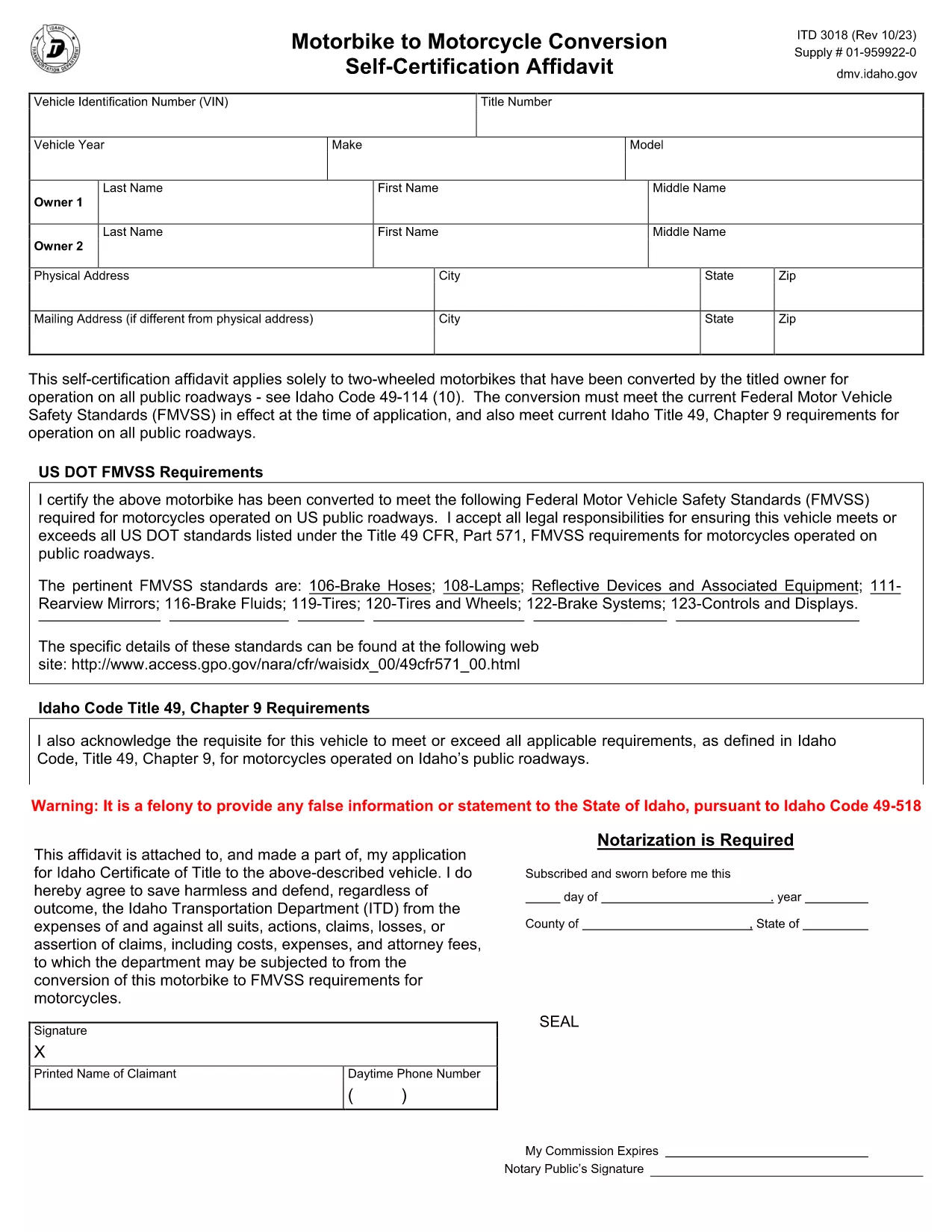
The ITD 3018 is Idaho’s Motorbike to Motorcycle Conversion Self‑Certification Affidavit. It is required when a two‑wheeled motorbike is permanently converted to meet Idaho’s motorcycle standards and be registered for road use.

What Is the ITD 3018 Form?

This affidavit verifies that the conversion complies with Idaho Code 49‑114 (10) and all applicable Federal Motor Vehicle Safety Standards (FMVSS). The form must be signed by the vehicle’s owner and submitted to the Idaho Transportation Department (ITD) as part of the titling process.

Who Must Use This Form?

  • Owners who have modified a motorbike into a street‑legal motorcycle.
  • Dealers registering a converted vehicle for a customer.
  • Anyone needing an official record of the conversion for insurance or resale.

How to Fill Out ITD 3018 Online

With Formize’s fillable PDF, you can complete the affidavit directly in your browser—no extra software required. Follow the simple steps in the How‑to section below.

Common Mistakes & Tips

  • Missing signatures: Both the owner and a qualified inspector must sign.
  • Incorrect VIN: Double‑check the Vehicle Identification Number after the conversion.
  • Omitting supporting documents: Attach any receipts or inspection reports that prove compliance.

Download the Fillable PDF

Click the button below to open the ITD 3018 affidavit in Formize’s PDF Filler. The form loads instantly, letting you type, check boxes, and sign electronically.

FAQ
  • Do I need a notary for the ITD 3018 affidavit?

    A notary is not required if you use an electronic signature within the Formize PDF Filler. However, a qualified inspector’s signature is mandatory.

  • Can I submit the PDF electronically to the ITD?

    Yes. Idaho Transportation Department accepts electronic PDFs for the ITD 3018 as long as they are fully completed and signed.

  • What if my conversion does not meet FMVSS standards?

    The affidavit will be rejected. Ensure the conversion complies with all applicable Federal Motor Vehicle Safety Standards before completing the form.

  • How long does the ITD 3018 processing take?

    Processing typically takes 5‑7 business days after submission, assuming all required documentation is attached.

  • Is there a fee for filing the ITD 3018?

    There is no separate fee for the affidavit itself, but standard titling and registration fees apply when you submit the form.

  • Can a dealer fill out the ITD 3018 on my behalf?

    Yes, dealers can complete the form for you, but the vehicle owner must still provide a signature.

  • What should I do if I make a mistake on the form?

    If you’re using the fillable PDF, simply delete the incorrect entry and re‑type. For printed copies, you must start a new form.

HOW TO

How to fill out ITD 3018 for free, online in 5 easy steps:

  1. 1
    Click the "Fill out this form" button
    On the page, press the highlighted button to launch the Formize PDF Filler with the ITD 3018 affidavit loaded.
  2. 2
    Wait for the Formize PDF Filler to load
    The filler initializes in a few seconds. You’ll see a fully interactive PDF ready for input.
  3. 3
    Complete each section
    Enter the required information, select the appropriate check boxes, and use the built‑in signature field to sign electronically.
  4. 4
    Save or download the completed form
    When you’re done, click “Save” to store the file in your browser or “Download” to get a copy on your computer.
  5. 5
    Print or submit to ITD
    Print the signed PDF and attach it to your vehicle title application, or submit the electronic copy according to Idaho Transportation Department guidelines.
Formize PDF Filler app
ABOUT

Vehicle Registration Forms

If you own or lease a motor vehicle, trailer or boat, you must meet certain obligations to keep your vehicle legally registered and safe.

ITD 3018 is one of Vehicle registration forms that are documents that are used to register a motor vehicle with the relevant state or provincial authority. These forms are typically required when a person purchases a new or used vehicle or when they move to a new state or province with a vehicle.

The exact requirements and forms needed for vehicle registration can vary by location, but generally, the process involves providing information about the vehicle, the owner, and any liens on the vehicle.

Once the registration forms and fees are submitted, the state or provincial authority will issue a registration certificate or license plate to the owner of the vehicle. This registration allows the vehicle to be legally operated on public roads and highways.

FEATURES

PDF Filler

The easiest way to fill ITD 3018 online

  • Quickly fill out ITD 3018
    Looking for a way to quickly fill ITD 3018 online? With our online free PDF form filler, you’ll know how to how to edit and fill this pdf document in less than a minute.
  • Easy to use online PDF editor
    Fed up with printing out PDF files so you can edit them, before rescanning and sending them back? Edit PDF documents for free online. Use our online pdf editor to save time and paper.
  • Great tools, all platforms
    Wondering how to fill in ITD 3018 on a Mac, or maybe how to use a PDF filler free? Our online PDF tools work on all platforms.
  • Secure file storage
    Completed "ITD 3018" files are stored in a secured database managed by Amazon Cloud hosting. You can delete your files from our system anytime. In any case, these files are automatically deleted after 24 hours.
  • Chat with ITD 3018
    Chat with "ITD 3018" on Chatize that is a free PDF reader assistant. Ask questions and get answers from "ITD 3018". Just click on Chat With Document button above.

Delete filling session

Delete the selected filling session? In this case, your progress in completing the form will be lost.

Delete editing session

Delete the selected editing session? In this case, your progress in creating and editing the form will be lost.