
Select language

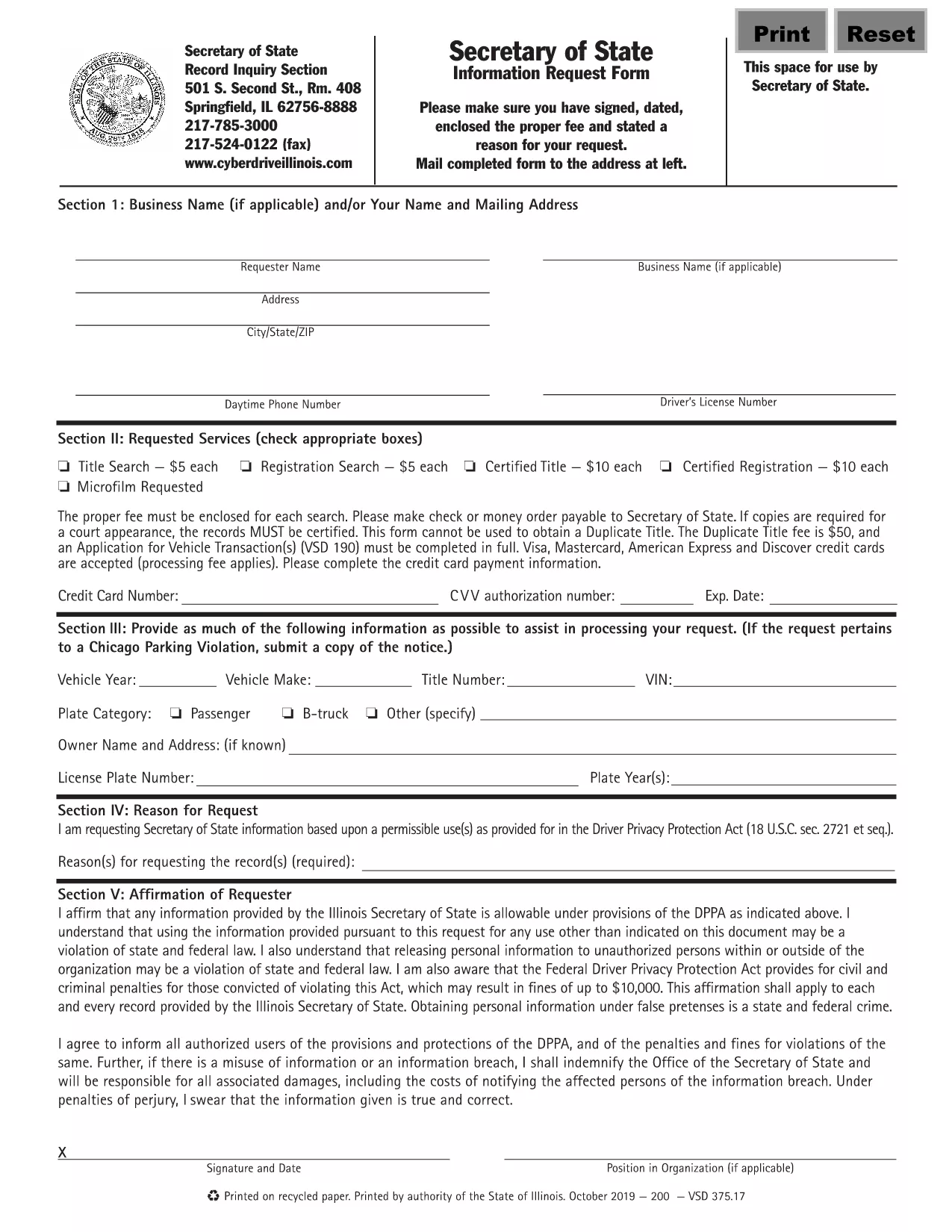
Illinois VSD 375 Information Request Form (Fillable PDF)

  1. Language English
  2. Country USA
  3. Activity Vehicle Registration
  4. State Illinois
Fill out this form
Illinois VSD 375 Information Request Form (Fillable PDF)

The VSD 375 is the Illinois Secretary of State’s official Information Request Form. It is used to obtain vehicle‑related records such as ownership history, title status, and registration details. This page provides a direct link to the fillable VSD 375 PDF and step‑by‑step instructions for completing it online with Formize’s PDF Filler.

What is the VSD 375 Form?

The VSD 375 form is required whenever you need official information from the Illinois Secretary of State’s Vehicle Services Division. Typical uses include:

  • Verifying ownership before purchasing a used vehicle
  • Checking title history for lien information
  • Obtaining registration status for legal or insurance purposes

How to Fill Out the VSD 375 Online

Instead of printing, scanning, or editing the PDF manually, simply click the “Fill out this form” button on this page. The Formize PDF Filler will load in your browser, allowing you to complete every field, add an electronic signature, and download the finished document.

Common Mistakes to Avoid

  • Missing signatures: The form is invalid without a signed and dated request.
  • Incorrect VIN or plate number: Double‑check the numbers for accuracy to prevent processing delays.
  • Omitting the fee: Include the required filing fee with your submission, as instructed on the form.

Where to Submit the Completed Form

After you have filled, signed, and saved the PDF, you can:

  • Mail it to the address listed on the form’s last page.
  • Deliver it in person to any Illinois Secretary of State office.

Processing times vary; in‑person delivery is usually faster.

FAQ
  • What does VSD 375 stand for?

    VSD 375 is the Illinois Secretary of State’s Vehicle Services Division Information Request Form used to obtain official vehicle records.

  • Is the form free to download?

    Yes, the fillable PDF is free to download. However, a filing fee may be required when you submit the request.

  • Can I submit the form electronically?

    The Illinois Secretary of State currently requires a signed paper copy. You can fill it out online, then print, sign, and mail it.

  • How long does it take to receive the requested records?

    Processing typically takes 5‑10 business days by mail; in‑person delivery can be faster.

  • What information do I need to provide?

    You must include your name, address, contact details, the vehicle’s VIN or license plate number, and the specific type of information you are requesting.

  • Do I need a notary for the VSD 375 form?

    No notary is required. A regular handwritten or electronic signature is sufficient.

  • What if I make a mistake after submitting?

    If you notice an error, contact the Illinois Secretary of State office immediately to request a correction or submit a new form.

HOW TO

How to fill out VSD 375 for free, online in 5 easy steps:

  1. 1
    Click the Fill‑out Button
    Press the “Fill out this form” button on this page to launch Formize’s PDF Filler in a new tab.
  2. 2
    Wait for the Filler to Load
    The Formize PDF Filler loads automatically; this may take a few seconds depending on your connection.
  3. 3
    Complete Each Field
    Enter your contact information, vehicle details (VIN, plate number, make, model), and specify the records you need.
  4. 4
    Add Your Electronic Signature
    Use the built‑in signature tool to sign and date the form. The signature is legally binding.
  5. 5
    Download or Submit
    Save the completed PDF to your device, then mail or deliver it to the Illinois Secretary of State office as instructed.
Formize PDF Filler app
ABOUT

Vehicle Registration Forms

VSD 375 is one of DMV forms, also known as Department of Motor Vehicles forms, that are documents used in various transactions and processes related to motor vehicles. The DMV is a government agency responsible for driver licensing, vehicle registration, and enforcing motor vehicle laws. The specific DMV forms available can vary by jurisdiction, but here are some common examples:

Driver's License Forms: These forms are used to apply for a driver's license or to request changes or renewals. They typically require personal information, proof of identity, and may include sections for medical information or driving history.

Vehicle Registration Forms: These forms are used to register a motor vehicle with the DMV. They require vehicle information, ownership details, and proof of insurance.

Title Transfer Forms: When buying or selling a vehicle, these forms are used to transfer ownership from one party to another. They require information about the buyer, seller, vehicle details, and may include a bill of sale.

Vehicle Release of Liability Forms: When selling or transferring ownership of a vehicle, these forms notify the DMV that the seller is no longer responsible for the vehicle. It helps protect the seller from liability for accidents or incidents involving the vehicle after the sale.

License Plate and Registration Renewal Forms: These forms are used to renew vehicle registration or request new license plates. They typically require information about the registered owner, current registration details, and payment of applicable fees.

Driving Records Request Forms: These forms allow individuals to request their driving records from the DMV, which provide information about driving violations, license status, and other relevant details.

Specialty or Personalized License Plate Forms: These forms are used to apply for personalized or specialty license plates, which allow individuals to customize their license plate with specific characters or designs.

These are just a few examples of the many forms that may be available through the DMV. The specific forms and requirements can vary by jurisdiction, so it is important to consult the local DMV website or visit a DMV office to obtain the correct forms for your particular needs.

FEATURES

PDF Filler

The easiest way to fill VSD 375 online

  • Quickly fill out VSD 375
    Looking for a way to quickly fill VSD 375 online? With our online free PDF form filler, you’ll know how to how to edit and fill this pdf document in less than a minute.
  • Easy to use online PDF editor
    Fed up with printing out PDF files so you can edit them, before rescanning and sending them back? Edit PDF documents for free online. Use our online pdf editor to save time and paper.
  • Great tools, all platforms
    Wondering how to fill in VSD 375 on a Mac, or maybe how to use a PDF filler free? Our online PDF tools work on all platforms.
  • Secure file storage
    Completed "VSD 375" files are stored in a secured database managed by Amazon Cloud hosting. You can delete your files from our system anytime. In any case, these files are automatically deleted after 24 hours.
  • Chat with VSD 375
    Chat with "VSD 375" on Chatize that is a free PDF reader assistant. Ask questions and get answers from "VSD 375". Just click on Chat With Document button above.

Delete filling session

Delete the selected filling session? In this case, your progress in completing the form will be lost.

Delete editing session

Delete the selected editing session? In this case, your progress in creating and editing the form will be lost.