
Select language

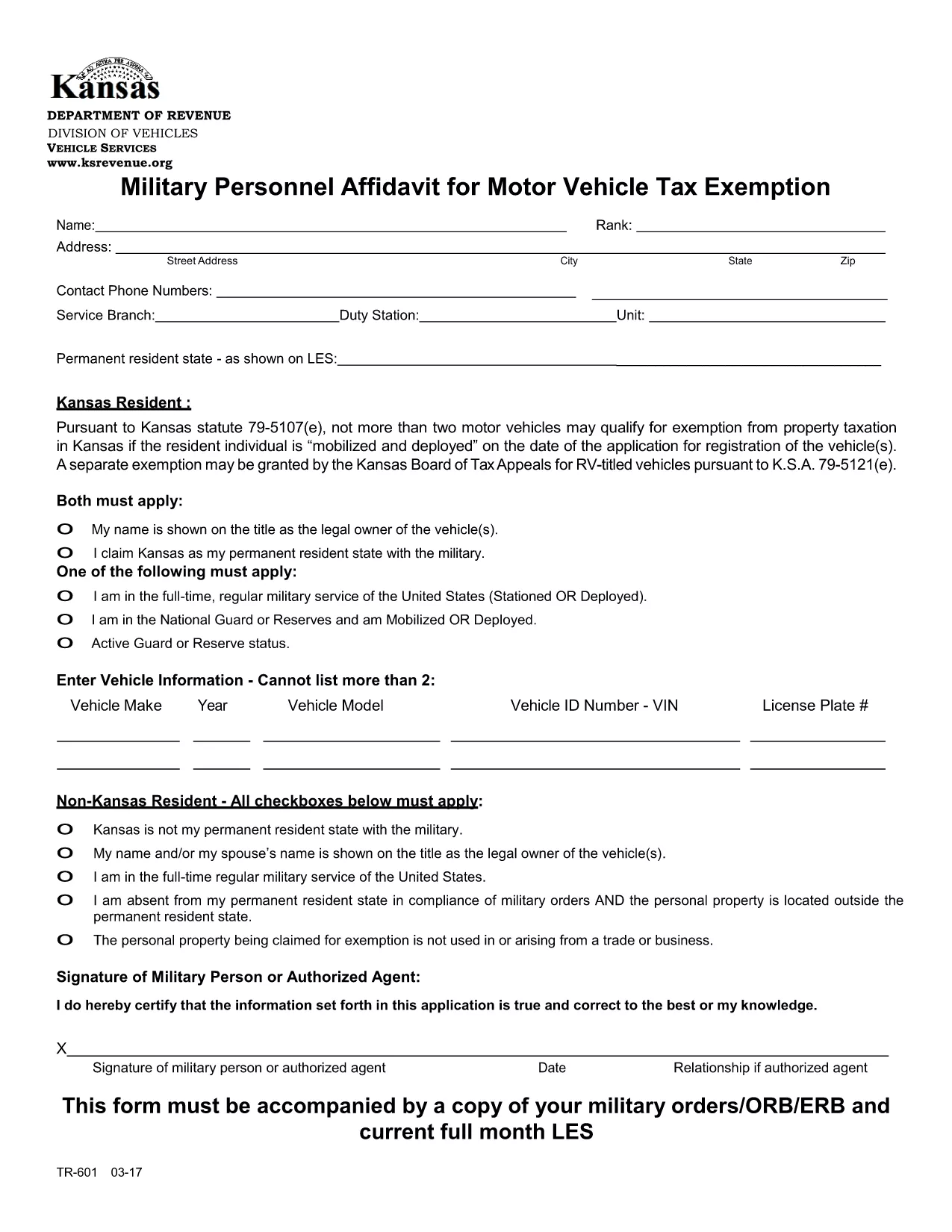
TR‑601 Kansas Military Personnel Affidavit (Fillable PDF)

  1. Country USA
  2. Language English
  3. Activity Vehicle Registration
  4. State Kansas
Fill out this form
TR‑601 Kansas Military Personnel Affidavit (Fillable PDF)

The TR‑601 Military Personnel Affidavit is the official Kansas form used by active‑duty service members to claim exemption from motor vehicle property tax. The form must be filed with the Kansas Department of Revenue (or your local county clerk) together with a copy of your military orders.

What Is the TR‑601 Affidavit?

This affidavit verifies that you are a member of the United States Armed Forces and that the vehicle(s) you own qualify for the two‑vehicle exemption under Kansas Statute 79‑5107(e)(1). The form requests basic personal information, vehicle details, and a copy of your orders (ORB/ERB).

How to Complete the Form in Seconds

Instead of downloading, printing, and hand‑filling the PDF, use the Formize fillable PDF feature:

  1. Click the Fill out this form button on this page.
  2. Wait a few seconds for the Formize PDF Filler app to load.
  3. Enter your information directly into the on‑screen fields.
  4. Upload a scanned copy of your military orders.
  5. Review, then click Submit to download a completed PDF you can print or email.

Common Mistakes & Tips for a Smooth Submission

  • Missing orders: The affidavit is invalid without a current copy of your ORB/ERB.
  • Vehicle count: Kansas only allows exemption for up to two qualifying vehicles.
  • Signature: Use an electronic signature in Formize or sign the printed copy before submission.
  • Incorrect VIN: Double‑check the Vehicle Identification Number; a typo will delay processing.

Where to Submit Your Completed Affidavit

After completing the form, you can:

  • Mail the PDF to your county treasurer’s office.
  • Upload it through the Kansas Department of Revenue’s online portal.
  • Deliver a printed copy in person at the local county clerk.

Keep a copy for your records in case the agency requests additional documentation.

FAQ
  • Who is eligible to use the TR‑601 affidavit?

    Active‑duty members of the U.S. Armed Forces who own up to two motor vehicles that are registered in Kansas.

  • Do I need to attach my military orders?

    Yes. A current copy of your ORB/ERB (or other official orders) must accompany the affidavit.

  • Can I claim exemption for more than two vehicles?

    No. Kansas law limits the exemption to a maximum of two qualifying vehicles per service member.

  • Is an electronic signature accepted?

    Yes. The Formize PDF Filler lets you add an electronic signature, which is accepted by the Kansas Department of Revenue.

  • How long does it take for the county to process the affidavit?

    Processing times vary by county, but most offices review the submission within 7‑10 business days.

  • What if I make a mistake after submitting?

    Contact your county treasurer’s office immediately. You may need to submit a corrected affidavit with a new signature.

  • Do I need to re‑file the affidavit each year?

    Yes. The exemption must be renewed annually, and you must provide updated orders if your status changes.

  • Can I file the form online without printing?

    Yes. Once you complete the form in Formize, you can download the PDF and email it directly to the appropriate agency.

HOW TO

How to fill out TR-601 for free, online in 5 easy steps:

  1. 1
    Open the Fillable Form
    Click the "Fill out this form" button on this page to launch the Formize PDF Filler.
  2. 2
    Load the PDF Filler
    Wait a few seconds while the Formize app loads the TR‑601 PDF in your browser.
  3. 3
    Enter Your Information
    Type your personal details, vehicle information, and upload a scanned copy of your military orders.
  4. 4
    Review and Sign
    Check all fields for accuracy, add an electronic signature, and click "Submit" to generate the completed PDF.
  5. 5
    Download or Print
    Save the finished affidavit to your device, print it, and send it to the appropriate Kansas agency.
Formize PDF Filler app
ABOUT

Vehicle Registration Forms

TR-601 is one of Vehicle registration forms that are documents used to register a motor vehicle with the relevant government authority, typically the Department of Motor Vehicles (DMV) or equivalent agency. These forms are required when a person purchases a new or used vehicle, transfers ownership of a vehicle, or moves to a new jurisdiction with a vehicle.

The specific vehicle registration forms can vary by jurisdiction, but they generally require the following information:

Vehicle Information: This includes details about the vehicle, such as the make, model, year, vehicle identification number (VIN), and odometer reading.

Owner Information: The form will require information about the vehicle's owner, including their name, address, contact information, and driver's license number.

Proof of Ownership: Depending on the circumstances, proof of ownership may be required, such as a title certificate, bill of sale, or manufacturer's certificate of origin (for new vehicles).

Insurance Information: Proof of valid vehicle insurance coverage is typically required. This may include providing the insurance policy number, dates of coverage, and insurance company details.

Payment of Fees: Vehicle registration involves payment of various fees, such as registration fees, taxes, and possibly other charges specific to the jurisdiction.

In addition to these basic requirements, some jurisdictions may have additional forms or documentation requirements. For example, emissions test results, safety inspections, or proof of residency might be necessary in certain areas.

Once the vehicle registration forms are completed and submitted, the government authority will issue a registration certificate, license plates, and registration stickers. These documents indicate that the vehicle is legally registered and authorized to be operated on public roads.

It is important to note that vehicle registration requirements can vary significantly by jurisdiction. Therefore, it is recommended to consult the local DMV or equivalent agency for the specific forms and procedures applicable to your location.

FEATURES

PDF Filler

The easiest way to fill TR-601 online

  • Quickly fill out TR-601
    Looking for a way to quickly fill TR-601 online? With our online free PDF form filler, you’ll know how to how to edit and fill this pdf document in less than a minute.
  • Easy to use online PDF editor
    Fed up with printing out PDF files so you can edit them, before rescanning and sending them back? Edit PDF documents for free online. Use our online pdf editor to save time and paper.
  • Great tools, all platforms
    Wondering how to fill in TR-601 on a Mac, or maybe how to use a PDF filler free? Our online PDF tools work on all platforms.
  • Secure file storage
    Completed "TR-601" files are stored in a secured database managed by Amazon Cloud hosting. You can delete your files from our system anytime. In any case, these files are automatically deleted after 24 hours.
  • Chat with TR-601
    Chat with "TR-601" on Chatize that is a free PDF reader assistant. Ask questions and get answers from "TR-601". Just click on Chat With Document button above.

Delete filling session

Delete the selected filling session? In this case, your progress in completing the form will be lost.

Delete editing session

Delete the selected editing session? In this case, your progress in creating and editing the form will be lost.