
Select language

VR-217 Security Interest Filing Form (Fillable PDF)

  1. Language English
  2. Country USA
  3. Activity Vehicle Registration
  4. State Maryland
Fill out this form
VR-217 Security Interest Filing Form (Fillable PDF)

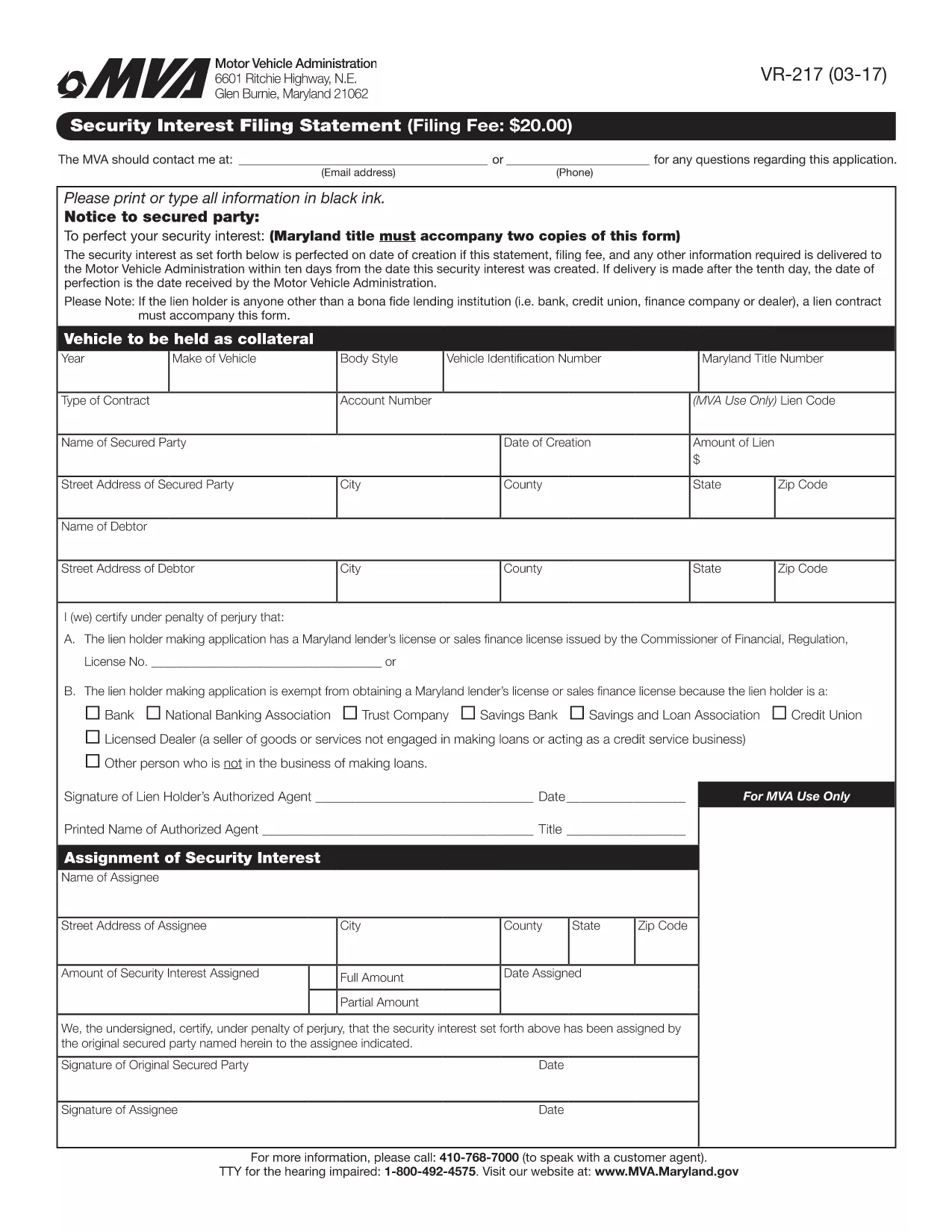
The VR-217 is the Maryland Motor Vehicle Administration (MVA) Security Interest Filing Statement. It is required when a lienholder or secured party needs to record a security interest against a motor vehicle. Using Formize’s fillable PDF, you can complete the form quickly, avoid printing, and submit it electronically.

Why choose the fillable PDF? The online version automatically validates required fields, saves your progress, and produces a clean, printable copy for your records. No extra software is needed – just click the button and let Formize handle the rest.

Below you’ll find step‑by‑step instructions, tips to prevent common errors, and answers to the most frequently asked questions about the VR-217.

FAQ
  • What is the purpose of the VR-217 form?

    The VR-217 records a security interest (lien) on a motor vehicle, informing the Maryland MVA that a third party has a claim against the vehicle.

  • Who must file a VR-217?

    Any lienholder, financing company, or secured party that has a legal interest in a vehicle registered in Maryland must file the VR-217.

  • Can I file the VR-217 electronically?

    Yes. Using Formize’s fillable PDF, you can complete the form online and submit a PDF copy to the MVA, eliminating the need for paper.

  • What information is required on the VR-217?

    You’ll need the vehicle’s VIN, lienholder’s name and address, the type of security interest, and the effective date of the lien.

  • Is there a filing fee for the VR-217?

    The MVA typically charges a modest filing fee (check the latest schedule on the MVA website). The fee is paid directly to the agency, not through Formize.

  • How long does the filing process take?

    When submitted electronically, the MVA processes the VR-217 within 1–3 business days. Paper filings may take longer.

  • What common mistakes should I avoid?

    Make sure the VIN is entered exactly as it appears on the title, double‑check the lienholder’s address, and ensure the date format matches MM/DD/YYYY.

  • Can I edit the form after I’ve submitted it?

    Once submitted, you’ll need to file an amendment (VR-217A) to make changes. Use Formize to complete the amendment form as well.

  • Where do I send the completed VR-217?

    Submit the PDF to the Maryland Motor Vehicle Administration via their online portal or mail it to the address listed on the form.

  • Is the fillable PDF compatible with all browsers?

    Yes. Formize works in Chrome, Edge, Firefox, and Safari without additional plugins.

HOW TO

How to fill out VR-217 for free, online in 5 easy steps:

  1. 1
    Open the Fillable Form
    Click the "Fill out this form" button on this page. The Formize PDF Filler app will load instantly in your browser.
  2. 2
    Enter Your Information
    Complete each field – the app highlights required sections and checks for formatting errors as you type.
  3. 3
    Review and Validate
    When all fields are filled, click "Validate". The system will flag any missing or incorrectly entered data.
  4. 4
    Submit the Form
    After validation, press "Submit". Formize will generate a secure PDF copy and give you the option to download or email it to the MVA.
  5. 5
    Save a Copy for Your Records
    Download the completed PDF and store it safely. You can also print a hard copy if the MVA requests a paper version.
Formize PDF Filler app
ABOUT

Vehicle Registration Forms

VR-217 is one of Vehicle registration forms that are documents used to register a motor vehicle with the relevant government authority, typically the Department of Motor Vehicles (DMV) or equivalent agency. These forms are required when a person purchases a new or used vehicle, transfers ownership of a vehicle, or moves to a new jurisdiction with a vehicle.

The specific vehicle registration forms can vary by jurisdiction, but they generally require the following information:

Vehicle Information: This includes details about the vehicle, such as the make, model, year, vehicle identification number (VIN), and odometer reading.

Owner Information: The form will require information about the vehicle's owner, including their name, address, contact information, and driver's license number.

Proof of Ownership: Depending on the circumstances, proof of ownership may be required, such as a title certificate, bill of sale, or manufacturer's certificate of origin (for new vehicles).

Insurance Information: Proof of valid vehicle insurance coverage is typically required. This may include providing the insurance policy number, dates of coverage, and insurance company details.

Payment of Fees: Vehicle registration involves payment of various fees, such as registration fees, taxes, and possibly other charges specific to the jurisdiction.

In addition to these basic requirements, some jurisdictions may have additional forms or documentation requirements. For example, emissions test results, safety inspections, or proof of residency might be necessary in certain areas.

Once the vehicle registration forms are completed and submitted, the government authority will issue a registration certificate, license plates, and registration stickers. These documents indicate that the vehicle is legally registered and authorized to be operated on public roads.

It is important to note that vehicle registration requirements can vary significantly by jurisdiction. Therefore, it is recommended to consult the local DMV or equivalent agency for the specific forms and procedures applicable to your location.

FEATURES

PDF Filler

The easiest way to fill VR-217 online

  • Quickly fill out VR-217
    Looking for a way to quickly fill VR-217 online? With our online free PDF form filler, you’ll know how to how to edit and fill this pdf document in less than a minute.
  • Easy to use online PDF editor
    Fed up with printing out PDF files so you can edit them, before rescanning and sending them back? Edit PDF documents for free online. Use our online pdf editor to save time and paper.
  • Great tools, all platforms
    Wondering how to fill in VR-217 on a Mac, or maybe how to use a PDF filler free? Our online PDF tools work on all platforms.
  • Secure file storage
    Completed "VR-217" files are stored in a secured database managed by Amazon Cloud hosting. You can delete your files from our system anytime. In any case, these files are automatically deleted after 24 hours.
  • Chat with VR-217
    Chat with "VR-217" on Chatize that is a free PDF reader assistant. Ask questions and get answers from "VR-217". Just click on Chat With Document button above.

Delete filling session

Delete the selected filling session? In this case, your progress in completing the form will be lost.

Delete editing session

Delete the selected editing session? In this case, your progress in creating and editing the form will be lost.