
Select language

Missouri Form 5435 – Fillable Sales Tax Exemption PDF

  1. Language English
  2. Country USA
  3. Activity Vehicle Registration
  4. State Missouri
Fill out this form
Missouri Form 5435 – Fillable Sales Tax Exemption PDF

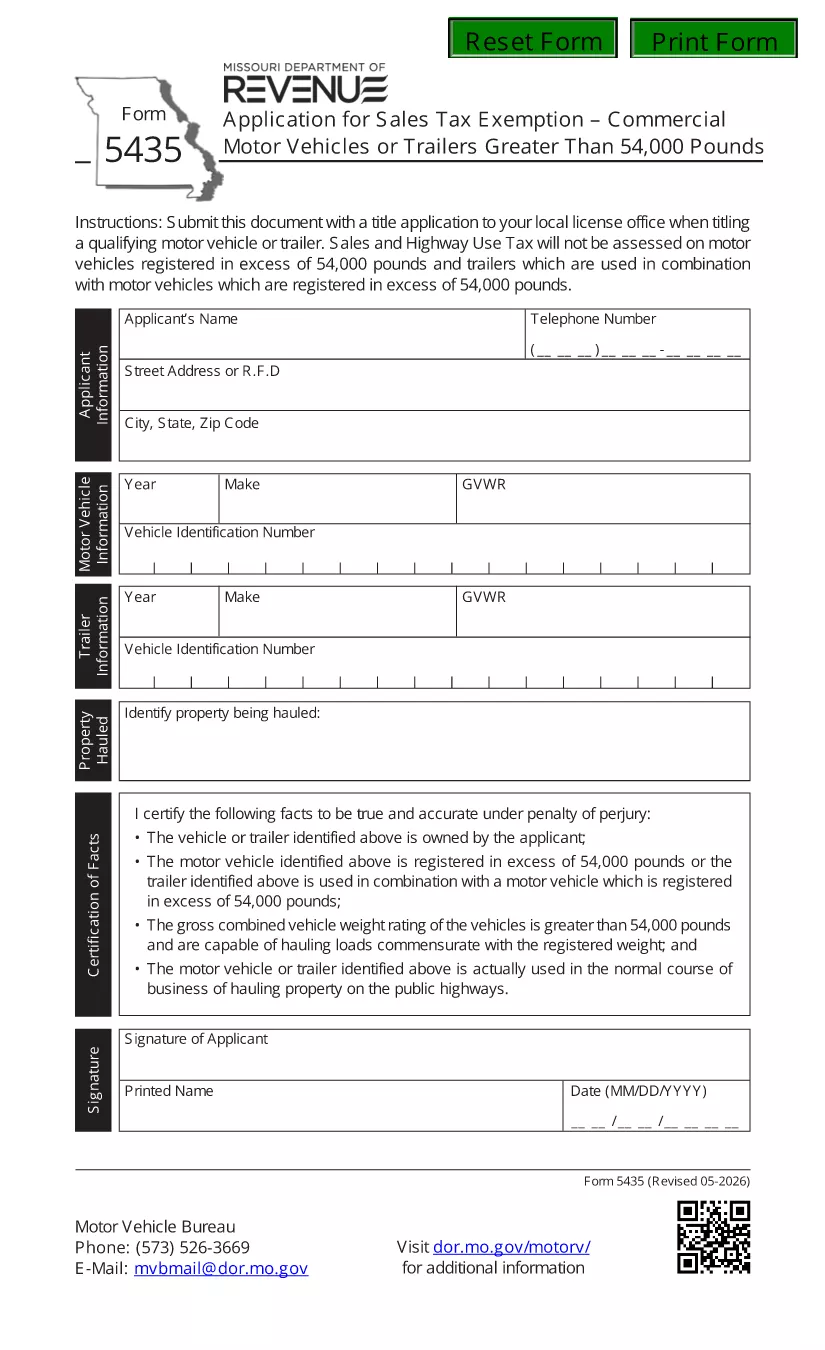
Form 5435 is the official Missouri Department of Revenue document used to apply for a sales‑ and highway‑use tax exemption on motor vehicles or trailers that weigh over 54,000 lbs. Whether you own a logging truck, a heavy‑duty trailer, or any qualifying commercial motor vehicle, this fillable PDF lets you complete the application quickly and submit it with confidence.

What Is Missouri Form 5435?

The form collects essential information such as the applicant’s name, address, vehicle identification number (VIN), gross vehicle weight rating (GVWR), and a certification that the vehicle is used exclusively for business purposes. Properly completed, Form 5435 serves as a legally binding request for tax exemption under Missouri statutes.

How to Fill Out Form 5435 with Formize

Instead of printing, scanning, or using a third‑party editor, you can fill the form directly on our site:

  1. Click “Fill out this form”. The Formize PDF Filler loads in your browser.
  2. Enter your information. All fields are interactive – just type, select dates, or upload supporting documents.
  3. Review and e‑sign. Use your finger or mouse to add a digital signature.
  4. Save or submit. Download the completed PDF or send it directly to the Missouri Department of Revenue.

Common Mistakes to Avoid

  • Leaving the VIN or GVWR blank – the exemption will be rejected.
  • Using an outdated form version. Always use the latest PDF (linked below).
  • Failing to sign the certification section.
  • Submitting the form to the wrong address – check the submission section for the correct mailing or electronic portal.

Where to Submit the Completed Form

After you’ve saved the filled PDF, you have two options:

  • Electronic submission: Upload the file through the Missouri Department of Revenue’s online portal.
  • Mail submission: Send the printed copy to the address listed in the form’s instructions.

Frequently Asked Questions

Below are quick answers to the most common queries about Form 5435.

Can I use Form 5435 for vehicles under 54,000 lbs?
No. The exemption only applies to vehicles or trailers exceeding 54,000 lbs.

Do I need a separate exemption for each vehicle?
Yes. Each qualifying vehicle requires its own completed Form 5435.

Is an electronic signature accepted?
Yes. The Missouri Department of Revenue accepts a valid e‑signature created in the Formize filler.

What is the filing deadline?
The form must be filed by the tax year’s filing deadline, typically April 15, unless an extension is granted.

Do I need to attach proof of weight?
Attach a copy of the vehicle’s weight certification or registration document showing the GVWR.

FAQ
  • Who can use Form 5435?

    Any individual or business that owns a motor vehicle or trailer over 54,000 lbs and uses it exclusively for qualified business purposes in Missouri.

  • Is there a filing fee for the exemption?

    No. The exemption request itself does not require a fee, but you must ensure all supporting documents are accurate.

  • Can I edit the form after I’ve saved it?

    Yes. Open the saved PDF again in the Formize filler to make changes before final submission.

  • What supporting documents are required?

    A copy of the vehicle’s registration showing GVWR, a weight certification, and any lease or ownership agreements.

  • How long does the approval process take?

    Typically 7‑10 business days after the Department of Revenue receives a complete and correctly signed Form 5435.

  • Can I submit Form 5435 for multiple vehicles on one form?

    No. Each vehicle must have its own separate Form 5435 submission.

  • What if I make a mistake after submission?

    Contact the Missouri Department of Revenue immediately to request a correction or submit a new, corrected form.

HOW TO

How to fill out Missouri Form 5435 for free, online in 4 easy steps:

  1. 1
    Open the Fillable Form
    Click the “Fill out this form” button on the page. The Formize PDF Filler loads instantly in your browser.
  2. 2
    Enter Your Details
    Type your name, address, VIN, GVWR, and other required information into the interactive fields.
  3. 3
    Add Your Digital Signature
    Use your mouse, trackpad, or finger to sign the certification section. The signature is saved automatically.
  4. 4
    Save or Submit
    Download the completed PDF for your records or upload it directly to the Missouri Department of Revenue portal.
Formize PDF Filler app
ABOUT

Vehicle Registration Forms

Missouri Form 5435 is one of DMV forms, also known as Department of Motor Vehicles forms, that are documents used in various transactions and processes related to motor vehicles. The DMV is a government agency responsible for driver licensing, vehicle registration, and enforcing motor vehicle laws. The specific DMV forms available can vary by jurisdiction, but here are some common examples:

Driver's License Forms: These forms are used to apply for a driver's license or to request changes or renewals. They typically require personal information, proof of identity, and may include sections for medical information or driving history.

Vehicle Registration Forms: These forms are used to register a motor vehicle with the DMV. They require vehicle information, ownership details, and proof of insurance.

Title Transfer Forms: When buying or selling a vehicle, these forms are used to transfer ownership from one party to another. They require information about the buyer, seller, vehicle details, and may include a bill of sale.

Vehicle Release of Liability Forms: When selling or transferring ownership of a vehicle, these forms notify the DMV that the seller is no longer responsible for the vehicle. It helps protect the seller from liability for accidents or incidents involving the vehicle after the sale.

License Plate and Registration Renewal Forms: These forms are used to renew vehicle registration or request new license plates. They typically require information about the registered owner, current registration details, and payment of applicable fees.

Driving Records Request Forms: These forms allow individuals to request their driving records from the DMV, which provide information about driving violations, license status, and other relevant details.

Specialty or Personalized License Plate Forms: These forms are used to apply for personalized or specialty license plates, which allow individuals to customize their license plate with specific characters or designs.

These are just a few examples of the many forms that may be available through the DMV. The specific forms and requirements can vary by jurisdiction, so it is important to consult the local DMV website or visit a DMV office to obtain the correct forms for your particular needs.

FEATURES

PDF Filler

The easiest way to fill Missouri Form 5435 online

  • Quickly fill out Missouri Form 5435
    Looking for a way to quickly fill Missouri Form 5435 online? With our online free PDF form filler, you’ll know how to how to edit and fill this pdf document in less than a minute.
  • Easy to use online PDF editor
    Fed up with printing out PDF files so you can edit them, before rescanning and sending them back? Edit PDF documents for free online. Use our online pdf editor to save time and paper.
  • Great tools, all platforms
    Wondering how to fill in Missouri Form 5435 on a Mac, or maybe how to use a PDF filler free? Our online PDF tools work on all platforms.
  • Secure file storage
    Completed "Missouri Form 5435" files are stored in a secured database managed by Amazon Cloud hosting. You can delete your files from our system anytime. In any case, these files are automatically deleted after 24 hours.
  • Chat with Missouri Form 5435
    Chat with "Missouri Form 5435" on Chatize that is a free PDF reader assistant. Ask questions and get answers from "Missouri Form 5435". Just click on Chat With Document button above.

Delete filling session

Delete the selected filling session? In this case, your progress in completing the form will be lost.

Delete editing session

Delete the selected editing session? In this case, your progress in creating and editing the form will be lost.