
Select language

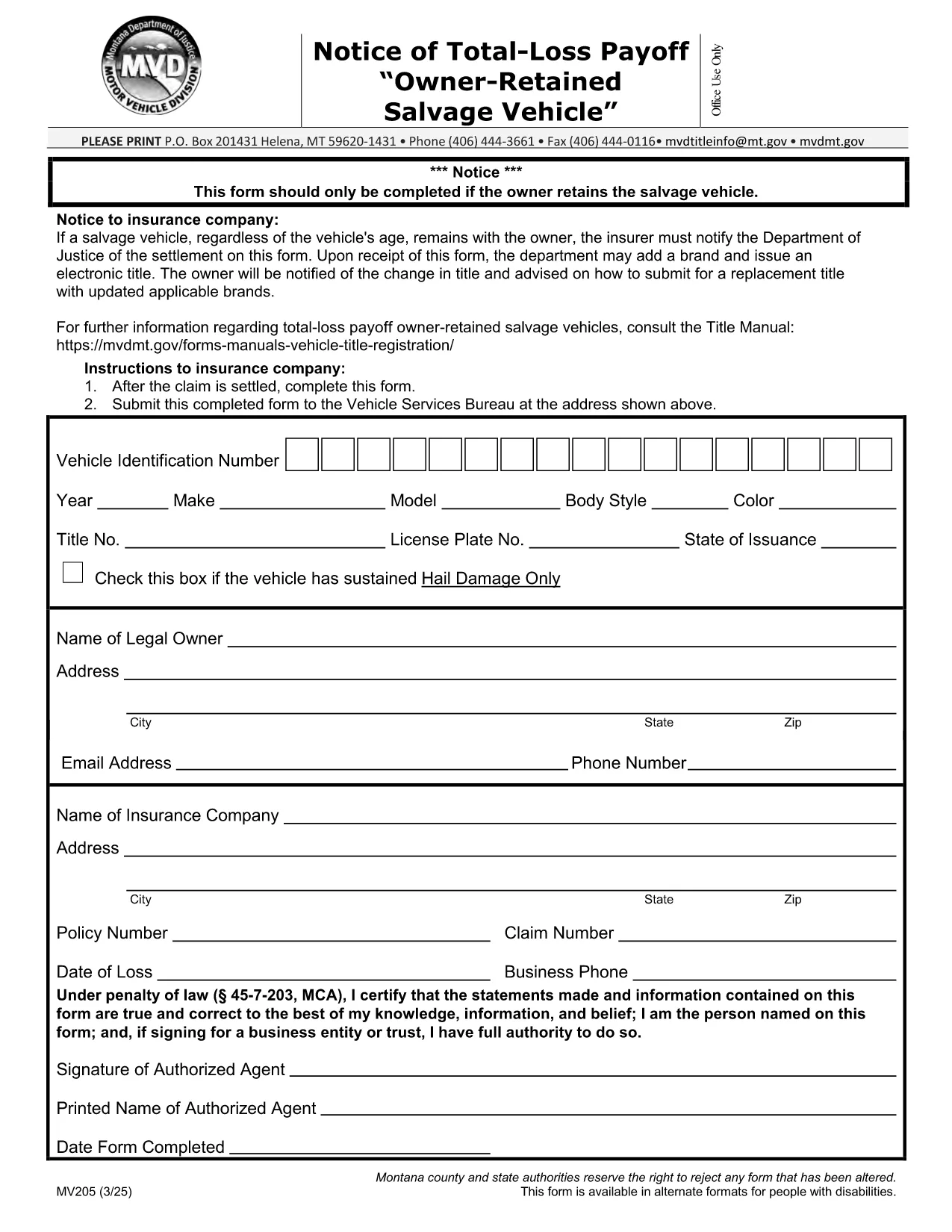
MV205 Notice of Total‑Loss Payoff – Owner‑Retained Salvage Vehicle

  1. Language English
  2. Country USA
  3. Activity Vehicle Registration
  4. State Montana
Fill out this form
MV205 Notice of Total‑Loss Payoff – Owner‑Retained Salvage Vehicle

The MV205 Notice of Total‑Loss Payoff is the official document used when a salvage vehicle remains with its owner after a total‑loss settlement. Insurance companies must notify the Department of Motor Vehicles (DMV) using this form, and the owner may be required to surrender the certificate of ownership.

What Is the MV205 Form?

The MV205 captures essential details about the vehicle, the insurance settlement, and the owner’s intent to retain the salvage. It is required by most state motor vehicle agencies, including Montana, to ensure proper title handling and to prevent fraudulent title transfers.

How to Complete the MV205 Online with Formize

Instead of downloading, printing, and scanning, you can fill the MV205 directly in your browser. Follow these simple steps:

  1. Click the "Fill out this form" button on this page.
  2. Wait a few seconds while the Formize PDF Filler app loads.
  3. Enter the required information in each fillable field (vehicle VIN, insurer details, payout amount, etc.).
  4. Use the built‑in eSignature tool to sign the form electronically.
  5. Click Save & Download to get a completed PDF, or choose Send via Email to forward it directly to your insurance company or DMV.

Common Mistakes & Tips for a Successful Submission

  • Incorrect VIN: Double‑check the Vehicle Identification Number; a single digit error can delay processing.
  • Missing insurer information: Include the insurer’s name, claim number, and contact details exactly as they appear on the settlement statement.
  • Signature errors: Use the eSignature tool; a handwritten signature scanned later may be rejected.
  • Leaving optional fields blank: If a field is marked "optional," you may leave it empty, but be sure all required fields are completed.
  • Submitting the wrong version: Use the official MV205 PDF provided below to avoid outdated formats.

Where to Send the Completed Form

After you finish the online fill, send the PDF to the address listed on the form. Typically, this is the state Department of Motor Vehicles or the specific office handling title transfers. Some states also accept electronic submissions through their online portal—check your local DMV website for details.

Need help? Review the FAQs below or contact your insurance provider for clarification on the settlement amount.

FAQ
  • Who needs to file the MV205 form?

    Any vehicle owner whose insurance company has paid a total‑loss settlement and who intends to keep the salvage vehicle must file the MV205 with the state DMV.

  • Can I submit the MV205 electronically?

    Many states accept an electronically signed PDF. Check your local DMV website; otherwise, print the completed form and mail it to the address shown on the form.

  • What happens if I forget to include the insurer’s claim number?

    The DMV may reject the form, causing processing delays. Always include the full claim number as it appears on the settlement statement.

  • Do I need to surrender my current certificate of ownership?

    Yes, the DMV typically requires you to surrender the existing certificate of ownership when you submit the MV205 for a salvage vehicle.

  • Is the Formize filler free to use?

    Formize offers free filling and e‑signing for most state forms, including MV205. No download or installation is required.

  • How long does it take the DMV to process the MV205?

    Processing time varies by state, but most DMVs complete the review within 7‑10 business days after receiving a correctly completed form.

  • Can I correct a mistake after I’ve submitted the MV205?

    If you notice an error, contact your DMV immediately. In most cases, you’ll need to submit a corrected MV205 with a brief explanation.

  • Is the MV205 the same as a title transfer form?

    No. The MV205 notifies the DMV of a total‑loss payoff for a retained salvage vehicle. A separate title transfer form is required to change ownership.

HOW TO

How to fill out MV205 form for free, online in 5 easy steps:

  1. 1
    Open the Fillable Form
    Click the "Fill out this form" button on the page. The Formize PDF Filler will open in a new tab.
  2. 2
    Load the Formize PDF Filler
    Wait a few seconds while the secure online editor loads the MV205 PDF.
  3. 3
    Enter All Required Information
    Type the VIN, insurer details, payout amount, and any other required fields directly into the fillable boxes.
  4. 4
    Add Your Electronic Signature
    Use the built‑in eSignature tool to sign the form. This signature is legally binding.
  5. 5
    Save or Send the Completed Form
    Click "Save & Download" to keep a copy, or choose "Send via Email" to forward the completed MV205 to your DMV or insurance company.
Formize PDF Filler app
ABOUT

Vehicle Registration Forms

If you own or lease a motor vehicle, trailer or boat, you must meet certain obligations to keep your vehicle legally registered and safe.

MV205 form is one of Vehicle registration forms that are documents that are used to register a motor vehicle with the relevant state or provincial authority. These forms are typically required when a person purchases a new or used vehicle or when they move to a new state or province with a vehicle.

The exact requirements and forms needed for vehicle registration can vary by location, but generally, the process involves providing information about the vehicle, the owner, and any liens on the vehicle.

Once the registration forms and fees are submitted, the state or provincial authority will issue a registration certificate or license plate to the owner of the vehicle. This registration allows the vehicle to be legally operated on public roads and highways.

FEATURES

PDF Filler

The easiest way to fill MV205 form online

  • Quickly fill out MV205 form
    Looking for a way to quickly fill MV205 form online? With our online free PDF form filler, you’ll know how to how to edit and fill this pdf document in less than a minute.
  • Easy to use online PDF editor
    Fed up with printing out PDF files so you can edit them, before rescanning and sending them back? Edit PDF documents for free online. Use our online pdf editor to save time and paper.
  • Great tools, all platforms
    Wondering how to fill in MV205 form on a Mac, or maybe how to use a PDF filler free? Our online PDF tools work on all platforms.
  • Secure file storage
    Completed "MV205 form" files are stored in a secured database managed by Amazon Cloud hosting. You can delete your files from our system anytime. In any case, these files are automatically deleted after 24 hours.
  • Chat with MV205 form
    Chat with "MV205 form" on Chatize that is a free PDF reader assistant. Ask questions and get answers from "MV205 form". Just click on Chat With Document button above.

Delete filling session

Delete the selected filling session? In this case, your progress in completing the form will be lost.

Delete editing session

Delete the selected editing session? In this case, your progress in creating and editing the form will be lost.