
Select language

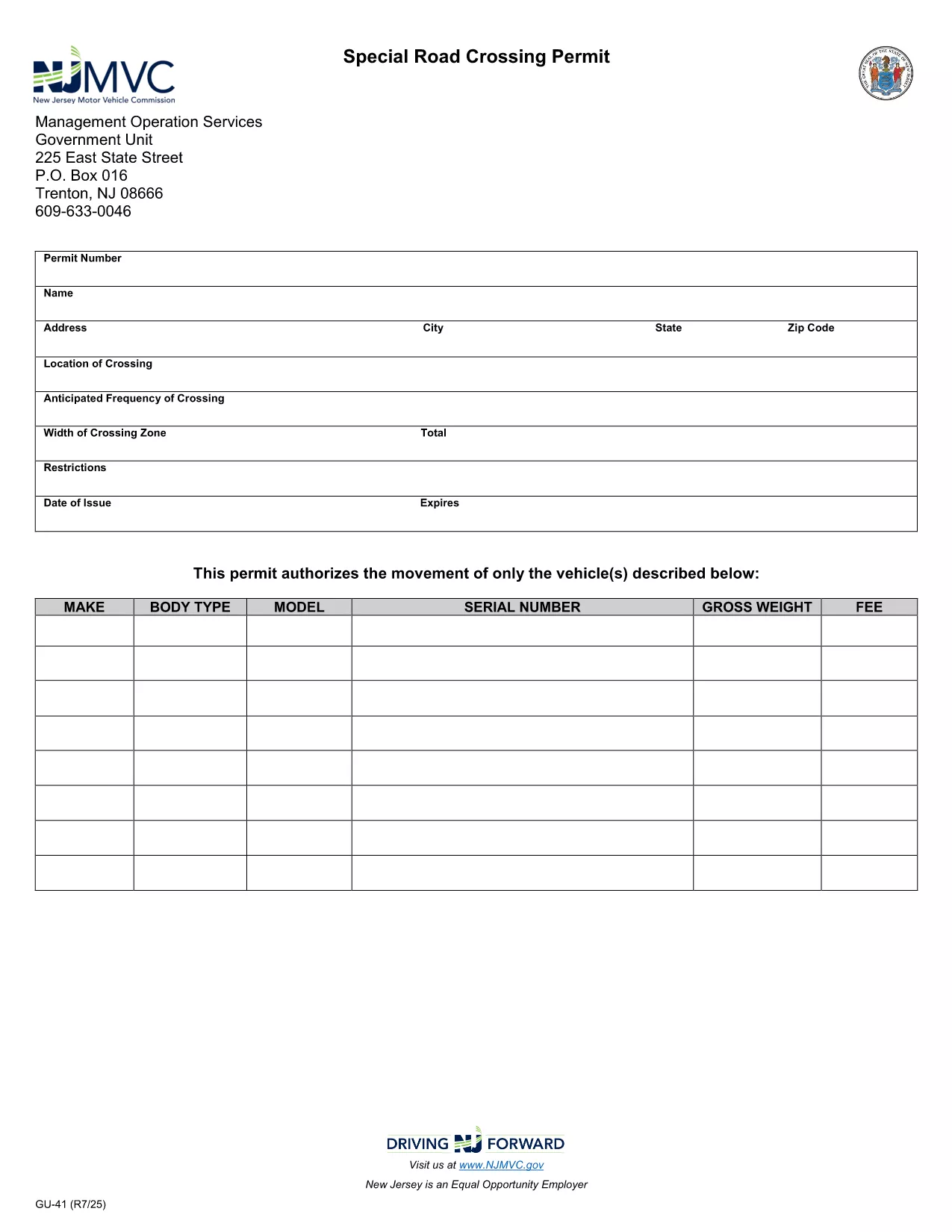
GU-41 Special Road Crossing Permit – Fillable PDF Form

  1. Language English
  2. Country USA
  3. Activity Vehicle Registration
  4. State New Jersey
Fill out this form
GU-41 Special Road Crossing Permit – Fillable PDF Form

The GU-41 is New Jersey's official Special Road Crossing Permit required for vehicles that need to cross a public roadway for construction, maintenance, or other authorized activities. This fillable PDF lets you complete the form quickly, accurately, and without any extra software.

What Is the GU-41 Form?

The GU-41 collects essential details such as the location of the crossing, vehicle specifications, lighting requirements, and the dates and times the crossing will occur. It is issued by the New Jersey Motor Vehicle Commission (NJ MVC) and must be approved before any crossing takes place.

How to Fill Out the GU-41 Online

Instead of downloading the PDF and opening it in a separate editor, simply click the "Fill out this form" button on this page. The Formize PDF Filler app will load in your browser, allowing you to:

  • Enter all required information directly into the fields.
  • Save your progress and return later if needed.
  • Download a completed copy for your records.

Common Mistakes to Avoid

  • Missing lighting details: The permit requires at least two white lights and amber reflectors on each side of the vehicle.
  • Incorrect dates or times: Crossings are generally limited to daylight hours unless special lighting is provided.
  • Unclear vehicle description: Include make, model, license plate, and weight.

Where to Submit the Completed Permit

After you finish the form, print the completed PDF and submit it to the NJ MVC Office of Motor Vehicles or mail it to the address listed in Section "F" of the form. You may also upload the signed PDF through the NJ MVC online portal if you have an account.

Download the Official GU-41 PDF

If you prefer the original document for offline use, you can download the official PDF directly from the NJ government site.

Download GU-41 PDF (official)

FAQ
  • What is the purpose of the GU-41 form?

    The GU-41 authorizes special road crossing activities in New Jersey, ensuring safety and compliance with lighting and timing requirements.

  • Can I fill out the GU-41 on a mobile device?

    Yes. The Formize PDF Filler works on most modern smartphones and tablets, allowing you to complete the form on the go.

  • Do I need a signature on the GU-41?

    A handwritten signature is required for the official submission. You can sign after downloading the completed PDF.

  • How long does the permit approval take?

    Approval times vary, but most requests are processed within 5‑7 business days after submission to the NJ MVC.

  • What lighting is required for night crossings?

    At least two white front lights capable of illuminating objects at 500 feet and two 4‑inch Class‑A amber reflectors on each side of the vehicle.

  • Is there a fee for the GU-41 permit?

    Yes. The fee schedule is listed in Section "G" of the form and must be paid before the permit is issued.

  • Can I submit the GU-41 electronically?

    Yes, after completing the form you can upload the signed PDF through the NJ MVC online portal if you have an account.

HOW TO

How to fill out GU-41 for free, online in 3 easy steps:

  1. 1
    Click the Fill-out Button
    On this page, click the "Fill out this form" button. The Formize PDF Filler will open directly in your browser.
  2. 2
    Wait for the Filler to Load
    The Formize app loads in a few seconds. Once the fields become editable, you can start entering your information.
  3. 3
    Complete and Save
    Fill in each section, double‑check for errors, then click "Save" to download a completed copy or print it for submission.
Formize PDF Filler app
ABOUT

Vehicle Registration Forms

GU-41 is one of Vehicle registration forms that are documents used to register a motor vehicle with the relevant government authority, typically the Department of Motor Vehicles (DMV) or equivalent agency. These forms are required when a person purchases a new or used vehicle, transfers ownership of a vehicle, or moves to a new jurisdiction with a vehicle.

The specific vehicle registration forms can vary by jurisdiction, but they generally require the following information:

Vehicle Information: This includes details about the vehicle, such as the make, model, year, vehicle identification number (VIN), and odometer reading.

Owner Information: The form will require information about the vehicle's owner, including their name, address, contact information, and driver's license number.

Proof of Ownership: Depending on the circumstances, proof of ownership may be required, such as a title certificate, bill of sale, or manufacturer's certificate of origin (for new vehicles).

Insurance Information: Proof of valid vehicle insurance coverage is typically required. This may include providing the insurance policy number, dates of coverage, and insurance company details.

Payment of Fees: Vehicle registration involves payment of various fees, such as registration fees, taxes, and possibly other charges specific to the jurisdiction.

In addition to these basic requirements, some jurisdictions may have additional forms or documentation requirements. For example, emissions test results, safety inspections, or proof of residency might be necessary in certain areas.

Once the vehicle registration forms are completed and submitted, the government authority will issue a registration certificate, license plates, and registration stickers. These documents indicate that the vehicle is legally registered and authorized to be operated on public roads.

It is important to note that vehicle registration requirements can vary significantly by jurisdiction. Therefore, it is recommended to consult the local DMV or equivalent agency for the specific forms and procedures applicable to your location.

FEATURES

PDF Filler

The easiest way to fill GU-41 online

  • Quickly fill out GU-41
    Looking for a way to quickly fill GU-41 online? With our online free PDF form filler, you’ll know how to how to edit and fill this pdf document in less than a minute.
  • Easy to use online PDF editor
    Fed up with printing out PDF files so you can edit them, before rescanning and sending them back? Edit PDF documents for free online. Use our online pdf editor to save time and paper.
  • Great tools, all platforms
    Wondering how to fill in GU-41 on a Mac, or maybe how to use a PDF filler free? Our online PDF tools work on all platforms.
  • Secure file storage
    Completed "GU-41" files are stored in a secured database managed by Amazon Cloud hosting. You can delete your files from our system anytime. In any case, these files are automatically deleted after 24 hours.
  • Chat with GU-41
    Chat with "GU-41" on Chatize that is a free PDF reader assistant. Ask questions and get answers from "GU-41". Just click on Chat With Document button above.

Delete filling session

Delete the selected filling session? In this case, your progress in completing the form will be lost.

Delete editing session

Delete the selected editing session? In this case, your progress in creating and editing the form will be lost.