
Select language

NY MV-82B Boat Registration & Title Application – Fillable PDF

  1. Country USA
  2. Language English
  3. Activity Vehicle Registration
  4. State New York
Fill out this form
NY MV-82B Boat Registration & Title Application – Fillable PDF

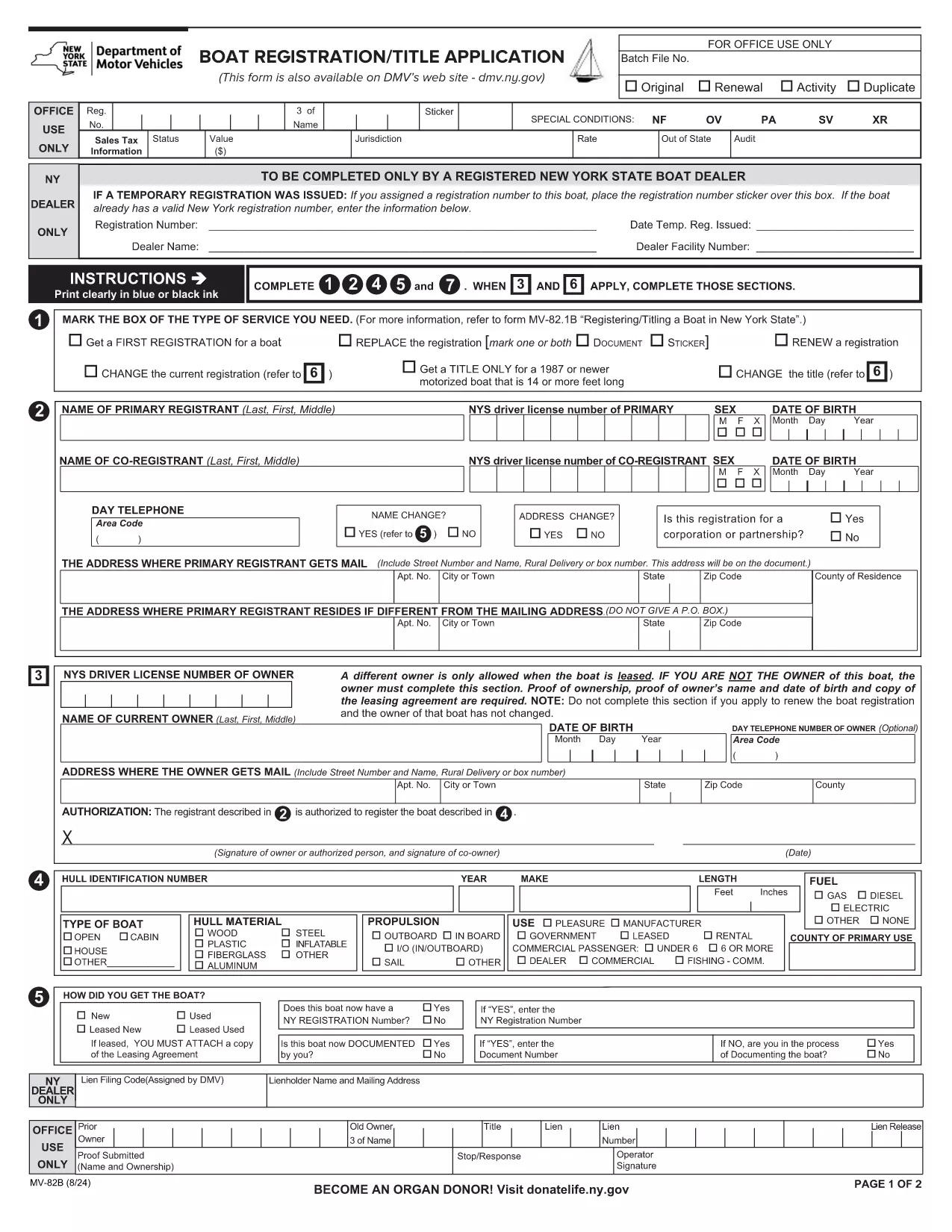
The MV-82B is New York State's official Boat Registration and Title Application. Whether you’re registering a new vessel, transferring ownership, or renewing a title, this fillable PDF lets you provide all required details quickly and accurately.

What Is the MV-82B Form?

Issued by the New York Department of Motor Vehicles (DMV), the MV-82B collects essential data about the boat, its hull identification number (HIN), ownership, and the registrant’s contact information. Completing this form is a legal requirement for any motorized or non‑motorized boat operating on New York waters.

How to Complete the MV-82B Online with Formize

Instead of downloading the PDF and opening it in a separate editor, simply click the "Fill out this form" button on this page. The Formize PDF Filler app will load in your browser, providing a smooth, fillable experience:

  1. Click "Fill out this form" – the Formize interface appears instantly.
  2. Enter your information in each highlighted field. The app auto‑saves as you type.
  3. eSign the document using the built‑in signature tool.
  4. Review & submit – you can download the completed PDF, email it, or print it for mailing.

Key Information Required

  • Hull Identification Number (HIN) or Manufacturer’s Serial Number
  • Boat type, length, and motor specifications
  • Current owner’s full name, address, and date of birth
  • Proof of ownership (bill of sale, previous registration, or lease agreement)
  • Contact information for the registrant

Common Mistakes & Tips

  • Leaving the HIN blank – the DMV will reject the application.
  • Incorrect owner name format – use "Last, First Middle" as shown on the form.
  • Missing signatures – both owner and dealer (if applicable) must sign.
  • Using the wrong PDF version – always use the latest official form linked below.
  • Failing to attach required documents – include a copy of the bill of sale or previous registration.

Where to Submit the Completed Form

After completing the MV-82B, you can:

  • Mail it to your local NY DMV office (address listed on the form).
  • Bring the printed PDF to a DMV Customer Service Center.
  • Submit electronically if your local office accepts scanned copies.

Using Formize ensures your data is entered correctly the first time, reducing processing delays and avoiding costly penalties.

FAQ
  • Do I need a separate title application for my boat?

    If the boat is new or you are transferring ownership, the MV-82B serves as both the registration and title application.

  • Can I submit the MV-82B electronically?

    Many NY DMV offices accept scanned copies. Check the local office’s guidelines or submit the printed form by mail.

  • What if I make a mistake after submitting?

    Contact the NY DMV to request a correction. You may need to submit a new MV-82B with the corrected information.

  • Is there a fee for filing the MV-82B?

    Yes, registration fees vary by boat length and type. The fee schedule is listed on the NY DMV website.

  • Do I need a hull identification number (HIN) for non‑motorized boats?

    Non‑motorized boats under 12 feet are exempt from HIN requirements, but you still must complete the MV-82B.

HOW TO

How to fill out MV-82B for free, online in 4 easy steps:

  1. 1
    Open the Fillable Form
    Click the "Fill out this form" button on the page. The Formize PDF Filler loads directly in your browser.
  2. 2
    Enter Required Details
    Complete each highlighted field with your boat and owner information. The app saves your entries automatically.
  3. 3
    Add Your Electronic Signature
    Use the built‑in eSign tool to sign as the owner (and dealer, if applicable).
  4. 4
    Review and Download
    Double‑check all entries, then download the finished PDF or print it for mailing to the NY DMV.
Formize PDF Filler app
ABOUT

Vehicle Registration Forms

If you own or lease a motor vehicle, trailer or boat, you must meet certain obligations to keep your vehicle legally registered and safe.

MV-82B is one of Vehicle registration forms that are documents that are used to register a motor vehicle with the relevant state or provincial authority. These forms are typically required when a person purchases a new or used vehicle or when they move to a new state or province with a vehicle.

The exact requirements and forms needed for vehicle registration can vary by location, but generally, the process involves providing information about the vehicle, the owner, and any liens on the vehicle.

Once the registration forms and fees are submitted, the state or provincial authority will issue a registration certificate or license plate to the owner of the vehicle. This registration allows the vehicle to be legally operated on public roads and highways.

FEATURES

PDF Filler

The easiest way to fill MV-82B online

  • Quickly fill out MV-82B
    Looking for a way to quickly fill MV-82B online? With our online free PDF form filler, you’ll know how to how to edit and fill this pdf document in less than a minute.
  • Easy to use online PDF editor
    Fed up with printing out PDF files so you can edit them, before rescanning and sending them back? Edit PDF documents for free online. Use our online pdf editor to save time and paper.
  • Great tools, all platforms
    Wondering how to fill in MV-82B on a Mac, or maybe how to use a PDF filler free? Our online PDF tools work on all platforms.
  • Secure file storage
    Completed "MV-82B" files are stored in a secured database managed by Amazon Cloud hosting. You can delete your files from our system anytime. In any case, these files are automatically deleted after 24 hours.
  • Chat with MV-82B
    Chat with "MV-82B" on Chatize that is a free PDF reader assistant. Ask questions and get answers from "MV-82B". Just click on Chat With Document button above.

Delete filling session

Delete the selected filling session? In this case, your progress in completing the form will be lost.

Delete editing session

Delete the selected editing session? In this case, your progress in creating and editing the form will be lost.