
Select language

MVR-181 Damage Disclosure Statement – Fillable PDF

  1. Language English
  2. Country USA
  3. Activity Vehicle Registration
  4. State North Carolina
Fill out this form
MVR-181 Damage Disclosure Statement – Fillable PDF

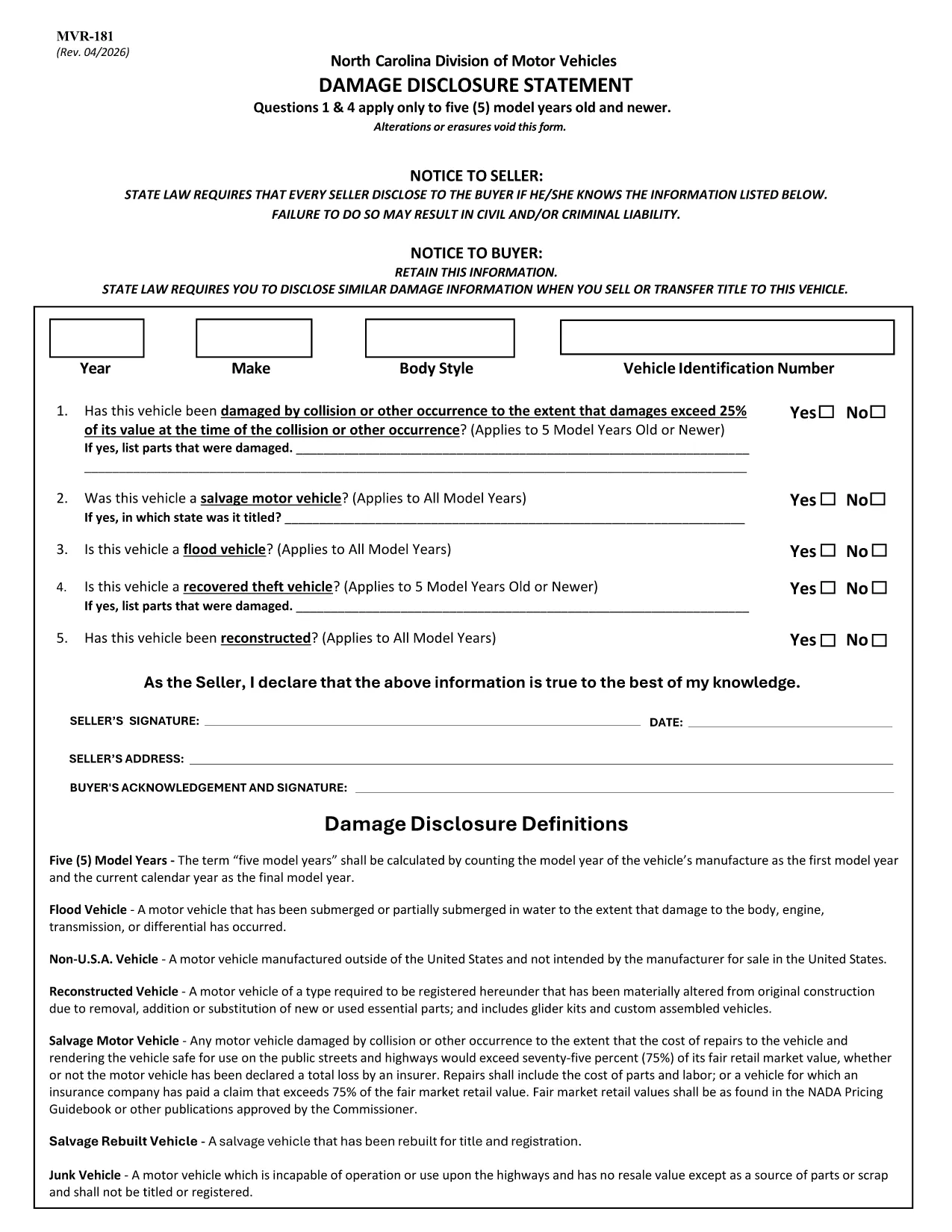
The MVR-181 Damage Disclosure Statement is a legally required form in North Carolina that sellers must complete to disclose any known damage, salvage status, or alterations to a motor vehicle before a sale. Providing accurate information protects both the seller and the buyer from future disputes.

What Is the MVR-181 Damage Disclosure Statement?

The form asks for details such as:

  • Vehicle identification (VIN, make, model, year)
  • Any prior collision or flood damage
  • Whether the vehicle has been declared a total loss or salvaged
  • Signatures of both seller and buyer confirming the information is true

Questions 1 & 4 only apply to vehicles that are five model years old or newer.

Why Choose a Fillable PDF for MVR-181?

Using a fillable PDF saves time, eliminates illegible handwriting, and ensures every required field is completed before submission. With Formize’s online editor you can:

  • Enter data directly on the form
  • Add a legally binding electronic signature
  • Validate the form instantly
  • Download or email the completed PDF in seconds

How to Complete the MVR-181 Online

Follow the simple steps below to fill out the form without leaving your browser.

Common Mistakes to Avoid

  • Leaving any required checkbox unchecked – the form will not validate.
  • Altering or erasing printed text – any changes void the statement.
  • Forgetting both signatures – an unsigned form is not enforceable.

Download the Official NC MVR-181 PDF

Click the button below to open the official North Carolina MVR‑181 PDF in Formize’s secure filler. No software download is required.

FAQ
  • Who is required to complete the MVR-181?

    Any private seller or dealer transferring ownership of a motor vehicle in North Carolina must complete the Damage Disclosure Statement.

  • Is an electronic signature accepted on the MVR-181?

    Yes. North Carolina law recognizes ESIGN‑compliant electronic signatures as valid for the MVR‑181.

  • Can I use the same MVR-181 for multiple vehicles?

    No. Each vehicle requires its own completed form with the specific VIN and damage details.

  • What happens if I leave a required box unchecked?

    The form will not validate, and the transaction could be considered non‑compliant, exposing both parties to liability.

  • Do I need to submit the form to a government agency?

    The completed MVR‑181 is kept with the vehicle’s title paperwork. It is not filed with the DMV, but it must be presented at the time of sale.

  • Can I edit the form after I’ve signed it?

    Once an electronic signature is applied, the document is locked to preserve integrity. If changes are needed, create a new form.

  • Is the PDF provided by Formize the official version?

    Yes. The download link points to the official North Carolina Department of Transportation version of MVR‑181.

  • Do I need special software to fill out the PDF?

    No. Formize’s online filler works in any modern browser – no additional software is required.

HOW TO

How to fill out MVR-181 for free, online in 5 easy steps:

  1. 1
    Open the Fillable Form
    Click the “Fill out this form” button on the page. The Formize PDF Filler app loads the MVR‑181 directly in your browser.
  2. 2
    Enter the Required Information
    Type into each fillable field – VIN, make, model, damage details, etc. The form highlights any missing required fields.
  3. 3
    Add Your Electronic Signature
    Use the built‑in e‑sign tool to sign as the seller and the buyer. The signature is legally binding and compliant with ESIGN.
  4. 4
    Review and Validate
    Click “Validate” to let Formize check for incomplete sections or unchecked boxes. Correct any issues before proceeding.
  5. 5
    Download or Email the Completed PDF
    When validation passes, choose “Download” to save a copy or “Email” to send the completed form directly to the other party.
Formize PDF Filler app
ABOUT

Vehicle Registration Forms

MVR-181 is one of DMV forms, also known as Department of Motor Vehicles forms, that are documents used in various transactions and processes related to motor vehicles. The DMV is a government agency responsible for driver licensing, vehicle registration, and enforcing motor vehicle laws. The specific DMV forms available can vary by jurisdiction, but here are some common examples:

Driver's License Forms: These forms are used to apply for a driver's license or to request changes or renewals. They typically require personal information, proof of identity, and may include sections for medical information or driving history.

Vehicle Registration Forms: These forms are used to register a motor vehicle with the DMV. They require vehicle information, ownership details, and proof of insurance.

Title Transfer Forms: When buying or selling a vehicle, these forms are used to transfer ownership from one party to another. They require information about the buyer, seller, vehicle details, and may include a bill of sale.

Vehicle Release of Liability Forms: When selling or transferring ownership of a vehicle, these forms notify the DMV that the seller is no longer responsible for the vehicle. It helps protect the seller from liability for accidents or incidents involving the vehicle after the sale.

License Plate and Registration Renewal Forms: These forms are used to renew vehicle registration or request new license plates. They typically require information about the registered owner, current registration details, and payment of applicable fees.

Driving Records Request Forms: These forms allow individuals to request their driving records from the DMV, which provide information about driving violations, license status, and other relevant details.

Specialty or Personalized License Plate Forms: These forms are used to apply for personalized or specialty license plates, which allow individuals to customize their license plate with specific characters or designs.

These are just a few examples of the many forms that may be available through the DMV. The specific forms and requirements can vary by jurisdiction, so it is important to consult the local DMV website or visit a DMV office to obtain the correct forms for your particular needs.

FEATURES

PDF Filler

The easiest way to fill MVR-181 online

  • Quickly fill out MVR-181
    Looking for a way to quickly fill MVR-181 online? With our online free PDF form filler, you’ll know how to how to edit and fill this pdf document in less than a minute.
  • Easy to use online PDF editor
    Fed up with printing out PDF files so you can edit them, before rescanning and sending them back? Edit PDF documents for free online. Use our online pdf editor to save time and paper.
  • Great tools, all platforms
    Wondering how to fill in MVR-181 on a Mac, or maybe how to use a PDF filler free? Our online PDF tools work on all platforms.
  • Secure file storage
    Completed "MVR-181" files are stored in a secured database managed by Amazon Cloud hosting. You can delete your files from our system anytime. In any case, these files are automatically deleted after 24 hours.
  • Chat with MVR-181
    Chat with "MVR-181" on Chatize that is a free PDF reader assistant. Ask questions and get answers from "MVR-181". Just click on Chat With Document button above.

Delete filling session

Delete the selected filling session? In this case, your progress in completing the form will be lost.

Delete editing session

Delete the selected editing session? In this case, your progress in creating and editing the form will be lost.