
Select language

MVR‑605A – Request for Motor Vehicle Information (Fillable PDF)

  1. Language English
  2. Country USA
  3. Activity Vehicle Registration
  4. State North Carolina
Fill out this form
MVR‑605A – Request for Motor Vehicle Information (Fillable PDF)

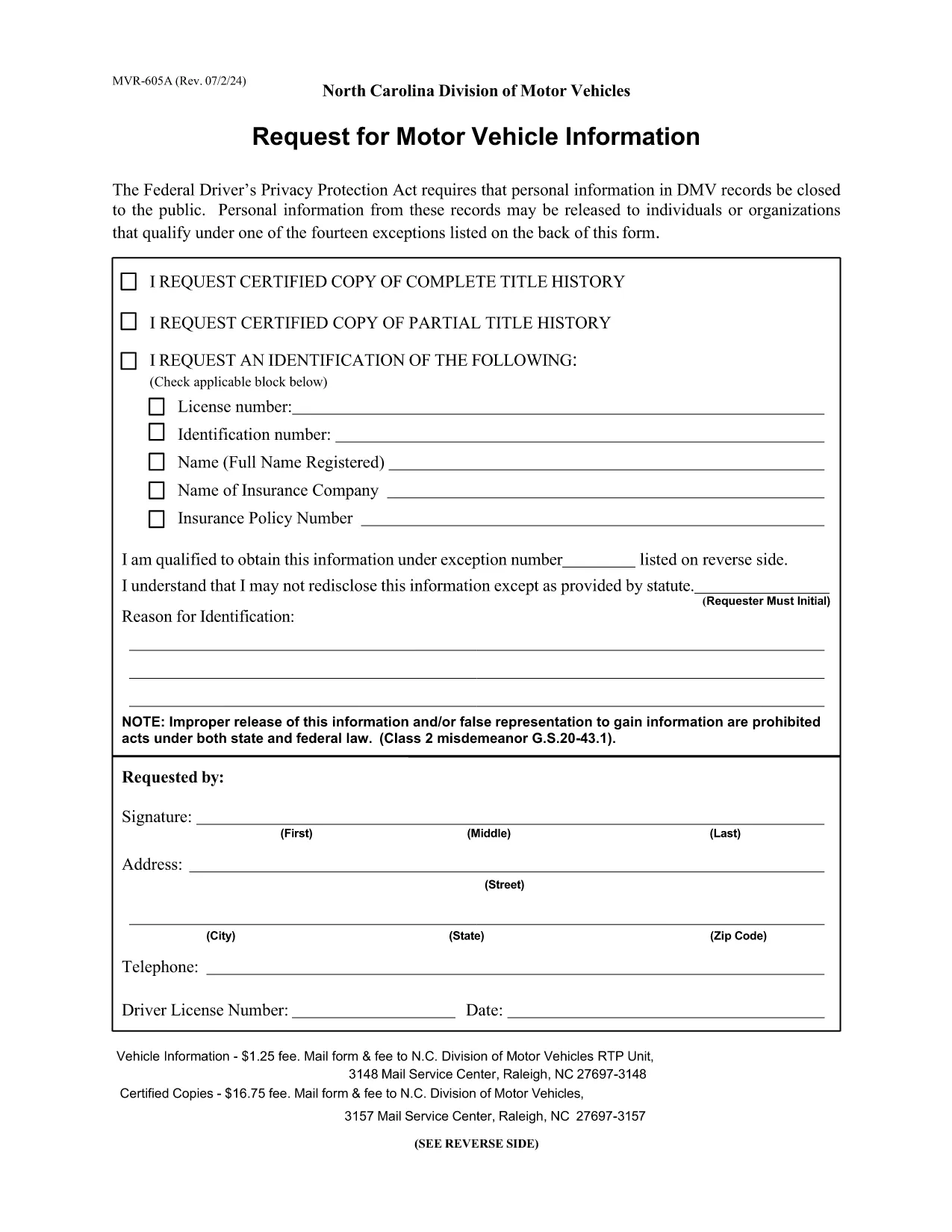
The MVR‑605A is the official North Carolina request form used to obtain motor vehicle records, driver safety data, emissions information, and related vehicle details. Whether you need the form for a legal matter, insurance claim, or personal research, the fillable PDF lets you complete it quickly and securely.

What Is the MVR‑605A Form?

The MVR‑605A (Motor Vehicle Record Request) is issued by the North Carolina Division of Motor Vehicles (NCDOT DMV). It authorizes the DMV to release vehicle and driver information to the requester. The form covers a wide range of uses, including safety investigations, emissions compliance, product recalls, and market research.

How to Fill Out the MVR‑605A Online

Instead of downloading and editing the PDF in a separate editor, simply click the "Fill out this form" button on this page. The Formize PDF Filler app will load the document directly in your browser, allowing you to type, check boxes, and sign electronically.

Common Mistakes to Avoid

  • Missing signatures: The DMV requires the requester's signature for every individual whose records are requested.
  • Incorrect fee amount: Verify the current processing fee on the form before submitting.
  • Incomplete address information: Provide a full mailing address; the DMV will not process partial entries.
  • Wrong vehicle identification: Include the correct VIN, license plate number, and registration details.

Where to Submit Your Request

After completing the form, print it (if a wet signature is required) and mail it to:

N.C. Division of Motor Vehicles – RTP Unit
3148 Mail Service Center
Raleigh, NC 27697‑3148

If you have a digital signature, you may email the PDF to the address listed on the form’s instructions.

Download the Fillable PDF

Click the button below to open the fillable MVR‑605A PDF in the Formize PDF Filler. No software download is needed.

FAQ
  • What fee is required to process the MVR‑605A?

    The standard fee is $1.00 for a basic record request. Certified copies cost $13.00. Verify the current fee on the form before submitting.

  • Can I submit the form electronically?

    Yes, if you use a digital signature the DMV accepts emailed PDFs. Otherwise, print, sign, and mail the form.

  • How long does it take to receive the records?

    Processing usually takes 5‑7 business days after the DMV receives a complete, correctly paid request.

  • Do I need to be the vehicle owner to request records?

    You must have a legitimate purpose and provide a signed authorization from the record holder. The DMV reviews each request for compliance.

  • What information must I include about the vehicle?

    Provide the full VIN, license plate number, and registration state. Incomplete vehicle data will delay the request.

  • Is the MVR‑605A form fillable on mobile devices?

    Yes. The Formize PDF Filler works on most modern smartphones and tablets, allowing you to complete the form on the go.

HOW TO

How to fill out MVR‑605A for free, online in 5 easy steps:

  1. 1
    Click the Fill Out Button
    Press the "Fill out this form" button on the page to launch the Formize PDF Filler in your browser.
  2. 2
    Wait for the Filler to Load
    The app loads the MVR‑605A PDF automatically; this usually takes a few seconds.
  3. 3
    Complete Each Field
    Enter your personal information, vehicle details, and the reason for the request. Use the tab key to move between fields.
  4. 4
    Add Your Signature
    Use the signature tool to draw or type your signature, then confirm.
  5. 5
    Review, Save, and Submit
    Double‑check all entries, click "Save" to download a copy, and follow the submission instructions on the form.
Formize PDF Filler app
ABOUT

Vehicle Registration Forms

If you own or lease a motor vehicle, trailer or boat, you must meet certain obligations to keep your vehicle legally registered and safe.

MVR‑605A is one of Vehicle registration forms that are documents that are used to register a motor vehicle with the relevant state or provincial authority. These forms are typically required when a person purchases a new or used vehicle or when they move to a new state or province with a vehicle.

The exact requirements and forms needed for vehicle registration can vary by location, but generally, the process involves providing information about the vehicle, the owner, and any liens on the vehicle.

Once the registration forms and fees are submitted, the state or provincial authority will issue a registration certificate or license plate to the owner of the vehicle. This registration allows the vehicle to be legally operated on public roads and highways.

FEATURES

PDF Filler

The easiest way to fill MVR‑605A online

  • Quickly fill out MVR‑605A
    Looking for a way to quickly fill MVR‑605A online? With our online free PDF form filler, you’ll know how to how to edit and fill this pdf document in less than a minute.
  • Easy to use online PDF editor
    Fed up with printing out PDF files so you can edit them, before rescanning and sending them back? Edit PDF documents for free online. Use our online pdf editor to save time and paper.
  • Great tools, all platforms
    Wondering how to fill in MVR‑605A on a Mac, or maybe how to use a PDF filler free? Our online PDF tools work on all platforms.
  • Secure file storage
    Completed "MVR‑605A" files are stored in a secured database managed by Amazon Cloud hosting. You can delete your files from our system anytime. In any case, these files are automatically deleted after 24 hours.
  • Chat with MVR‑605A
    Chat with "MVR‑605A" on Chatize that is a free PDF reader assistant. Ask questions and get answers from "MVR‑605A". Just click on Chat With Document button above.

Delete filling session

Delete the selected filling session? In this case, your progress in completing the form will be lost.

Delete editing session

Delete the selected editing session? In this case, your progress in creating and editing the form will be lost.