
Select language

Pennsylvania Form MV-375 – Fillable Motor Vehicle Bond

  1. Language English
  2. Country USA
  3. Activity Vehicle Registration
  4. State Pennsylvania
Fill out this form
Pennsylvania Form MV-375 – Fillable Motor Vehicle Bond

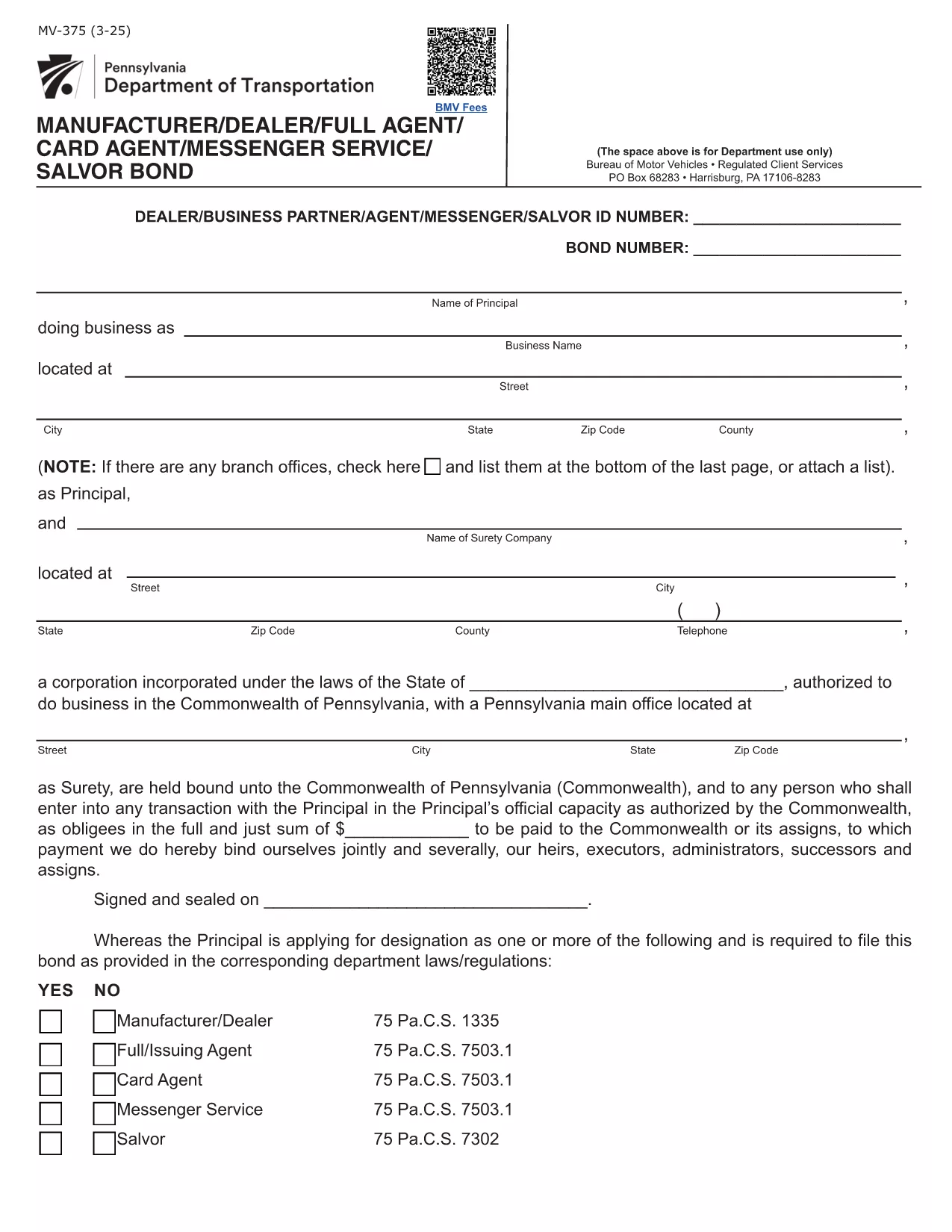
The Pennsylvania Form MV-375 is the official surety bond application used by manufacturers, dealers, full agents, card agents, messenger services, and salvors operating under the Commonwealth’s motor‑vehicle regulations. This multi‑use bond guarantees compliance with 75 Pa.C.S. statutes and protects the public from monetary loss.

What is Form MV-375?

Form MV-375 serves as a single, statewide bond for several motor‑vehicle related activities. Whether you are applying for a dealer bond, a full‑card agent bond, a messenger service bond, or a salvor bond, the same PDF form is required.

How to Fill Form MV-375 Online

Instead of downloading the PDF and editing it with a separate program, simply click the "Fill out this form" button on this page. The Formize PDF Filler app will load directly in your browser, allowing you to complete every field instantly.

Common Mistakes to Avoid

  • Leaving required fields blank – the filler will highlight missing information before you can submit.
  • Entering an incorrect bond amount – verify the amount that matches your business class (dealer, card agent, etc.).
  • Signing with a raster image instead of a digital signature – use the built‑in signature tool for a legally accepted signature.

Bond Amounts and Requirements

Bond amounts differ by activity:

  • Dealer or Manufacturer: $20,000 (or higher for multiple locations).
  • Full Card Agent: $30,000 per authorized agent.
  • Card Agent: $3,000 per location.
  • Messenger Service: $50,000 per location.
  • Salvor (Vehicle Salvage): $10,000 per location.

Where to Submit the Completed Form

After completing the form, you can:

  • Download the finished PDF and mail it to the Pennsylvania Department of Transportation (PennDOT).
  • Submit the electronic version via PennDOT’s online portal if you have a registered account.

Need assistance? Review the official PDF instructions for detailed guidance.

FAQ
  • What types of businesses need Form MV-375?

    Any manufacturer, dealer, full‑card agent, card agent, messenger service, or vehicle salvor operating in Pennsylvania must file Form MV-375 as a surety bond.

  • Can I fill out MV-375 on a mobile device?

    Yes. The Formize PDF Filler is responsive and works on smartphones and tablets as long as you have a modern browser.

  • Is an electronic signature accepted?

    PennDOT accepts electronic signatures created with the Formize PDF Filler, provided the signature field is completed using the built‑in tool.

  • What happens if I enter the wrong bond amount?

    An incorrect bond amount will cause the application to be rejected. Verify the required amount for your specific activity before submitting.

  • Do I need a surety company to submit MV-375?

    Yes. The bond must be issued by a licensed surety company. The completed form includes a section for the surety’s details and signature.

  • How long does it take to process the form?

    Processing time varies by agency, but once the bond is issued and the form is submitted, PennDOT typically reviews it within 5‑10 business days.

HOW TO

How to fill out Form MV-375 for free, online in 5 easy steps:

  1. 1
    Open the Fillable Form
    Click the "Fill out this form" button on this page. The Formize PDF Filler will launch in a new browser tab.
  2. 2
    Load the Form
    Wait a few seconds while the MV-375 PDF loads into the online editor.
  3. 3
    Complete All Fields
    Enter your business information, bond amount, and sign using the digital signature tool.
  4. 4
    Review for Errors
    Use the built‑in validation to check for missing or incorrect entries before finalizing.
  5. 5
    Save or Submit
    Download the completed PDF for mailing, or submit electronically if your agency accepts online filings.
Formize PDF Filler app
ABOUT

Vehicle Registration Forms

Form MV-375 is one of Vehicle registration forms that are documents used to register a motor vehicle with the relevant government authority, typically the Department of Motor Vehicles (DMV) or equivalent agency. These forms are required when a person purchases a new or used vehicle, transfers ownership of a vehicle, or moves to a new jurisdiction with a vehicle.

The specific vehicle registration forms can vary by jurisdiction, but they generally require the following information:

Vehicle Information: This includes details about the vehicle, such as the make, model, year, vehicle identification number (VIN), and odometer reading.

Owner Information: The form will require information about the vehicle's owner, including their name, address, contact information, and driver's license number.

Proof of Ownership: Depending on the circumstances, proof of ownership may be required, such as a title certificate, bill of sale, or manufacturer's certificate of origin (for new vehicles).

Insurance Information: Proof of valid vehicle insurance coverage is typically required. This may include providing the insurance policy number, dates of coverage, and insurance company details.

Payment of Fees: Vehicle registration involves payment of various fees, such as registration fees, taxes, and possibly other charges specific to the jurisdiction.

In addition to these basic requirements, some jurisdictions may have additional forms or documentation requirements. For example, emissions test results, safety inspections, or proof of residency might be necessary in certain areas.

Once the vehicle registration forms are completed and submitted, the government authority will issue a registration certificate, license plates, and registration stickers. These documents indicate that the vehicle is legally registered and authorized to be operated on public roads.

It is important to note that vehicle registration requirements can vary significantly by jurisdiction. Therefore, it is recommended to consult the local DMV or equivalent agency for the specific forms and procedures applicable to your location.

FEATURES

PDF Filler

The easiest way to fill Form MV-375 online

  • Quickly fill out Form MV-375
    Looking for a way to quickly fill Form MV-375 online? With our online free PDF form filler, you’ll know how to how to edit and fill this pdf document in less than a minute.
  • Easy to use online PDF editor
    Fed up with printing out PDF files so you can edit them, before rescanning and sending them back? Edit PDF documents for free online. Use our online pdf editor to save time and paper.
  • Great tools, all platforms
    Wondering how to fill in Form MV-375 on a Mac, or maybe how to use a PDF filler free? Our online PDF tools work on all platforms.
  • Secure file storage
    Completed "Form MV-375" files are stored in a secured database managed by Amazon Cloud hosting. You can delete your files from our system anytime. In any case, these files are automatically deleted after 24 hours.
  • Chat with Form MV-375
    Chat with "Form MV-375" on Chatize that is a free PDF reader assistant. Ask questions and get answers from "Form MV-375". Just click on Chat With Document button above.

Delete filling session

Delete the selected filling session? In this case, your progress in completing the form will be lost.

Delete editing session

Delete the selected editing session? In this case, your progress in creating and editing the form will be lost.