
Select language

RMO-1VR Fillable PDF – Report Vehicle Fraud (Pennsylvania)

  1. Language English
  2. Country USA
  3. Activity Vehicle Registration
  4. State Pennsylvania
Fill out this form
RMO-1VR Fillable PDF – Report Vehicle Fraud (Pennsylvania)

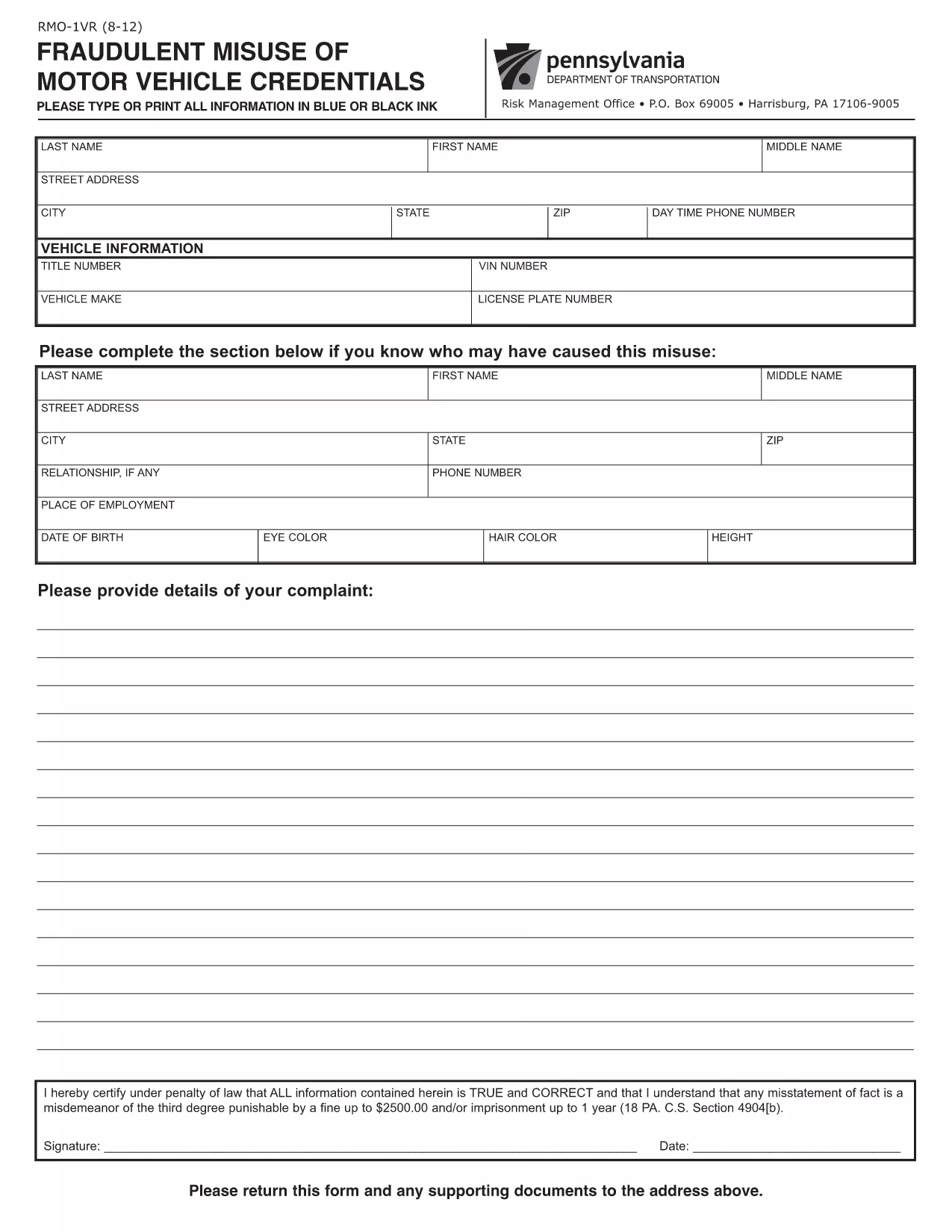
The RMO-1VR (Fraudulent Misuse of Motor Vehicle Credentials) is the official PennDOT form used to report suspected vehicle fraud, such as odometer tampering, title fraud, or misuse of dealer plates. Formize makes this PDF fully fillable online, so you can submit accurate information without printing or scanning.

What Is Form RMO-1VR?

RMO-1VR is a PennDOT Risk Management Office document that collects detailed information about the vehicle, the alleged fraudulent activity, and any supporting evidence. The form helps PennDOT investigate and take action against fraudulent motor‑vehicle transactions.

When Should You Use the RMO-1VR?

  • Odometer rollback or alteration
  • Title or registration fraud
  • Unauthorized use of dealer or temporary plates
  • Any suspicious activity that could affect vehicle ownership or safety

How to Complete the RMO-1VR Online

Follow the simple steps below to fill out the form directly in your browser using Formize’s PDF Filler.

Common Mistakes to Avoid

  • Leaving required fields blank – the form will not submit.
  • Providing vague descriptions – be as specific as possible about dates, VIN, and circumstances.
  • Forgetting to attach supporting documents – photos, police reports, or previous titles strengthen your case.
  • Submitting the form without a signature – use the digital signature field.

Where to Send Your Completed Form

After you download the completed PDF, mail it to:

PennDOT Risk Management Office
P.O. Box 69005
Harrisburg, PA 17106‑9005

If you prefer, you can also deliver the printed form to any PennDOT driver’s license center.

FAQ
  • What does RMO-1VR stand for?

    RMO-1VR stands for "Fraudulent Misuse of Motor Vehicle Credentials" and is used to report vehicle‑related fraud to PennDOT.

  • Can I submit the form electronically?

    PennDOT currently requires a printed and mailed copy, but you can fill out the form online with Formize, download the PDF, and then mail it.

  • What supporting documents should I attach?

    Include copies of the vehicle title, registration, photos of the odometer, police reports, or any correspondence that evidences the fraud.

  • Is there a fee to file RMO-1VR?

    No, filing the RMO-1VR form with PennDOT is free of charge.

  • How long does PennDOT take to investigate?

    Investigation timelines vary, but PennDOT typically acknowledges receipt within 10‑15 business days and may request additional information.

  • Can I use the same form for driver’s‑license fraud?

    No. Driver’s‑license or ID fraud uses a different form (RMO‑1DL). Use RMO‑1VR only for vehicle‑related fraud.

  • What if I make a mistake on the form?

    Correct any errors before printing. If you’ve already mailed it, you can submit a new, corrected form and reference the previous submission.

  • Do I need a notary for this form?

    A notary is not required for RMO‑1VR, but a signature and accurate information are mandatory.

HOW TO

How to fill out RMO-1VR for free, online in 5 easy steps:

  1. 1
    Click the Fillable Form Button
    Press the "Fill out this form" button on the page. The Formize PDF Filler app will open instantly.
  2. 2
    Wait for the PDF Filler to Load
    The fillable PDF loads in your browser. No download or extra software is required.
  3. 3
    Enter Your Information
    Complete each field with accurate details about the vehicle, alleged fraud, and any supporting documents.
  4. 4
    Review and Sign
    Double‑check all entries, add a digital signature if required, and click the "Submit" button to generate a completed PDF.
  5. 5
    Download or Print
    Save the finished PDF to your computer, then print and mail it to PennDOT’s Risk Management Office, or keep a digital copy for your records.
Formize PDF Filler app
ABOUT

Vehicle Registration Forms

If you own or lease a motor vehicle, trailer or boat, you must meet certain obligations to keep your vehicle legally registered and safe.

RMO-1VR is one of Vehicle registration forms that are documents that are used to register a motor vehicle with the relevant state or provincial authority. These forms are typically required when a person purchases a new or used vehicle or when they move to a new state or province with a vehicle.

The exact requirements and forms needed for vehicle registration can vary by location, but generally, the process involves providing information about the vehicle, the owner, and any liens on the vehicle.

Once the registration forms and fees are submitted, the state or provincial authority will issue a registration certificate or license plate to the owner of the vehicle. This registration allows the vehicle to be legally operated on public roads and highways.

FEATURES

PDF Filler

The easiest way to fill RMO-1VR online

  • Quickly fill out RMO-1VR
    Looking for a way to quickly fill RMO-1VR online? With our online free PDF form filler, you’ll know how to how to edit and fill this pdf document in less than a minute.
  • Easy to use online PDF editor
    Fed up with printing out PDF files so you can edit them, before rescanning and sending them back? Edit PDF documents for free online. Use our online pdf editor to save time and paper.
  • Great tools, all platforms
    Wondering how to fill in RMO-1VR on a Mac, or maybe how to use a PDF filler free? Our online PDF tools work on all platforms.
  • Secure file storage
    Completed "RMO-1VR" files are stored in a secured database managed by Amazon Cloud hosting. You can delete your files from our system anytime. In any case, these files are automatically deleted after 24 hours.
  • Chat with RMO-1VR
    Chat with "RMO-1VR" on Chatize that is a free PDF reader assistant. Ask questions and get answers from "RMO-1VR". Just click on Chat With Document button above.

Delete filling session

Delete the selected filling session? In this case, your progress in completing the form will be lost.

Delete editing session

Delete the selected editing session? In this case, your progress in creating and editing the form will be lost.