
Select language

VTR-71-6 – Application for Authority to Dispose of an Abandoned Vehicle (Fillable PDF)

  1. Language English
  2. Country USA
  3. Activity Vehicle Registration
  4. State Texas
Fill out this form
VTR-71-6 – Application for Authority to Dispose of an Abandoned Vehicle (Fillable PDF)

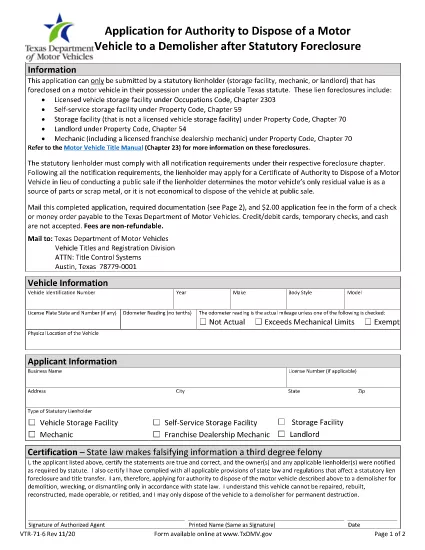
The Texas Department of Motor Vehicles (TxDMV) requires the VTR-71-6 form when you need official permission to dispose of an abandoned or public nuisance vehicle to a licensed demolisher. This fillable PDF is now available through Formize, so you can complete it securely in your browser—no extra software needed.

What Is the VTR-71-6 Form?

VTR-71-6, titled Application for Authority to Dispose of an Abandoned Nuisance Vehicle to a Demolisher, is used by vehicle owners, lienholders, or law‑enforcement agencies to certify that a vehicle meets the state’s criteria for demolition. The form collects:

  • Vehicle identification details (VIN, make, model, year)
  • Owner and lienholder information
  • Reason for disposal and supporting documentation
  • Signatures from the owner, lienholder and a law‑enforcement officer (if required)

How to Complete the VTR-71-6 Online with Formize

Instead of downloading the PDF, clicking “Fill out this form” on this page launches the Formize PDF Filler app. Follow the steps below to finish the form in minutes.

Common Mistakes to Avoid

  • Missing signatures: Every required signature must be entered; otherwise the TxDMV will reject the submission.
  • Incorrect VIN: Double‑check the VIN against the title and registration documents.
  • Incomplete supporting documents: Attach a copy of the notice to the owner and any police reports when applicable.

Where to Submit the Completed Form

After you finish the online form, you can:

  • Print the completed PDF and mail it to the TxDMV address listed on the form.
  • Upload the PDF through the TxDMV online filing portal.

Download the Official PDF

If you prefer the original document, you can download the official VTR-71-6 PDF directly from the TxDMV:

Download VTR-71-6 PDF

FAQ
  • Who can submit a VTR-71-6 form?

    The vehicle owner, a lienholder, or an authorized law‑enforcement agency may complete and submit the VTR-71-6.

  • Is the Formize filler free to use?

    Yes, Formize provides a free online filler for this PDF. No download or installation is required.

  • What happens after I submit the form?

    The TxDMV reviews the application. If approved, you’ll receive a Certificate of Authority, allowing the vehicle to be taken to a licensed demolisher.

  • Can I save my progress and finish later?

    The Formize app lets you save a draft locally. Click “Save Draft” before closing the browser, then reopen the saved file to continue.

  • Do I need a notarized signature?

    A notarized signature is not required for VTR-71-6, but all required parties must sign electronically.

  • How long does the approval process take?

    Processing typically takes 7‑10 business days after the TxDMV receives a complete, correctly signed form.

HOW TO

How to fill out VTR-71-6 for free, online in 5 easy steps:

  1. 1
    Open the Fillable Form
    Click the “Fill out this form” button on this page. The Formize PDF Filler app will load in a new window.
  2. 2
    Enter Vehicle Information
    Type the VIN, make, model, year, and license plate number into the highlighted fields.
  3. 3
    Provide Owner and Lienholder Details
    Fill in the owner’s name, address, and any lienholder information required by the form.
  4. 4
    Add Supporting Documents
    Upload a scanned copy of the notice to the owner and any police or law‑enforcement reports if applicable.
  5. 5
    Sign and Submit
    Use the electronic signature fields for the owner, lienholder, and law‑enforcement officer. When finished, click “Save & Download” to get the completed PDF.
Formize PDF Filler app
ABOUT

Vehicle Registration Forms

If you own or lease a motor vehicle, trailer or boat, you must meet certain obligations to keep your vehicle legally registered and safe.

VTR-71-6 is one of Vehicle registration forms that are documents that are used to register a motor vehicle with the relevant state or provincial authority. These forms are typically required when a person purchases a new or used vehicle or when they move to a new state or province with a vehicle.

The exact requirements and forms needed for vehicle registration can vary by location, but generally, the process involves providing information about the vehicle, the owner, and any liens on the vehicle.

Once the registration forms and fees are submitted, the state or provincial authority will issue a registration certificate or license plate to the owner of the vehicle. This registration allows the vehicle to be legally operated on public roads and highways.

FEATURES

PDF Filler

The easiest way to fill VTR-71-6 online

  • Quickly fill out VTR-71-6
    Looking for a way to quickly fill VTR-71-6 online? With our online free PDF form filler, you’ll know how to how to edit and fill this pdf document in less than a minute.
  • Easy to use online PDF editor
    Fed up with printing out PDF files so you can edit them, before rescanning and sending them back? Edit PDF documents for free online. Use our online pdf editor to save time and paper.
  • Great tools, all platforms
    Wondering how to fill in VTR-71-6 on a Mac, or maybe how to use a PDF filler free? Our online PDF tools work on all platforms.
  • Secure file storage
    Completed "VTR-71-6" files are stored in a secured database managed by Amazon Cloud hosting. You can delete your files from our system anytime. In any case, these files are automatically deleted after 24 hours.
  • Chat with VTR-71-6
    Chat with "VTR-71-6" on Chatize that is a free PDF reader assistant. Ask questions and get answers from "VTR-71-6". Just click on Chat With Document button above.

Delete filling session

Delete the selected filling session? In this case, your progress in completing the form will be lost.

Delete editing session

Delete the selected editing session? In this case, your progress in creating and editing the form will be lost.