
Select language

Texas VTR-901 Purchaser’s Certification of Export‑Only Sale (Fillable PDF)

  1. Language English
  2. Country USA
  3. Activity Vehicle Registration
  4. State Texas
Fill out this form
Texas VTR-901 Purchaser’s Certification of Export‑Only Sale (Fillable PDF)

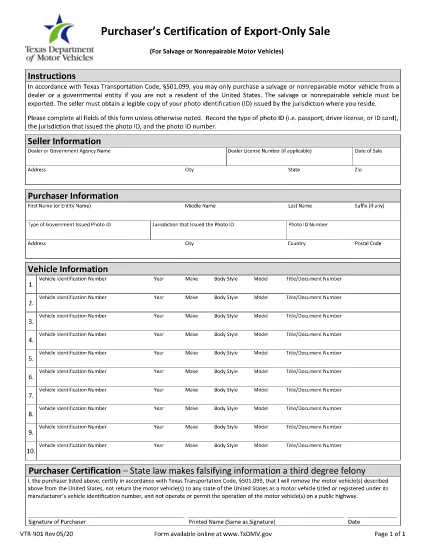
The VTR-901 is Texas Transportation Code §501.099’s official Purchaser’s Certification of Export‑Only Sale. It is required whenever a non‑resident purchaser buys a salvage or non‑repairable vehicle for export. Filling it out correctly protects you from legal penalties and ensures a smooth export process.

Our fillable PDF version is hosted on Formize, so you never need to print, scan, or edit the document manually. Just click the button, let the Formize PDF Filler load, and complete the fields directly in your browser.

Key benefits of using the online VTR-901 form:

  • Instant access – no downloads or installations.
  • Auto‑validation of required fields reduces errors.
  • Secure storage – your data stays encrypted while you work.
  • Print‑ready PDF ready for submission to the Texas DMV.

Below you’ll find a quick guide, common pitfalls, and answers to the most frequently asked questions.

FAQ
  • Who must file the VTR-901 form?

    Any purchaser who is not a Texas resident and buys a salvage or non‑repairable vehicle for export must complete the VTR-901 certification.

  • Can I submit the form electronically?

    The Texas DMV currently requires a printed, signed copy. Use the online filler to create a printable PDF, then mail or deliver it as instructed.

  • What photo ID is acceptable?

    A passport, driver’s license, or state‑issued ID card. Record the ID type, issuing jurisdiction, and ID number on the form.

  • Is there a fee to file VTR-901?

    No separate fee is charged for the VTR-901 itself, but standard DMV fees may apply for title transfer or registration.

  • What happens if I provide false information?

    Falsifying the VTR-901 is a third‑degree felony under Texas law and may result in fines, imprisonment, and loss of export privileges.

  • Do I need a notary for this form?

    No notarization is required. The buyer’s signature and date are sufficient.

  • How long do I have to submit the completed form?

    Submit the signed VTR-901 within 30 days of the vehicle purchase to avoid penalties.

  • Can I use the VTR-901‑A version instead?

    Form VTR-901‑A is for automated export‑only sales reports. Most individual purchasers should use the standard VTR-901.

HOW TO

How to fill out VTR-901 for free, online in 5 easy steps:

  1. 1
    Open the Fillable Form
    Click the “Fill out this form” button on the page. The Formize PDF Filler app will open in a new tab.
  2. 2
    Wait for the Filler to Load
    The app loads the VTR-901 PDF and automatically converts each field into an editable box.
  3. 3
    Enter Required Information
    Complete all highlighted fields: buyer details, vehicle description, export destination, and photo‑ID information.
  4. 4
    Review and Validate
    Use the built‑in validation to check for missing or incorrect entries. Correct any highlighted errors.
  5. 5
    Save or Print
    When finished, click “Save PDF” to download a completed copy or “Print” to send it directly to the Texas DMV.
Formize PDF Filler app
ABOUT

Vehicle Registration Forms

VTR-901 is one of DMV forms, also known as Department of Motor Vehicles forms, that are documents used in various transactions and processes related to motor vehicles. The DMV is a government agency responsible for driver licensing, vehicle registration, and enforcing motor vehicle laws. The specific DMV forms available can vary by jurisdiction, but here are some common examples:

Driver's License Forms: These forms are used to apply for a driver's license or to request changes or renewals. They typically require personal information, proof of identity, and may include sections for medical information or driving history.

Vehicle Registration Forms: These forms are used to register a motor vehicle with the DMV. They require vehicle information, ownership details, and proof of insurance.

Title Transfer Forms: When buying or selling a vehicle, these forms are used to transfer ownership from one party to another. They require information about the buyer, seller, vehicle details, and may include a bill of sale.

Vehicle Release of Liability Forms: When selling or transferring ownership of a vehicle, these forms notify the DMV that the seller is no longer responsible for the vehicle. It helps protect the seller from liability for accidents or incidents involving the vehicle after the sale.

License Plate and Registration Renewal Forms: These forms are used to renew vehicle registration or request new license plates. They typically require information about the registered owner, current registration details, and payment of applicable fees.

Driving Records Request Forms: These forms allow individuals to request their driving records from the DMV, which provide information about driving violations, license status, and other relevant details.

Specialty or Personalized License Plate Forms: These forms are used to apply for personalized or specialty license plates, which allow individuals to customize their license plate with specific characters or designs.

These are just a few examples of the many forms that may be available through the DMV. The specific forms and requirements can vary by jurisdiction, so it is important to consult the local DMV website or visit a DMV office to obtain the correct forms for your particular needs.

FEATURES

PDF Filler

The easiest way to fill VTR-901 online

  • Quickly fill out VTR-901
    Looking for a way to quickly fill VTR-901 online? With our online free PDF form filler, you’ll know how to how to edit and fill this pdf document in less than a minute.
  • Easy to use online PDF editor
    Fed up with printing out PDF files so you can edit them, before rescanning and sending them back? Edit PDF documents for free online. Use our online pdf editor to save time and paper.
  • Great tools, all platforms
    Wondering how to fill in VTR-901 on a Mac, or maybe how to use a PDF filler free? Our online PDF tools work on all platforms.
  • Secure file storage
    Completed "VTR-901" files are stored in a secured database managed by Amazon Cloud hosting. You can delete your files from our system anytime. In any case, these files are automatically deleted after 24 hours.
  • Chat with VTR-901
    Chat with "VTR-901" on Chatize that is a free PDF reader assistant. Ask questions and get answers from "VTR-901". Just click on Chat With Document button above.

Delete filling session

Delete the selected filling session? In this case, your progress in completing the form will be lost.

Delete editing session

Delete the selected editing session? In this case, your progress in creating and editing the form will be lost.