
Select language

VSA-40 Vehicle Removal Certificate – Fillable PDF

  1. Language English
  2. Country USA
  3. Activity Vehicle Registration
  4. State Virginia
Fill out this form
VSA-40 Vehicle Removal Certificate – Fillable PDF

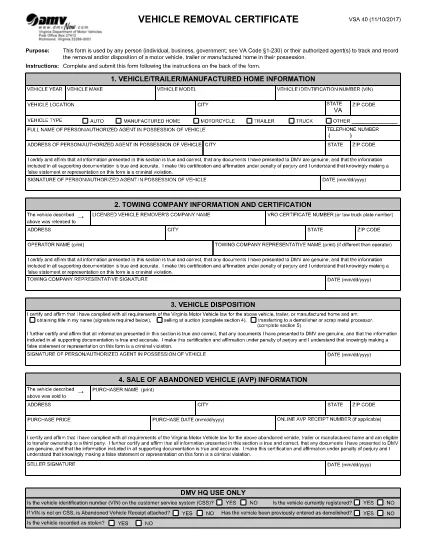
The VSA-40 Vehicle Removal Certificate is the official Virginia DMV form used to record the removal, disposal, or transfer of a motor vehicle, trailer, or manufactured home. Whether you are an individual, a business, or a government agency, this form provides a legal trail for any vehicle that leaves your possession.

Because the VSA-40 is required by Virginia Code §1‑230, completing it accurately protects you from future liability and ensures compliance with state regulations.

What Is the VSA-40 Vehicle Removal Certificate?

The VSA-40 captures essential details such as the vehicle identification number (VIN), owner information, reason for removal, and the date of disposition. It serves as proof that the vehicle was properly removed from the owner's records.

Who Must Complete the VSA-40 Form?

  • Private owners selling or disposing of a vehicle.
  • Dealerships transferring ownership to another party.
  • Government agencies handling fleet disposals.
  • Authorized agents acting on behalf of the owner.

How to Fill Out the VSA-40 Online with Formize

Instead of downloading the PDF and opening a separate editor, simply click the "Fill out this form" button on this page. The Formize PDF Filler app will load instantly, letting you complete every field directly in your browser.

Common Mistakes to Avoid

  • Leaving the VIN or license plate number blank.
  • Using an outdated address for the owner.
  • Forgetting to sign and date the form.
  • Submitting the form without attaching required supporting documents (e.g., bill of sale).

Where to Submit the Completed Form

After you finish the fillable VSA-40, you can:

  • Print and mail it to your local Virginia DMV office.
  • Upload a scanned copy through the DMV’s online portal.
  • Deliver it in person to the DMV service center.

Using the Formize filler saves time, reduces errors, and creates a clean, searchable PDF ready for submission.

FAQ
  • What is the purpose of the VSA‑40 form?

    The VSA‑40 records the removal, disposal, or transfer of a vehicle, trailer, or manufactured home, providing legal proof for the Virginia DMV.

  • Can I fill out the VSA‑40 on a mobile device?

    Yes. The Formize PDF Filler works on all major browsers, including mobile Safari and Chrome, so you can complete the form on a phone or tablet.

  • Do I need a digital signature?

    A digital signature created in the Formize filler is accepted for most DMV submissions. Check your local office if a wet signature is specifically required.

  • How long does the VSA‑40 remain valid after completion?

    Once submitted to the DMV, the certificate is considered valid indefinitely as a record of the vehicle’s removal.

  • Is there a filing fee for the VSA‑40?

    No, the VSA‑40 itself does not carry a fee. However, related DMV services (e.g., title transfer) may have separate charges.

  • What supporting documents should I attach?

    Include a bill of sale, transfer notice, or any document that proves the vehicle’s disposition, as required by the DMV.

  • Can I save my progress and finish later?

    Yes. The Formize filler lets you download a partially completed PDF, which you can reopen later to finish.

HOW TO

How to fill out VSA 40 for free, online in 4 easy steps:

  1. 1
    Open the Fillable Form
    Click the "Fill out this form" button on the page. The Formize PDF Filler loads directly in your browser.
  2. 2
    Enter All Required Information
    Complete each field—owner details, VIN, removal reason, and date—using the on‑screen keyboard or your own typing.
  3. 3
    Review and Sign
    Double‑check every entry for accuracy, then use the built‑in signature tool to sign the form.
  4. 4
    Save or Submit
    Download the completed PDF, print and mail it, or upload it to the Virginia DMV portal as instructed.
Formize PDF Filler app
ABOUT

Vehicle Registration Forms

If you own or lease a motor vehicle, trailer or boat, you must meet certain obligations to keep your vehicle legally registered and safe.

VSA 40 is one of Vehicle registration forms that are documents that are used to register a motor vehicle with the relevant state or provincial authority. These forms are typically required when a person purchases a new or used vehicle or when they move to a new state or province with a vehicle.

The exact requirements and forms needed for vehicle registration can vary by location, but generally, the process involves providing information about the vehicle, the owner, and any liens on the vehicle.

Once the registration forms and fees are submitted, the state or provincial authority will issue a registration certificate or license plate to the owner of the vehicle. This registration allows the vehicle to be legally operated on public roads and highways.

FEATURES

PDF Filler

The easiest way to fill VSA 40 online

  • Quickly fill out VSA 40
    Looking for a way to quickly fill VSA 40 online? With our online free PDF form filler, you’ll know how to how to edit and fill this pdf document in less than a minute.
  • Easy to use online PDF editor
    Fed up with printing out PDF files so you can edit them, before rescanning and sending them back? Edit PDF documents for free online. Use our online pdf editor to save time and paper.
  • Great tools, all platforms
    Wondering how to fill in VSA 40 on a Mac, or maybe how to use a PDF filler free? Our online PDF tools work on all platforms.
  • Secure file storage
    Completed "VSA 40" files are stored in a secured database managed by Amazon Cloud hosting. You can delete your files from our system anytime. In any case, these files are automatically deleted after 24 hours.
  • Chat with VSA 40
    Chat with "VSA 40" on Chatize that is a free PDF reader assistant. Ask questions and get answers from "VSA 40". Just click on Chat With Document button above.

Delete filling session

Delete the selected filling session? In this case, your progress in completing the form will be lost.

Delete editing session

Delete the selected editing session? In this case, your progress in creating and editing the form will be lost.