
Select language

Virginia VSA 57 – Non‑Repairable Certificate Application (Fillable PDF)

  1. Language English
  2. Country USA
  3. Activity Vehicle Registration
  4. State Virginia
Fill out this form
Virginia VSA 57 – Non‑Repairable Certificate Application (Fillable PDF)

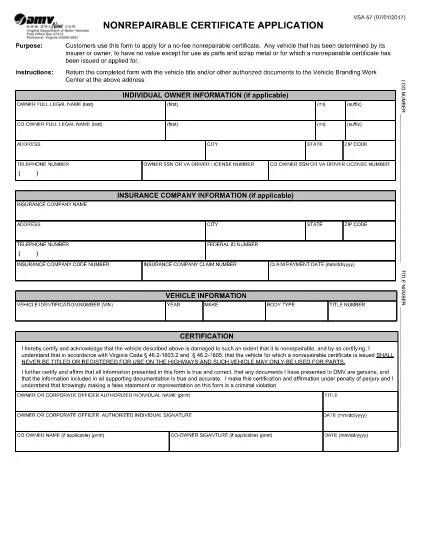
The VSA 57 is the official Virginia Department of Motor Vehicles (DMV) application used to obtain a Non‑Repairable Certificate. This certificate proves that a vehicle has no value other than parts or scrap metal, allowing it to be sold only to licensed dismantlers or scrap processors.

What Is Form VSA 57?

Form VSA 57, titled Non‑Repairable Certificate Application, is a free, downloadable PDF provided by the Virginia DMV. It is required when a vehicle is declared a total loss and cannot be repaired safely or economically.

When Do You Need a Non‑Repairable Certificate?

  • The vehicle has been deemed a total loss by an insurer or the owner.
  • Repair costs exceed the vehicle’s actual cash value.
  • You intend to sell the vehicle for parts, scrap metal, or to a licensed dismantler.

How to Complete the VSA 57 Form Online

Instead of downloading the PDF and editing it with a separate program, simply click the "Fill out this form" button on this page. The Formize PDF Filler app will load the fillable version of VSA 57 directly in your browser.

  1. Click the Fill out this form button.
  2. The Formize PDF Filler loads; the form fields become editable.
  3. Enter the required information (owner details, vehicle description, VIN, reason for non‑repairable status, etc.).
  4. Review the data for accuracy and click Submit to download a completed PDF.
  5. Print the completed form, sign where required, and submit it to your local Virginia DMV office.

Common Mistakes to Avoid

  • Leaving fields blank: Every field marked with an asterisk (*) is mandatory.
  • Incorrect VIN: Double‑check the 17‑character Vehicle Identification Number.
  • Missing signatures: Both the owner and, if applicable, the insurer must sign.
  • Using the wrong form version: Ensure you are using the latest VSA 57 PDF (the link below is always up‑to‑date).

Where to Submit the Completed Form

After printing and signing, mail or deliver the form to the Virginia DMV Vehicle Branding Work Center:

Virginia Department of Motor Vehicles
P.O. Box 27412
Richmond, VA 23269
Phone: (804) 497‑7100

For any questions, contact your local DMV office during business hours.

Download the original VSA 57 PDF (official source)

FAQ
  • Is the VSA 57 form free?

    Yes. The Virginia DMV provides the Non‑Repairable Certificate Application at no cost.

  • Can I submit the form electronically?

    Virginia DMV currently requires a printed, signed copy. Use the online filler for convenience, then print the final version.

  • What documents must accompany the VSA 57 form?

    You need the original vehicle title and, if applicable, a signed statement from your insurance company confirming total loss.

  • How long does it take to receive the certificate after submission?

    Processing usually takes 5‑7 business days once the DMV receives the completed, signed form.

  • Can I use the VSA 57 form for a rebuilt vehicle?

    No. The VSA 57 is only for vehicles that will be scrapped or used for parts. Rebuilt vehicles require a different application (Form VSA 56).

  • What happens if I sell a non‑repairable vehicle without the certificate?

    Selling without the certificate is illegal in Virginia and can result in fines and penalties. The certificate is required to transfer ownership to a licensed dismantler.

HOW TO

How to fill out VSA 57 for free, online in 4 easy steps:

  1. 1
    Open the Fillable Form
    Click the "Fill out this form" button on the page. The Formize PDF Filler will open the VSA 57 form directly in your browser.
  2. 2
    Enter Required Information
    Fill in every highlighted field: owner name, address, VIN, make/model/year, and reason for the non‑repairable status.
  3. 3
    Review and Submit
    Check all entries for accuracy, then click the Submit button to generate a completed PDF you can download.
  4. 4
    Print, Sign, and Mail
    Print the completed form, add the required signatures, and send it to the Virginia DMV Vehicle Branding Work Center.
Formize PDF Filler app
ABOUT

Vehicle Registration Forms

If you own or lease a motor vehicle, trailer or boat, you must meet certain obligations to keep your vehicle legally registered and safe.

VSA 57 is one of Vehicle registration forms that are documents that are used to register a motor vehicle with the relevant state or provincial authority. These forms are typically required when a person purchases a new or used vehicle or when they move to a new state or province with a vehicle.

The exact requirements and forms needed for vehicle registration can vary by location, but generally, the process involves providing information about the vehicle, the owner, and any liens on the vehicle.

Once the registration forms and fees are submitted, the state or provincial authority will issue a registration certificate or license plate to the owner of the vehicle. This registration allows the vehicle to be legally operated on public roads and highways.

FEATURES

PDF Filler

The easiest way to fill VSA 57 online

  • Quickly fill out VSA 57
    Looking for a way to quickly fill VSA 57 online? With our online free PDF form filler, you’ll know how to how to edit and fill this pdf document in less than a minute.
  • Easy to use online PDF editor
    Fed up with printing out PDF files so you can edit them, before rescanning and sending them back? Edit PDF documents for free online. Use our online pdf editor to save time and paper.
  • Great tools, all platforms
    Wondering how to fill in VSA 57 on a Mac, or maybe how to use a PDF filler free? Our online PDF tools work on all platforms.
  • Secure file storage
    Completed "VSA 57" files are stored in a secured database managed by Amazon Cloud hosting. You can delete your files from our system anytime. In any case, these files are automatically deleted after 24 hours.
  • Chat with VSA 57
    Chat with "VSA 57" on Chatize that is a free PDF reader assistant. Ask questions and get answers from "VSA 57". Just click on Chat With Document button above.

Delete filling session

Delete the selected filling session? In this case, your progress in completing the form will be lost.

Delete editing session

Delete the selected editing session? In this case, your progress in creating and editing the form will be lost.