
Select language

MV2388 Hobbyist License Plate Application – Fillable PDF

  1. Language English
  2. Country USA
  3. Activity Vehicle Registration
  4. State Wisconsin
Fill out this form
MV2388 Hobbyist License Plate Application – Fillable PDF

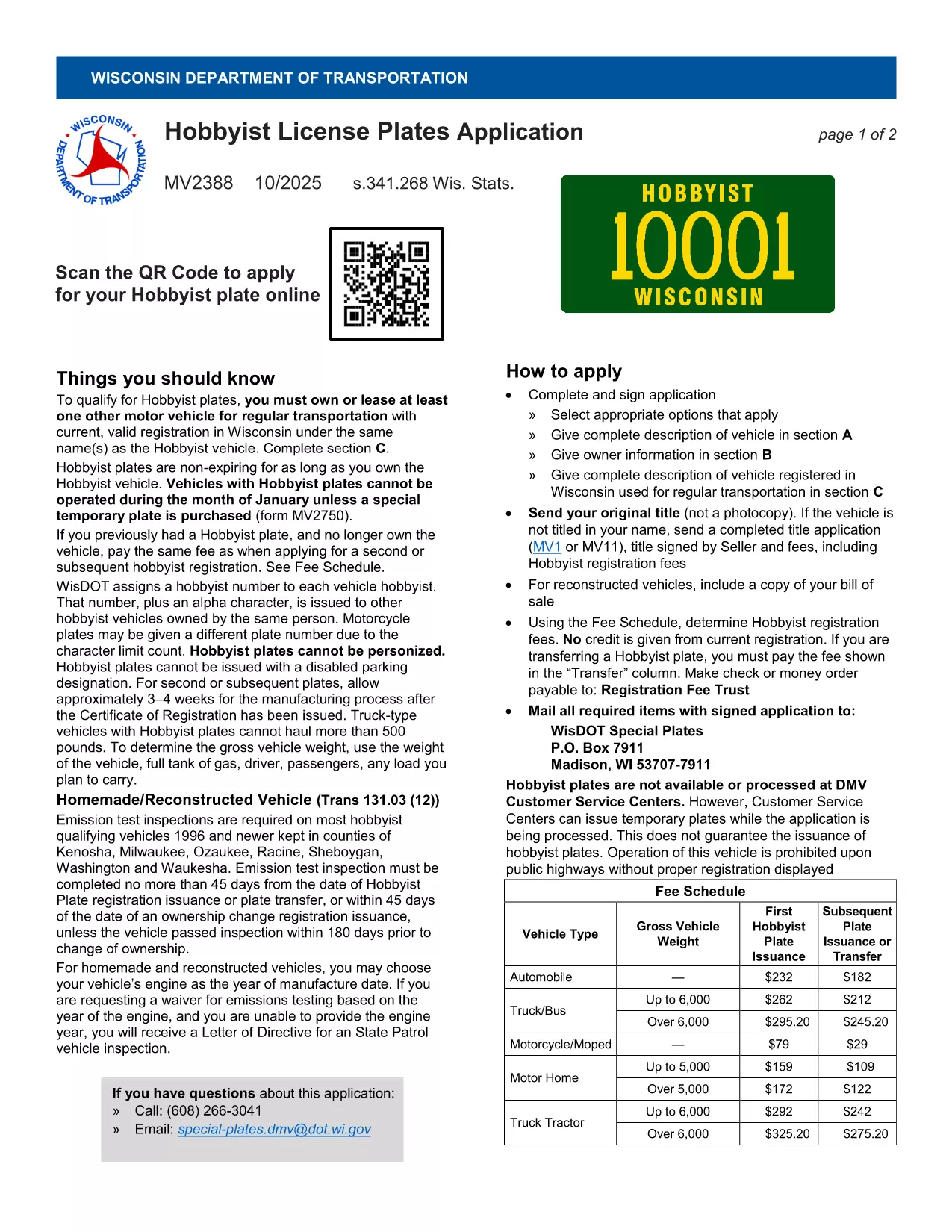
The MV2388 is the official Wisconsin Department of Transportation (DOT) application for a Hobbyist License Plate. This special plate is designed for vehicle enthusiasts who own a hobby vehicle—cars, trucks, motorcycles, or other specially‑built machines that are driven only occasionally.

Unlike standard plates, Hobbyist plates are non‑expiring as long as you retain ownership of the vehicle. However, they cannot be used during the month of January unless you purchase a temporary plate (form MV2750). Filling out the MV2388 correctly the first time saves you time, money, and a trip to the DMV.

With Formize’s fillable PDF feature, you can complete the entire application directly in your browser—no printing, scanning, or manual data entry required. Just click the “Fill out this form” button, let the Formize PDF Filler load, and start typing.

After you submit the completed form, you’ll receive a downloadable copy for your records and instructions on where to mail or drop off the application.

FAQ
  • Who is eligible for a Hobbyist License Plate?

    Any Wisconsin resident who owns a vehicle primarily used for hobby purposes—such as shows, club events, or occasional recreational driving—can apply using MV2388.

  • Why are Hobbyist plates non‑expiring?

    The plates are tied to vehicle ownership rather than a renewal cycle. As long as you keep the vehicle and the plate, you won’t need to renew annually.

  • Can I drive my hobby vehicle in January?

    No. Hobbyist plates are not valid during January. You must purchase a temporary plate (form MV2750) if you need to operate the vehicle that month.

  • Is there a fee for the Hobbyist plate?

    Yes. The current fee is listed on the MV2388 form and is payable to the Wisconsin DOT when you submit the application.

  • Do I need to print the form after filling it out online?

    If you choose to submit electronically, printing isn’t required. However, some DMV offices may still ask for a printed copy, so keep a PDF handy.

  • What if I make a mistake after submitting?

    Contact the Wisconsin DOT’s Vehicle Services Division at (608) 264‑7447. They can guide you on correcting or re‑filing the MV2388.

  • How long does it take to receive the Hobbyist plate?

    Processing typically takes 2–4 weeks after the Wisconsin DOT receives a complete application and payment.

  • Can I transfer a Hobbyist plate to another vehicle?

    Yes, you can transfer the plate, but you must submit a new MV2388 for the new vehicle and surrender the old plate.

  • Is the MV2388 form available in other languages?

    The official Wisconsin DOT version is only in English. If you need assistance, contact your local DMV office for translation help.

  • What documents should I attach with MV2388?

    Include proof of ownership (title), a current vehicle inspection, and payment receipt. Check the form’s checklist for the full list.

HOW TO

How to fill out MV2388 for free, online in 5 easy steps:

  1. 1
    Open the Fillable Form
    Click the blue “Fill out this form” button on the page. The Formize PDF Filler app will open in a new tab and load the MV2388 automatically.
  2. 2
    Enter Your Information
    Type directly into each field—owner name, address, vehicle details, and any required signatures. The form saves your entries in real time.
  3. 3
    Review and Validate
    Use the built‑in validation to check for missing or incorrectly formatted data. Correct any errors before proceeding.
  4. 4
    Submit or Download
    When the form is complete, click “Submit” to email the application to the Wisconsin DOT, or click “Download” to save a copy for your records.
  5. 5
    Finalize the Process
    Follow the on‑screen instructions to mail the printed form (if required) or bring the PDF to your local DMV office.
Formize PDF Filler app
ABOUT

Vehicle Registration Forms

If you own or lease a motor vehicle, trailer or boat, you must meet certain obligations to keep your vehicle legally registered and safe.

MV2388 is one of Vehicle registration forms that are documents that are used to register a motor vehicle with the relevant state or provincial authority. These forms are typically required when a person purchases a new or used vehicle or when they move to a new state or province with a vehicle.

The exact requirements and forms needed for vehicle registration can vary by location, but generally, the process involves providing information about the vehicle, the owner, and any liens on the vehicle.

Once the registration forms and fees are submitted, the state or provincial authority will issue a registration certificate or license plate to the owner of the vehicle. This registration allows the vehicle to be legally operated on public roads and highways.

FEATURES

PDF Filler

The easiest way to fill MV2388 online

  • Quickly fill out MV2388
    Looking for a way to quickly fill MV2388 online? With our online free PDF form filler, you’ll know how to how to edit and fill this pdf document in less than a minute.
  • Easy to use online PDF editor
    Fed up with printing out PDF files so you can edit them, before rescanning and sending them back? Edit PDF documents for free online. Use our online pdf editor to save time and paper.
  • Great tools, all platforms
    Wondering how to fill in MV2388 on a Mac, or maybe how to use a PDF filler free? Our online PDF tools work on all platforms.
  • Secure file storage
    Completed "MV2388" files are stored in a secured database managed by Amazon Cloud hosting. You can delete your files from our system anytime. In any case, these files are automatically deleted after 24 hours.
  • Chat with MV2388
    Chat with "MV2388" on Chatize that is a free PDF reader assistant. Ask questions and get answers from "MV2388". Just click on Chat With Document button above.

Delete filling session

Delete the selected filling session? In this case, your progress in completing the form will be lost.

Delete editing session

Delete the selected editing session? In this case, your progress in creating and editing the form will be lost.