
Wybierz język

Australian Age Pension Application Form (Fillable PDF)

  1. Język język angielski
  2. Kraj Australia
  3. Dział Centrelink
  4. Działalność Retirement Benefits
Australian Age Pension Application Form (Fillable PDF)

Applying for the Centrelink Age Pension can feel overwhelming, but with the right form and clear instructions you can submit your claim confidently. This page gives you a direct link to the fillable PDF, a quick walkthrough of each section, and answers to the most common questions.

Why You Need the Age Pension Application Form

The Age Pension is a government‑provided income support for Australians aged 67 or older who meet residency and means‑test requirements. To start receiving payments you must complete the official application form, attach supporting documents, and submit it through myGov or a Centrelink service centre.

How to Fill Out the Form with Formize PDF Filler

Instead of downloading the PDF and editing it in a separate program, simply click the “Fill out this form” button on this page. The Formize PDF Filler app will load in your browser, letting you type, select dates, and add checkmarks directly on the form. When you’re done, you can save a copy and submit it online.

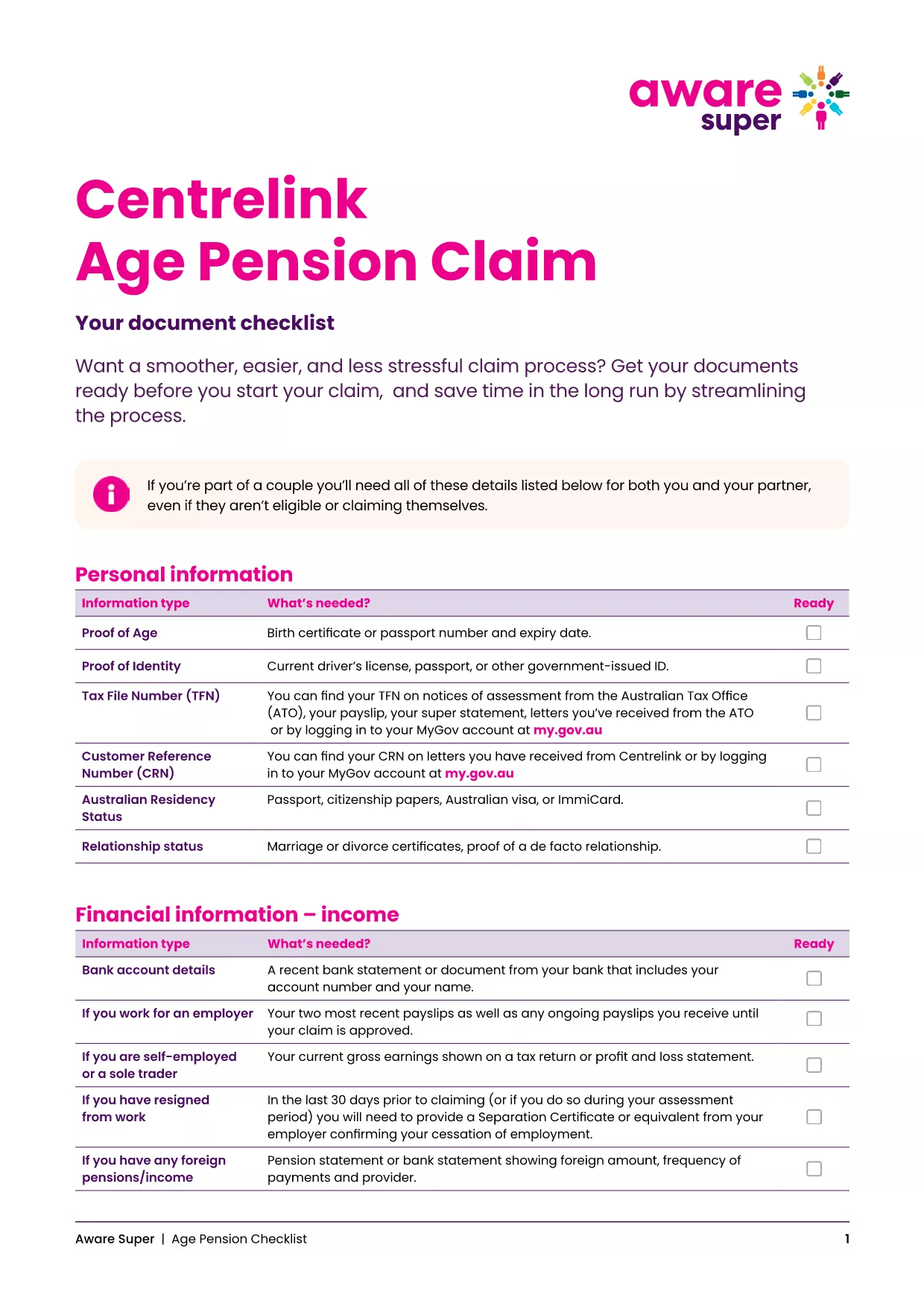
Key Documents & Information Required

  • Proof of identity (passport, driver’s licence, or birth certificate)
  • Centrelink Reference Number (CRN)
  • Bank account details for pension payments
  • Details of assets, superannuation, and income
  • Proof of Australian residency (e.g., rental agreement or utility bill)

Common Mistakes to Avoid

  • Leaving fields blank: Even if a question does not apply, enter “N/A”.
  • Mismatched personal details: Ensure the name, date of birth and address match your Centrelink records.
  • Incorrect bank account: Payments are only made to accounts in the applicant’s name.
  • Out‑of‑date asset values: Use current market values for property, vehicles and investments.

Download & Print the Checklist PDF

For a printable, step‑by‑step checklist that helps you gather all required paperwork before you start the online claim, download the Age Pension Checklist PDF. Use it alongside the fillable application to keep everything organised.

CZĘSTO ZADAWANE PYTANIA
  • When can I start my Age Pension application?

    You can lodge an application up to 13 weeks before you turn 67. It’s best to gather all documents early to avoid delays.

  • Do I need to fill out a separate form for my partner?

    Yes. Even if your partner is not claiming the pension, you must provide their details and any assets they own.

  • Can I edit the PDF after I’ve saved it?

    Absolutely. The Formize PDF Filler lets you reopen the saved file, make changes, and re‑save before submitting.

  • What if I don’t have a myGov account?

    Create a myGov account at my.gov.au, then link it to your Centrelink profile using your CRN.

  • How long does the Age Pension claim take to process?

    Typical processing time is 2‑4 weeks after all required documents are received. You’ll be notified via email or SMS.

  • Is the PDF form truly fillable on mobile devices?

    Yes. Formize PDF Filler works on all modern browsers, including mobile Safari and Chrome.

  • What happens if I make a mistake on the form?

    Centrelink may contact you for clarification, which can delay payment. Double‑check each section before submitting.

  • Do I need to provide proof of home ownership?

    You must disclose any property you own, even if it’s rented out, and provide a recent valuation or mortgage statement.

  • Can I claim the Age Pension if I have superannuation?

    Yes, but your superannuation balances are counted towards the assets test. Include the current balance in the form.

  • Where can I get help if I’m stuck?

    Visit your nearest Centrelink service centre or call the Seniors Helpline on 132 300.

JAK

Jak wypełnić age pension application australia za darmo online w 5 prostych krokach:

  1. 1
    Open the Fillable Form
    Click the “Fill out this form” button on this page. The Formize PDF Filler will open in a new tab.
  2. 2
    Enter Your Personal Details
    Type your name, date of birth, CRN and contact information into the highlighted fields.
  3. 3
    Add Supporting Information
    Upload or type details about your assets, income, and residency status as prompted.
  4. 4
    Review and Save
    Use the “Review” button to check for empty fields, then click “Save” to download a copy for your records.
  5. 5
    Submit Your Claim
    Log into myGov, link your Centrelink account, and upload the completed PDF. Submit and wait for confirmation.
Aplikacja Formize PDF Filler
O

szablon age pension application australia

Dzięki tradycyjnemu zestawowi funkcji do przeglądania i wypełniania dokumentów PDF, w połączeniu z zaletami aplikacji internetowej i responsywnego układu, możesz ukończyć age pension application australia w ciągu kilku minut.

CECHY

Wypełniacz PDF

Najłatwiejszy sposób wypełniania formularzy PDF online

  • Szybko wypełnij age pension application australia
    Szukasz sposobu na szybkie wypełnienie age pension application australia online? Dzięki naszemu bezpłatnemu wypełniaczowi formularzy PDF online dowiesz się, jak edytować i wypełniać ten dokument PDF w mniej niż minutę.
  • Łatwy w użyciu edytor PDF online
    Masz dość drukowania plików PDF, aby móc je edytować przed ponownym zeskanowaniem i odesłaniem? Edytuj dokumenty PDF za darmo online. Skorzystaj z naszego internetowego edytora pdf, aby zaoszczędzić czas i papier.
  • Świetne narzędzia, wszystkie platformy
    Zastanawiasz się, jak wypełnić age pension application australia na komputerze Mac, a może jak bezpłatnie skorzystać z wypełniacza PDF? Nasze narzędzia PDF online działają na wszystkich platformach.
  • Bezpieczne przechowywanie plików
    Gotowe pliki „age pension application australia” są przechowywane w zabezpieczonej bazie danych zarządzanej przez hosting Amazon Cloud. W każdej chwili możesz usunąć swoje pliki z naszego systemu. W każdym przypadku pliki te są automatycznie usuwane po 24 godzinach.
  • Czatuj z age pension application australia
    Porozmawiaj z „age pension application australia” na Chatize, który jest bezpłatnym asystentem czytnika plików PDF. Zadawaj pytania i uzyskuj odpowiedzi od „age pension application australia”. Po prostu kliknij przycisk Czatuj z dokumentem powyżej.

Usuń sesję napełniania

Usunąć wybraną sesję napełniania? W takim przypadku Twoje postępy w wypełnianiu formularza zostaną utracone.

Usuń sesję edycji

Usunąć wybraną sesję edycji? W takim przypadku Twój postęp w tworzeniu i edytowaniu formularza zostanie utracony.