Wybierz język

Positive/Refused Drug and Alcohol Test Report (Fillable PDF)

  1. Język język angielski
  2. Kraj Australia
  3. Dział Transport
  4. Działalność Safety Compliance
Positive/Refused Drug and Alcohol Test Report (Fillable PDF)

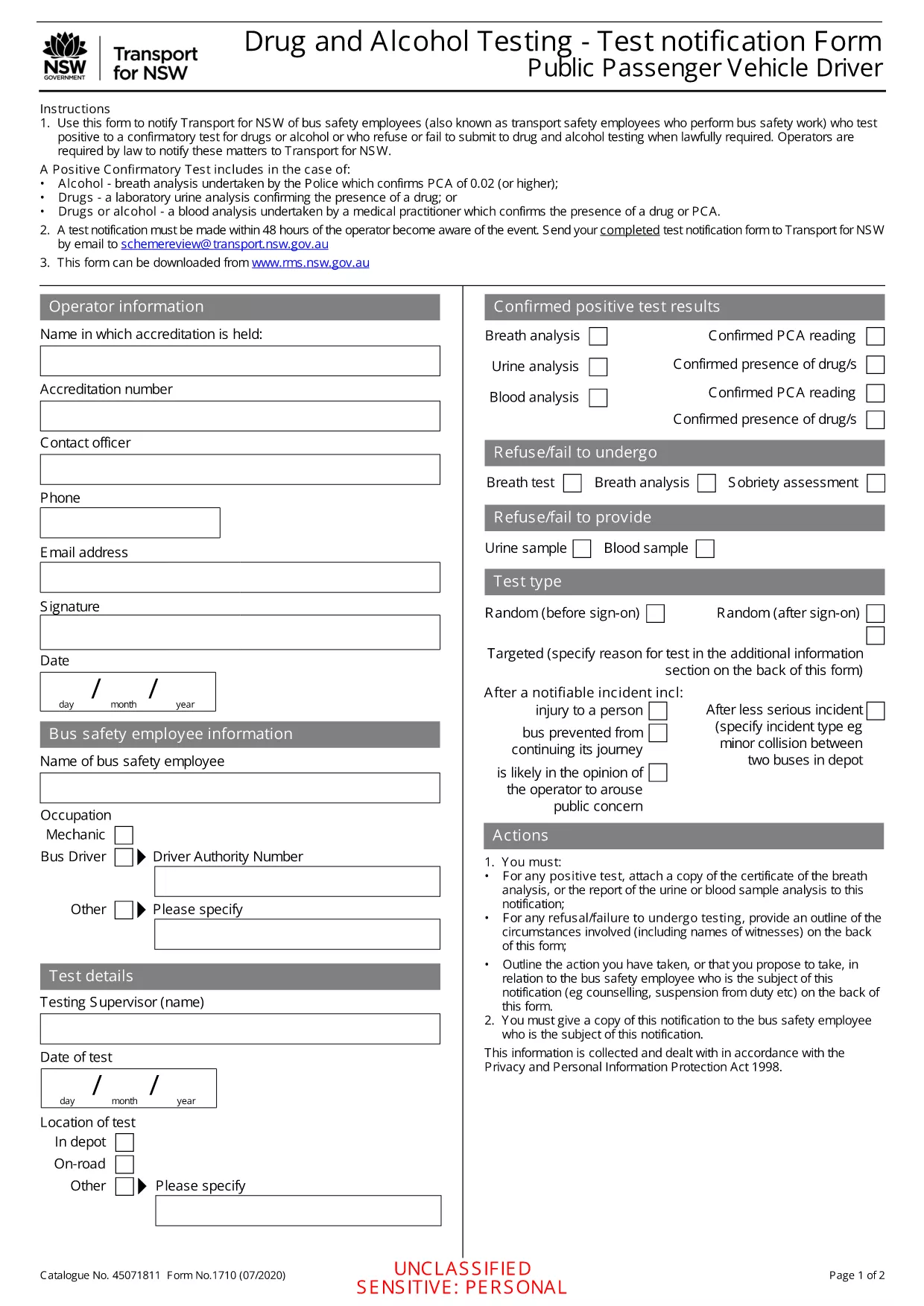
Employers, transport agencies, and safety managers often need to document a worker’s positive, refused, or failed drug/alcohol test. The Positive/Refused Drug and Alcohol Test Report is a mandatory notification form used across Australian jurisdictions, especially for public passenger vehicle operators.

When to Use This Test Report

This form is required whenever a driver or safety‑critical employee:

  • Tests positive for drugs or alcohol after a confirmatory analysis.
  • Refuses to submit a sample when lawfully required.
  • Fails to appear for a scheduled test without a valid excuse.

Submitting the report promptly helps maintain compliance with the National Heavy Vehicle Regulator (NHVR) and state transport regulations.

Key Sections of the Form

The fillable PDF is divided into clear sections:

  1. Employer & Employee Details – names, licence numbers, and contact information.
  2. Test Information – date, time, type of test, and laboratory results.
  3. Outcome – Positive, Refused, or Failed to Test.
  4. Follow‑up Actions – suspension dates, medical review, and notification dates.
  5. Signature & Declaration – authorised signatory acknowledgment.

How to Fill Out the Form Online

Instead of downloading and editing the PDF in a separate editor, simply click the "Fill out this form" button on this page. The Formize PDF Filler app will load instantly, allowing you to complete every field directly in your browser.

Common Mistakes & Tips

  • Missing licence numbers – double‑check the driver’s licence and vehicle registration numbers.
  • Incorrect test type – specify whether the test was urine, breath, or blood.
  • Skipping the signature – the form is invalid without an authorised signature.
  • Delays in submission – submit within 24 hours of the test result to stay compliant.

Follow these tips to ensure a smooth, error‑free submission.

CZĘSTO ZADAWANE PYTANIA
  • What qualifies as a "refused" test?

    A refusal occurs when the employee declines to provide a sample after being lawfully directed to do so, or when they intentionally obstruct the collection process.

  • Do I need a laboratory report to submit this form?

    Yes. For a positive result, attach the confirmatory laboratory report. For a refusal, include a written statement of the employee’s refusal.

  • Can I edit the PDF after I download it?

    The form is fully fillable online via Formize. After downloading, you can still edit it with any standard PDF editor, but online completion is recommended for accuracy.

  • How long must I keep the completed report?

    Regulations require retention for at least 3 years, or longer if stipulated by your state’s transport authority.

  • Is the online filler secure?

    Formize uses SSL encryption and stores data only in your browser session. No information is transmitted to third parties unless you choose to email or upload the file.

  • What if I make an error after submitting?

    Contact your compliance officer immediately. You can submit a corrected form with a clear note indicating it supersedes the previous submission.

  • Do I need a digital signature?

    A typed name in the signature field is acceptable when the form is submitted electronically. For hard‑copy submissions, print and sign the document.

JAK

Jak wypełnić drug test report PDF za darmo online w 5 prostych krokach:

  1. 1
    Click the Fill‑out Button
    On this page, click the "Fill out this form" button. The Formize PDF Filler will open in a new tab.
  2. 2
    Wait for the Filler to Load
    The app loads the fillable PDF automatically. No download or extra software is required.
  3. 3
    Enter All Required Information
    Complete each highlighted field with accurate employer, employee, and test details.
  4. 4
    Save and Download
    When finished, click "Save" to store a copy in your browser, then download the completed PDF for your records.
  5. 5
    Submit to the Authority
    Email or upload the saved PDF to the relevant transport authority as instructed in your organisation’s policy.
Aplikacja Formize PDF Filler
O

szablon drug test report PDF

Dzięki tradycyjnemu zestawowi funkcji do przeglądania i wypełniania dokumentów PDF, w połączeniu z zaletami aplikacji internetowej i responsywnego układu, możesz ukończyć drug test report PDF w ciągu kilku minut.

CECHY

Wypełniacz PDF

Najłatwiejszy sposób wypełniania formularzy PDF online

  • Szybko wypełnij drug test report PDF
    Szukasz sposobu na szybkie wypełnienie drug test report PDF online? Dzięki naszemu bezpłatnemu wypełniaczowi formularzy PDF online dowiesz się, jak edytować i wypełniać ten dokument PDF w mniej niż minutę.
  • Łatwy w użyciu edytor PDF online
    Masz dość drukowania plików PDF, aby móc je edytować przed ponownym zeskanowaniem i odesłaniem? Edytuj dokumenty PDF za darmo online. Skorzystaj z naszego internetowego edytora pdf, aby zaoszczędzić czas i papier.
  • Świetne narzędzia, wszystkie platformy
    Zastanawiasz się, jak wypełnić drug test report PDF na komputerze Mac, a może jak bezpłatnie skorzystać z wypełniacza PDF? Nasze narzędzia PDF online działają na wszystkich platformach.
  • Bezpieczne przechowywanie plików
    Gotowe pliki „drug test report PDF” są przechowywane w zabezpieczonej bazie danych zarządzanej przez hosting Amazon Cloud. W każdej chwili możesz usunąć swoje pliki z naszego systemu. W każdym przypadku pliki te są automatycznie usuwane po 24 godzinach.
  • Czatuj z drug test report PDF
    Porozmawiaj z „drug test report PDF” na Chatize, który jest bezpłatnym asystentem czytnika plików PDF. Zadawaj pytania i uzyskuj odpowiedzi od „drug test report PDF”. Po prostu kliknij przycisk Czatuj z dokumentem powyżej.

Usuń sesję napełniania

Usunąć wybraną sesję napełniania? W takim przypadku Twoje postępy w wypełnianiu formularza zostaną utracone.

Usuń sesję edycji

Usunąć wybraną sesję edycji? W takim przypadku Twój postęp w tworzeniu i edytowaniu formularza zostanie utracony.