
Wybierz język

RTB‑45 Notice of Rent Increase – Fillable PDF

  1. Język język angielski
  2. Kraj Kanada
  3. Działalność Dzierżawa
  4. Państwo Brytyjska Kolumbia
RTB‑45 Notice of Rent Increase – Fillable PDF

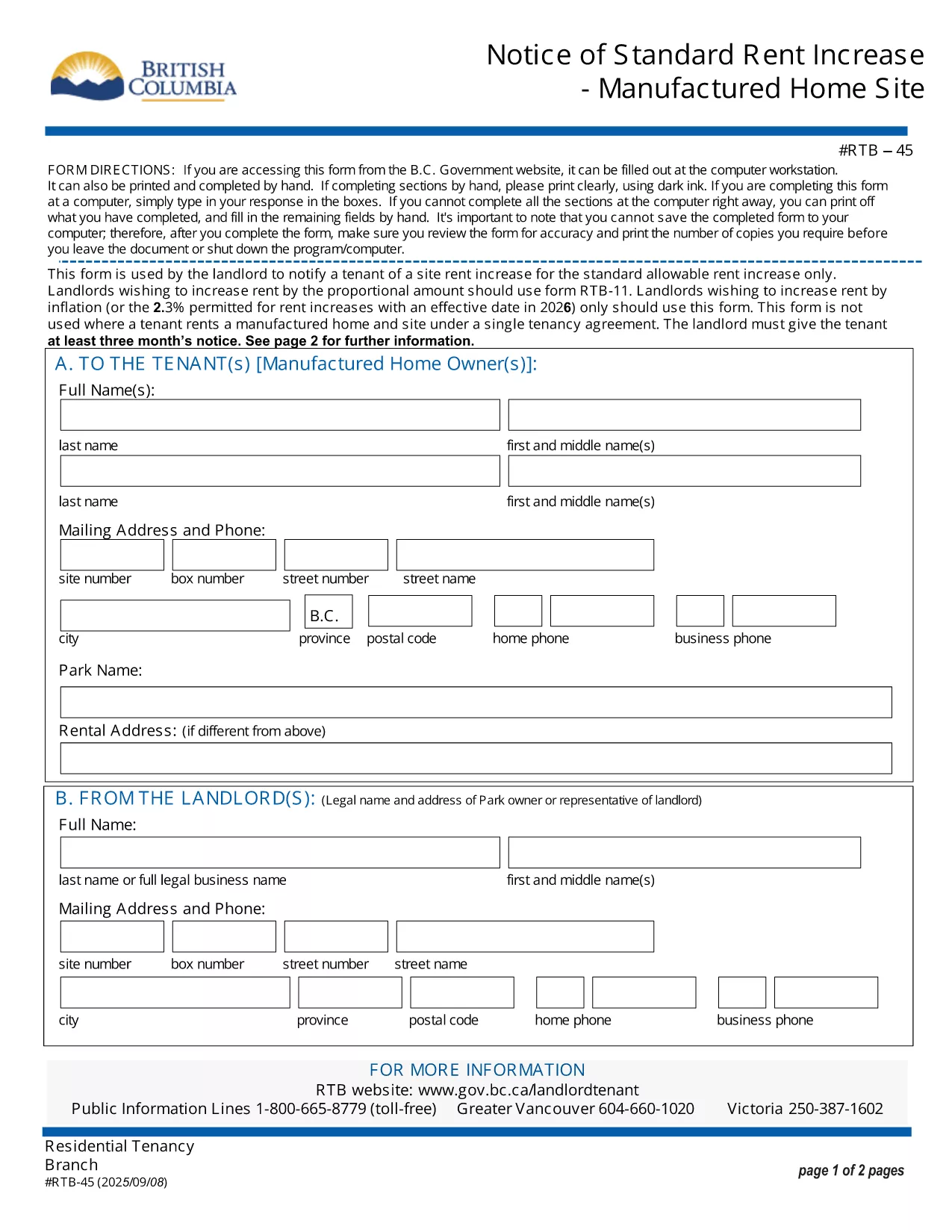
The RTB‑45 is the official notice used in British Columbia to inform tenants of a rent increase for manufactured home sites. Landlords must provide this form at least three months before the increase takes effect, as required by the Residential Tenancy Act.

Our fillable PDF version lets you complete the notice directly in your browser—no printing, scanning, or faxing needed. Simply click the button below, fill the required fields, and download a legally‑compliant PDF ready to serve.

What Is the RTB‑45 Form?

The RTB‑45 details the new rent amount, the date the increase starts, and the reason for the change. It must be signed by the landlord (or authorized agent) and delivered to the tenant in writing.

How to Complete the RTB‑45 Online

Using Formize’s PDF Filler, the process is quick and secure:

  • Click the "Fill out this form" button.
  • Wait for the Formize PDF Filler app to load.
  • Enter the landlord’s contact information, tenant’s name, current rent, new rent, and effective date.
  • Review the populated fields for accuracy.
  • Save or download the completed PDF and serve it to the tenant.

Common Mistakes to Avoid

  • Incorrect notice period: BC law requires at least three months’ written notice.
  • Missing signatures: The form is not valid without the landlord’s signature.
  • Wrong effective date: The increase cannot take effect before the tenancy has been in place for 12 months.

Download & Save Your Completed Form

After filling out the RTB‑45, you can download the PDF for your records or email it directly to the tenant. The fillable version retains all formatting, ensuring the document remains compliant with BC tenancy regulations.

CZĘSTO ZADAWANE PYTANIA
  • Who must use the RTB‑45 form?

    Landlords of manufactured home sites in British Columbia must use RTB‑45 to give tenants written notice of a rent increase.

  • How many days notice is required?

    BC law requires at least three months (90 days) written notice before the rent increase takes effect.

  • Can I submit the RTB‑45 electronically?

    Yes. The fillable PDF can be completed online and emailed to the tenant, as long as the tenant receives a legible, signed copy.

  • Do I need a lawyer to fill out the form?

    No. The form is straightforward; just follow the on‑screen prompts. If you have complex questions, consult a tenancy specialist.

  • What happens if I miss the notice period?

    If the three‑month notice isn’t given, the rent increase is invalid and you must re‑issue a new RTB‑45 with proper notice.

  • Is the fillable PDF compatible with all browsers?

    The Formize PDF Filler works with modern browsers (Chrome, Edge, Firefox, Safari). For best results, use the latest version.

JAK

Jak wypełnić RTB-45 za darmo online w 5 prostych krokach:

  1. 1
    Click the Fill Out Button
    Press the "Fill out this form" button on the page to launch the Formize PDF Filler.
  2. 2
    Wait for the Filler to Load
    The app loads in a few seconds; a loading indicator will appear.
  3. 3
    Enter Required Information
    Complete each field: landlord details, tenant name, current rent, new rent, and effective date.
  4. 4
    Review and Validate
    Double‑check all entries for accuracy and ensure the signature field is filled.
  5. 5
    Save or Download
    Click "Save" to store the form in your account or "Download" to get a printable PDF.
Aplikacja Formize PDF Filler
O

Formularze dla właścicieli i/lub najemców do proponowania działań związanych z umowami najmu.

RTB-45 to rodzaj umów najmu mieszkań stosowanych przez większość prywatnych właścicieli i spółdzielnie mieszkaniowe.

Istnieje szereg spraw, w których wynajmujący lub najemcy muszą przestrzegać pewnych zasad określonych w przepisach. W niektórych przypadkach może być konieczne wypełnienie przez nich formularza, zwanego „przepisowym formularzem”, w którym proponuje się działanie, które może mieć wpływ na drugą stronę umowy najmu.

Formularze nazywane są formularzami zalecanymi, ponieważ ich treść została starannie opracowana, aby osoba wypełniająca formularz i osoba, której jest on doręczany, zrozumiały, co jest proponowane i co mogą zrobić w odpowiedzi. Niedoręczenie prawidłowego formularza może unieważnić proponowaną czynność.

Nie możesz zmieniać sformułowań w tych formularzach, chyba że formularz mówi, że możesz to zrobić. W przypadku zmiany sformułowania formularz może zostać unieważniony. Należy również przestrzegać wszelkich okresów wypowiedzenia określonych w formularzu.

CECHY

Wypełniacz PDF

Najłatwiejszy sposób wypełniania formularzy PDF online

  • Szybko wypełnij RTB-45
    Szukasz sposobu na szybkie wypełnienie RTB-45 online? Dzięki naszemu bezpłatnemu wypełniaczowi formularzy PDF online dowiesz się, jak edytować i wypełniać ten dokument PDF w mniej niż minutę.
  • Łatwy w użyciu edytor PDF online
    Masz dość drukowania plików PDF, aby móc je edytować przed ponownym zeskanowaniem i odesłaniem? Edytuj dokumenty PDF za darmo online. Skorzystaj z naszego internetowego edytora pdf, aby zaoszczędzić czas i papier.
  • Świetne narzędzia, wszystkie platformy
    Zastanawiasz się, jak wypełnić RTB-45 na komputerze Mac, a może jak bezpłatnie skorzystać z wypełniacza PDF? Nasze narzędzia PDF online działają na wszystkich platformach.
  • Bezpieczne przechowywanie plików
    Gotowe pliki „RTB-45” są przechowywane w zabezpieczonej bazie danych zarządzanej przez hosting Amazon Cloud. W każdej chwili możesz usunąć swoje pliki z naszego systemu. W każdym przypadku pliki te są automatycznie usuwane po 24 godzinach.
  • Czatuj z RTB-45
    Porozmawiaj z „RTB-45” na Chatize, który jest bezpłatnym asystentem czytnika plików PDF. Zadawaj pytania i uzyskuj odpowiedzi od „RTB-45”. Po prostu kliknij przycisk Czatuj z dokumentem powyżej.

Usuń sesję napełniania

Usunąć wybraną sesję napełniania? W takim przypadku Twoje postępy w wypełnianiu formularza zostaną utracone.

Usuń sesję edycji

Usunąć wybraną sesję edycji? W takim przypadku Twój postęp w tworzeniu i edytowaniu formularza zostanie utracony.