
Wybierz język

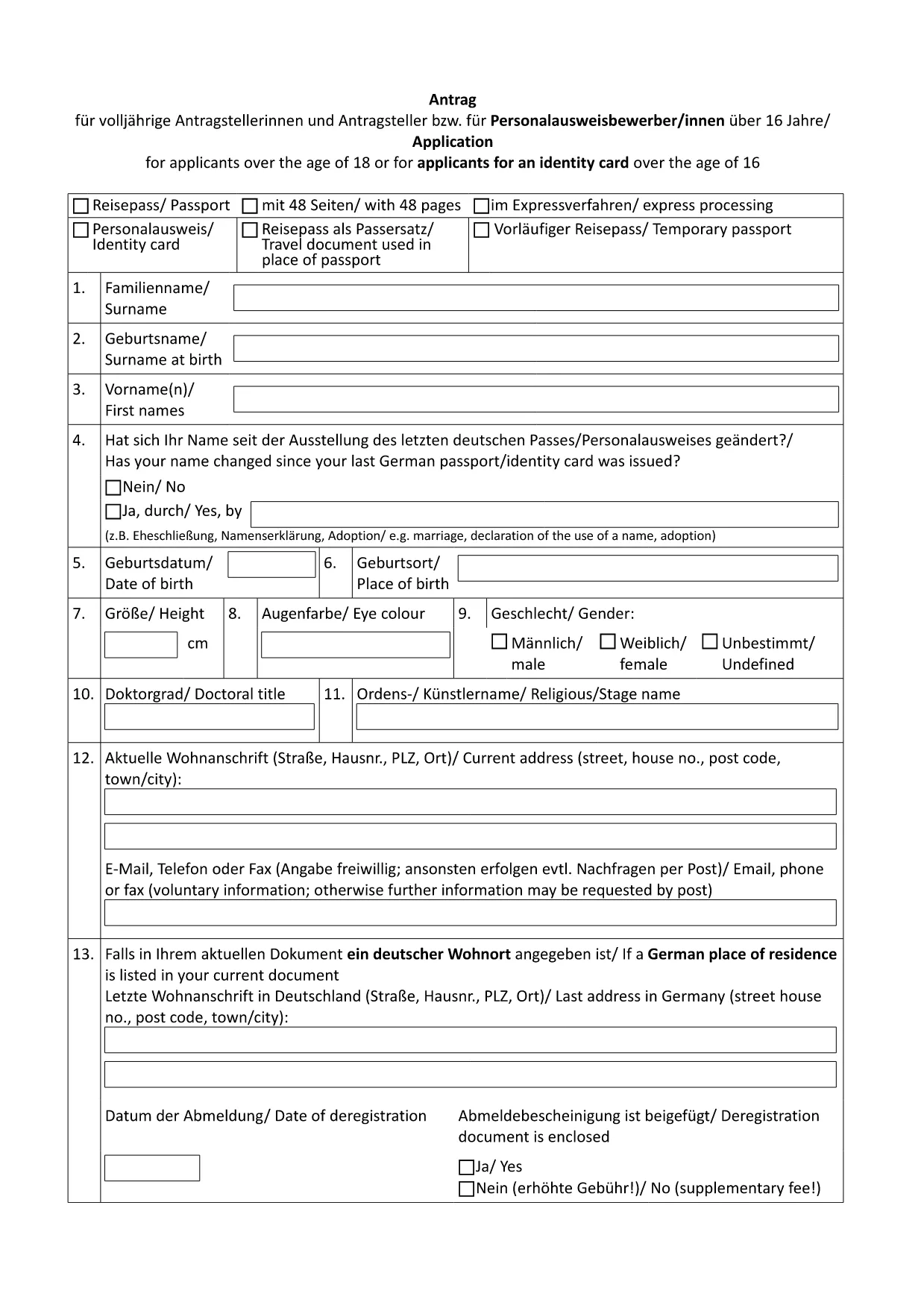
German Passport Application Form (Fillable PDF)

  1. Kraj Niemcy
  2. Język język angielski
  3. Dział Federal Foreign Office
  4. Działalność Passports
German Passport Application Form (Fillable PDF)

Applying for a German passport can feel overwhelming, especially when you need to gather the right paperwork and fill out a lengthy application. With Formize’s fillable PDF solution, you can complete the official German passport application form directly in your browser, avoid transcription errors, and save a printable copy for your embassy appointment.

Why Use a Fillable PDF for Your German Passport?

  • Accuracy: Fields are validated in real time, reducing the risk of missing or incorrect information.
  • Speed: No more printing, writing, and re‑typing. Fill, save, and download instantly.
  • Secure storage: Your data stays within the Formize app until you choose to export it.
  • Eco‑friendly: Reduce paper waste by printing only the final, completed form.

How to Complete the German Passport Application Online

Follow these simple steps (see the How‑To section below for a detailed guide):

  1. Click the "Fill out this form" button on this page.
  2. Wait for the Formize PDF Filler to load.
  3. Enter your personal data, passport details, and supporting information.
  4. Review the form for completeness and correctness.
  5. Save the PDF and print a hard copy for your appointment.

Required Documents and Common Mistakes

Before you start, gather the following original documents:

  • Completed application form (the PDF you will fill out).
  • Two recent biometric passport photos.
  • Birth certificate or proof of German citizenship.
  • Current passport or ID card.
  • Proof of residence (e.g., utility bill, driver’s license).
  • Marriage or divorce certificates if applicable.

Common pitfalls to avoid:

  • Leaving any mandatory field blank.
  • Using photos that are not biometric or are cropped incorrectly.
  • Submitting outdated or non‑original documents.
  • Forgetting a name declaration when your current surname differs from the one in your previous passport.

Download & Print the Official Form

The PDF linked below is the exact form used by German embassies and consulates worldwide. Click the button, fill it online, then print a single copy for your scheduled appointment.

Download German Passport Application Form (PDF)

FAQ – German Passport Application

Find quick answers to the most common questions below. If you need further assistance, contact your local German mission.

CZĘSTO ZADAWANE PYTANIA
  • Do I need to print the form after filling it online?

    Yes. German embassies require a printed, signed copy of the completed application together with original supporting documents.

  • Can I submit the application by mail?

    No. Since November 2007, all German passport applications must be submitted in person at an embassy, consulate, or honorary consul.

  • What biometric photo specifications are required?

    Two identical, recent biometric photos (35 mm × 45 mm), with a plain background and no glasses. The Formize filler does not embed photos; attach them separately.

  • How long does processing take?

    Typical processing time is six to eight weeks. If a name declaration is needed, it may take longer.

  • Is the form available in English?

    The official form is in German. However, you can fill it out using Formize and refer to the English guidance on this page.

  • What if I make a mistake after saving the PDF?

    Open the saved PDF again in the Formize filler, correct the error, and re‑save. Do not hand‑write changes on the printed form.

  • Do I need to bring my old passport?

    Yes. Bring the data page of your current or most recent passport, even if it is expired.

  • Are there fees for the application?

    Passport fees vary by age and type. Check the fee schedule on the website of the German mission where you will apply.

JAK

Jak wypełnić German passport application za darmo online w 5 prostych krokach:

  1. 1
    Click the Fill‑out Button
    On this page, click the "Fill out this form" button to launch the Formize PDF Filler.
  2. 2
    Wait for the Formizer to Load
    The online filler will open in a new tab. Allow a few seconds for all fields to become interactive.
  3. 3
    Enter Your Information
    Complete each section – personal data, passport details, and supporting information – using the keyboard or drop‑down menus.
  4. 4
    Validate and Save
    Use the built‑in validation to check for missing fields, then click "Save" to download the completed PDF to your device.
  5. 5
    Print for Your Appointment
    Print a single copy of the filled form and bring it, along with the required documents, to your embassy or consulate appointment.
Aplikacja Formize PDF Filler
O

szablon German passport application

Dzięki tradycyjnemu zestawowi funkcji do przeglądania i wypełniania dokumentów PDF, w połączeniu z zaletami aplikacji internetowej i responsywnego układu, możesz ukończyć German passport application w ciągu kilku minut.

CECHY

Wypełniacz PDF

Najłatwiejszy sposób wypełniania formularzy PDF online

  • Szybko wypełnij German passport application
    Szukasz sposobu na szybkie wypełnienie German passport application online? Dzięki naszemu bezpłatnemu wypełniaczowi formularzy PDF online dowiesz się, jak edytować i wypełniać ten dokument PDF w mniej niż minutę.
  • Łatwy w użyciu edytor PDF online
    Masz dość drukowania plików PDF, aby móc je edytować przed ponownym zeskanowaniem i odesłaniem? Edytuj dokumenty PDF za darmo online. Skorzystaj z naszego internetowego edytora pdf, aby zaoszczędzić czas i papier.
  • Świetne narzędzia, wszystkie platformy
    Zastanawiasz się, jak wypełnić German passport application na komputerze Mac, a może jak bezpłatnie skorzystać z wypełniacza PDF? Nasze narzędzia PDF online działają na wszystkich platformach.
  • Bezpieczne przechowywanie plików
    Gotowe pliki „German passport application” są przechowywane w zabezpieczonej bazie danych zarządzanej przez hosting Amazon Cloud. W każdej chwili możesz usunąć swoje pliki z naszego systemu. W każdym przypadku pliki te są automatycznie usuwane po 24 godzinach.
  • Czatuj z German passport application
    Porozmawiaj z „German passport application” na Chatize, który jest bezpłatnym asystentem czytnika plików PDF. Zadawaj pytania i uzyskuj odpowiedzi od „German passport application”. Po prostu kliknij przycisk Czatuj z dokumentem powyżej.

Usuń sesję napełniania

Usunąć wybraną sesję napełniania? W takim przypadku Twoje postępy w wypełnianiu formularza zostaną utracone.

Usuń sesję edycji

Usunąć wybraną sesję edycji? W takim przypadku Twój postęp w tworzeniu i edytowaniu formularza zostanie utracony.